Minimal Image Viewer, an image viewing application developed in C++ specifically for Windows, has announced its latest version, 1.8.0. The application emphasizes performance and minimalism, utilizing native Windows APIs and the Windows Imaging Component (WIC) to offer users a reliable and efficient image viewing experience.
Overview of Minimal Image Viewer
Minimal Image Viewer is designed to provide a straightforward and privacy-conscious way to view images. Upon launching, users are presented with a sleek black, borderless window, allowing for easy image import via drag-and-drop or through the right-click context menu that opens the classic Windows “Open” dialog. This functionality enables users to browse their files and select images conveniently.
Context Menu and Navigation
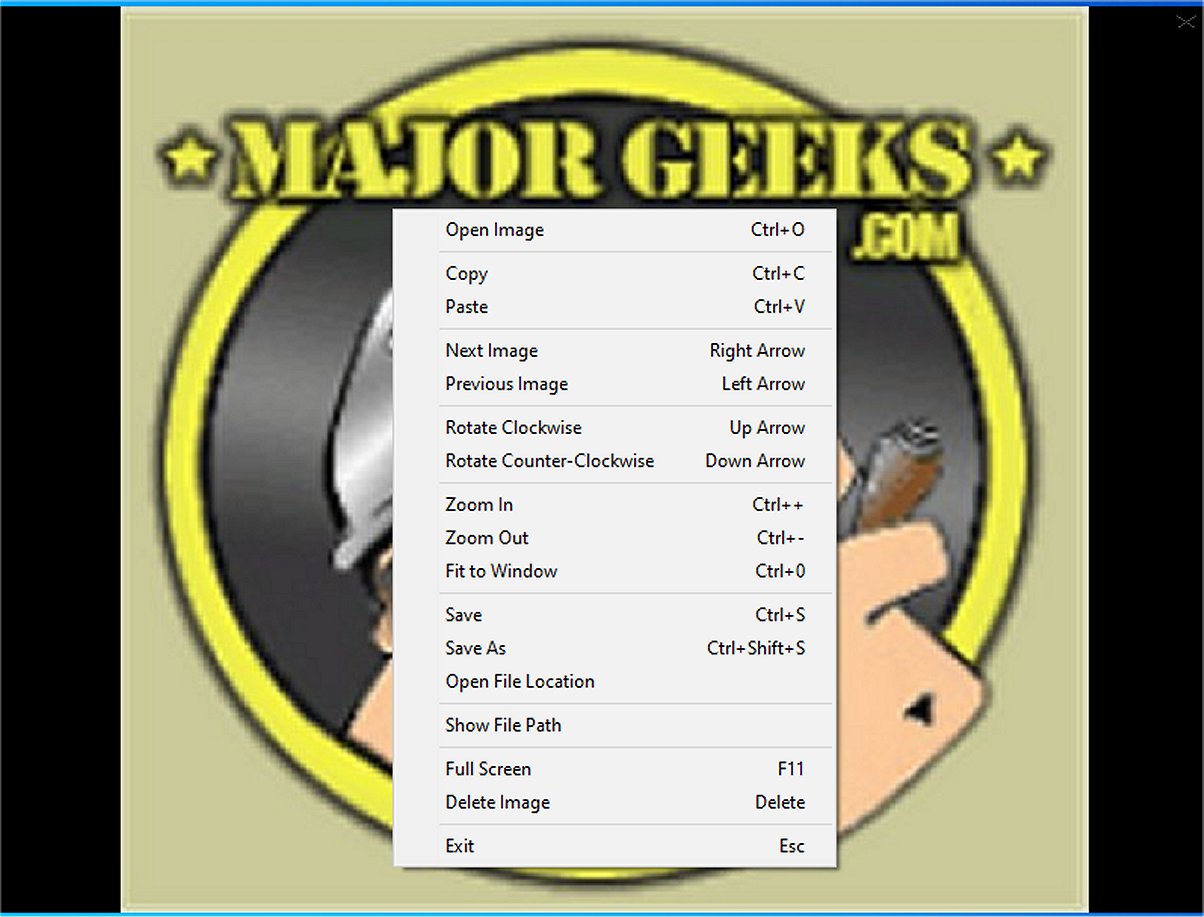
The context menu in Minimal Image Viewer offers several options, albeit limited, such as copying the current image to the clipboard or pasting an image from the clipboard into the viewer. The application simplifies navigation through images within a designated folder, ensuring compatibility with a variety of file formats through the Windows Imaging Component.
Viewing Features and Controls
Minimal Image Viewer boasts a set of minimal yet effective viewing features. Users can rotate images, adjust zoom levels, fit images to the window, or switch to full-screen mode. They can also easily save images to different locations or delete them, facilitating efficient organization of their photo collections.
The application provides intuitive keyboard shortcuts for various functions:
- Open Image: Ctrl+O or right-click → "Open Image"
- Next/Previous Image: Left/Right arrows or right-click
- Zoom In/Out: Ctrl++/-, mouse wheel, or right-click
- Rotate: Up/Down arrows or right-click
- Save Image: Ctrl+S or right-click
- Delete Image: Delete key or right-click
- Full Screen: F11 or right-click
- Exit: Esc or right-click
Conclusion and User Experience
Overall, Minimal Image Viewer is recognized for its minimalist design, providing a distraction-free viewing experience while ensuring user data privacy through offline operation. As users continue to seek efficient and straightforward tools for image viewing, this application stands out for its focus on simplicity and functionality.
Future Enhancements
To further enrich user experience, future updates could consider adding features such as basic image editing tools, support for additional file formats, or customizable themes to cater to a wider audience. Enhanced organizational features, like tagging or sorting options, could also improve the usability for users with extensive image libraries
Overview of Minimal Image Viewer
Minimal Image Viewer is designed to provide a straightforward and privacy-conscious way to view images. Upon launching, users are presented with a sleek black, borderless window, allowing for easy image import via drag-and-drop or through the right-click context menu that opens the classic Windows “Open” dialog. This functionality enables users to browse their files and select images conveniently.
Context Menu and Navigation
The context menu in Minimal Image Viewer offers several options, albeit limited, such as copying the current image to the clipboard or pasting an image from the clipboard into the viewer. The application simplifies navigation through images within a designated folder, ensuring compatibility with a variety of file formats through the Windows Imaging Component.
Viewing Features and Controls
Minimal Image Viewer boasts a set of minimal yet effective viewing features. Users can rotate images, adjust zoom levels, fit images to the window, or switch to full-screen mode. They can also easily save images to different locations or delete them, facilitating efficient organization of their photo collections.
The application provides intuitive keyboard shortcuts for various functions:
- Open Image: Ctrl+O or right-click → "Open Image"
- Next/Previous Image: Left/Right arrows or right-click
- Zoom In/Out: Ctrl++/-, mouse wheel, or right-click
- Rotate: Up/Down arrows or right-click
- Save Image: Ctrl+S or right-click
- Delete Image: Delete key or right-click
- Full Screen: F11 or right-click
- Exit: Esc or right-click
Conclusion and User Experience
Overall, Minimal Image Viewer is recognized for its minimalist design, providing a distraction-free viewing experience while ensuring user data privacy through offline operation. As users continue to seek efficient and straightforward tools for image viewing, this application stands out for its focus on simplicity and functionality.
Future Enhancements
To further enrich user experience, future updates could consider adding features such as basic image editing tools, support for additional file formats, or customizable themes to cater to a wider audience. Enhanced organizational features, like tagging or sorting options, could also improve the usability for users with extensive image libraries
Minimal Image Viewer 1.8.0 released
Minimal Image Viewer is an image viewing application developed in C++ that is specifically designed for Windows. It is designed with a focus on both performance and minimalism. By utilizing native Windows APIs, along with the Windows Imaging Component (WIC), the application provides reliable functionality for users seeking an efficient way to view images.