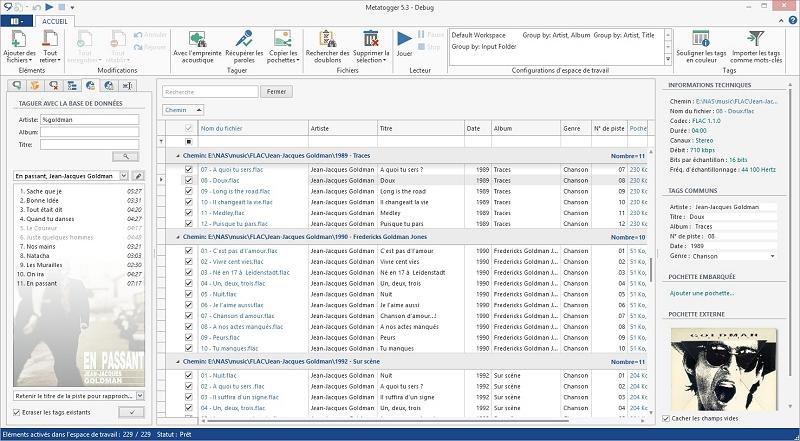
MetatOGGer version 7.7.0.0 has been released, enhancing the capabilities for managing audio files. This software allows users to rename, tag, and classify their audio files, specifically supporting formats such as Ogg Vorbis, FLAC, Speex, and MP3. Users can also extend the software's functionality to include additional audio formats through plug-ins.
One of the standout features of MetatOGGer is its ability to perform operations both manually and automatically by accessing a comprehensive local database, which includes information on over 300,000 discs sourced from MusicBrainz. The software is notable for being the first tagging tool to incorporate a dynamic vector user interface built on Windows Presentation Foundation (WPF), offering a user-friendly experience that balances simplicity and power.
Key functionalities include:
- Manual tag editing or automated tagging using C# scripts.
- Tag extraction from filenames or file paths.
- File renaming based on associated tags.
- Organization of audio files through tagging, including options for copying, moving, or creating symbolic links, compatible with Windows Vista.
- Retrieval of tags from an extensive local database.
- Access to cover art from the internet.
- Identification of files through their acoustic fingerprints.
- Quick cleaning of unwanted tags.
In addition to these features, users may find similar questions about audio management, such as removing the DTS Audio Control Panel, enabling Windows Sonic Surround Sound, toggling key sounds in Windows, and renaming audio input or output devices.
Given the continuous evolution of audio management software, users can expect further updates and potential new features in future versions, keeping MetatOGGer competitive in the market for audio file management solutions
One of the standout features of MetatOGGer is its ability to perform operations both manually and automatically by accessing a comprehensive local database, which includes information on over 300,000 discs sourced from MusicBrainz. The software is notable for being the first tagging tool to incorporate a dynamic vector user interface built on Windows Presentation Foundation (WPF), offering a user-friendly experience that balances simplicity and power.
Key functionalities include:
- Manual tag editing or automated tagging using C# scripts.
- Tag extraction from filenames or file paths.
- File renaming based on associated tags.
- Organization of audio files through tagging, including options for copying, moving, or creating symbolic links, compatible with Windows Vista.
- Retrieval of tags from an extensive local database.
- Access to cover art from the internet.
- Identification of files through their acoustic fingerprints.
- Quick cleaning of unwanted tags.
In addition to these features, users may find similar questions about audio management, such as removing the DTS Audio Control Panel, enabling Windows Sonic Surround Sound, toggling key sounds in Windows, and renaming audio input or output devices.
Given the continuous evolution of audio management software, users can expect further updates and potential new features in future versions, keeping MetatOGGer competitive in the market for audio file management solutions
MetatOGGer 7.7.0.0 released
MetatOGGer makes it possible to rename, tag, and easily classify your Ogg Vorbis, FLAC, Speex, and MP3 files.