MemoryCleaner version 1.9.8 has been released, offering a simple and effective solution for optimizing your computer's memory with just a single click. The tool features an easy-to-use interface that is designed for users of all experience levels, displaying live counters for both physical and virtual memory. Users can initiate memory cleaning with a single button press.
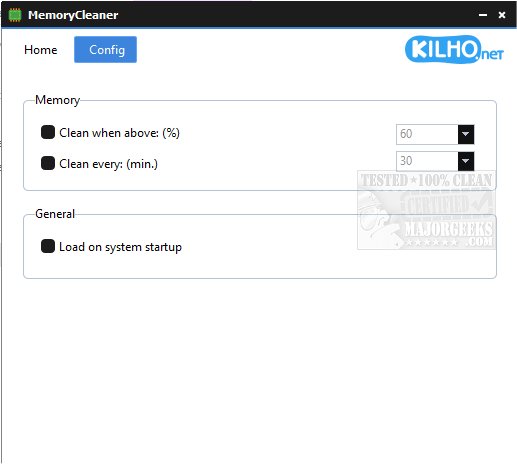
In addition to its straightforward functionality, MemoryCleaner offers configuration options for automated cleaning. Users can set it to clean memory when it exceeds a specified percentage or at regular time intervals. For added convenience, it can also be configured to launch automatically upon system startup.
This lightweight application is ideal for anyone looking to maintain their system's memory performance without the need for complex settings or extensive technical knowledge.
For those interested in similar tools, there are resources available, such as Windows Repair, which includes a free memory cleaner, and guides on fixing memory errors in Windows 10 and 11, as well as managing virtual memory settings in these operating systems.
In future updates, MemoryCleaner could benefit from additional features such as enhanced reporting on memory usage trends, integration with other system optimization tools, or a more customizable user interface to cater to advanced users while still maintaining its ease of use for novices
In addition to its straightforward functionality, MemoryCleaner offers configuration options for automated cleaning. Users can set it to clean memory when it exceeds a specified percentage or at regular time intervals. For added convenience, it can also be configured to launch automatically upon system startup.
This lightweight application is ideal for anyone looking to maintain their system's memory performance without the need for complex settings or extensive technical knowledge.
For those interested in similar tools, there are resources available, such as Windows Repair, which includes a free memory cleaner, and guides on fixing memory errors in Windows 10 and 11, as well as managing virtual memory settings in these operating systems.
In future updates, MemoryCleaner could benefit from additional features such as enhanced reporting on memory usage trends, integration with other system optimization tools, or a more customizable user interface to cater to advanced users while still maintaining its ease of use for novices
MemoryCleaner 1.9.8 released
MemoryCleaner is a straightforward tool to help your machine's memory with a single click.