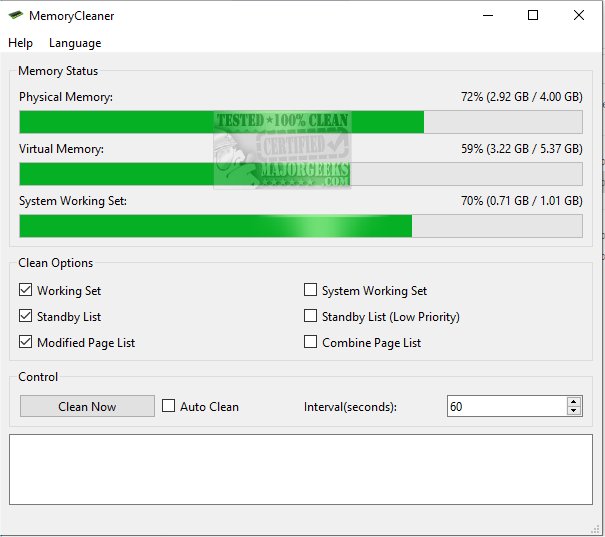
MemoryCleaner is a powerful open-source tool designed to enhance memory usage on Windows systems, optimizing overall performance. The software allows users to clean various memory areas, including working sets and standby lists, leading to smoother operation and improved efficiency.
Purpose and Functionality
The primary goal of MemoryCleaner is to optimize RAM usage, directing resources to the most critical tasks. While Windows has built-in memory management features, they may not always perform optimally. MemoryCleaner serves as a dedicated solution to significantly boost system performance tailored to users' workflows. Upon launching the application for the first time, users should change the default language from Chinese to English or select from 11 other supported languages.
MemoryCleaner offers six customizable options for memory cleanup:
- Working Set: Targets memory used by the current process.
- System Working Set: Addresses memory usage across all processes.
- Standby and Low Priority Standby List: Manages standby memory with different priority levels.
- Modified and Combined Page List: Focuses on optimizing page caching.
Users can toggle these options to fit their specific requirements.
Automation and User Configuration
Once a preferred cleanup profile is established, MemoryCleaner can be set to perform automated memory cleanups at user-defined intervals. It’s recommended to monitor system performance with the chosen configuration before activating this feature to ensure optimal results.
Expert Insights
MemoryCleaner is recognized as an effective tool for improving RAM usage, making it essential for enhancing system performance during resource-intensive tasks. This user-friendly application is particularly beneficial for systems with limited memory, promoting efficient operations. While hardware upgrades are the ultimate solution for persistent memory issues, utilizing MemoryCleaner can help manage memory allocation effectively, ensuring reliable performance when needed.
In addition to MemoryCleaner, users may also find other related tools and guides helpful, such as Windows Repair, which includes a free memory cleaner, and various methods for fixing low memory errors and managing virtual memory in Windows 10 and 11.
Future Directions
As technology evolves, the demand for optimized memory management will continue to grow. Future updates to MemoryCleaner could include enhanced algorithms for memory optimization, support for newer operating systems, and user-friendly features that simplify the cleanup process even further. Additionally, community-driven enhancements and feedback could lead to more tailored solutions for specific user needs, making MemoryCleaner an indispensable resource for Windows users seeking to maximize system performance
Purpose and Functionality
The primary goal of MemoryCleaner is to optimize RAM usage, directing resources to the most critical tasks. While Windows has built-in memory management features, they may not always perform optimally. MemoryCleaner serves as a dedicated solution to significantly boost system performance tailored to users' workflows. Upon launching the application for the first time, users should change the default language from Chinese to English or select from 11 other supported languages.
MemoryCleaner offers six customizable options for memory cleanup:
- Working Set: Targets memory used by the current process.
- System Working Set: Addresses memory usage across all processes.
- Standby and Low Priority Standby List: Manages standby memory with different priority levels.
- Modified and Combined Page List: Focuses on optimizing page caching.
Users can toggle these options to fit their specific requirements.
Automation and User Configuration
Once a preferred cleanup profile is established, MemoryCleaner can be set to perform automated memory cleanups at user-defined intervals. It’s recommended to monitor system performance with the chosen configuration before activating this feature to ensure optimal results.
Expert Insights
MemoryCleaner is recognized as an effective tool for improving RAM usage, making it essential for enhancing system performance during resource-intensive tasks. This user-friendly application is particularly beneficial for systems with limited memory, promoting efficient operations. While hardware upgrades are the ultimate solution for persistent memory issues, utilizing MemoryCleaner can help manage memory allocation effectively, ensuring reliable performance when needed.
In addition to MemoryCleaner, users may also find other related tools and guides helpful, such as Windows Repair, which includes a free memory cleaner, and various methods for fixing low memory errors and managing virtual memory in Windows 10 and 11.
Future Directions
As technology evolves, the demand for optimized memory management will continue to grow. Future updates to MemoryCleaner could include enhanced algorithms for memory optimization, support for newer operating systems, and user-friendly features that simplify the cleanup process even further. Additionally, community-driven enhancements and feedback could lead to more tailored solutions for specific user needs, making MemoryCleaner an indispensable resource for Windows users seeking to maximize system performance
MemoryCleaner 1.1.2 / 1.2.0 released
MemoryCleaner is an effective software tool designed to optimize memory usage on Windows systems.