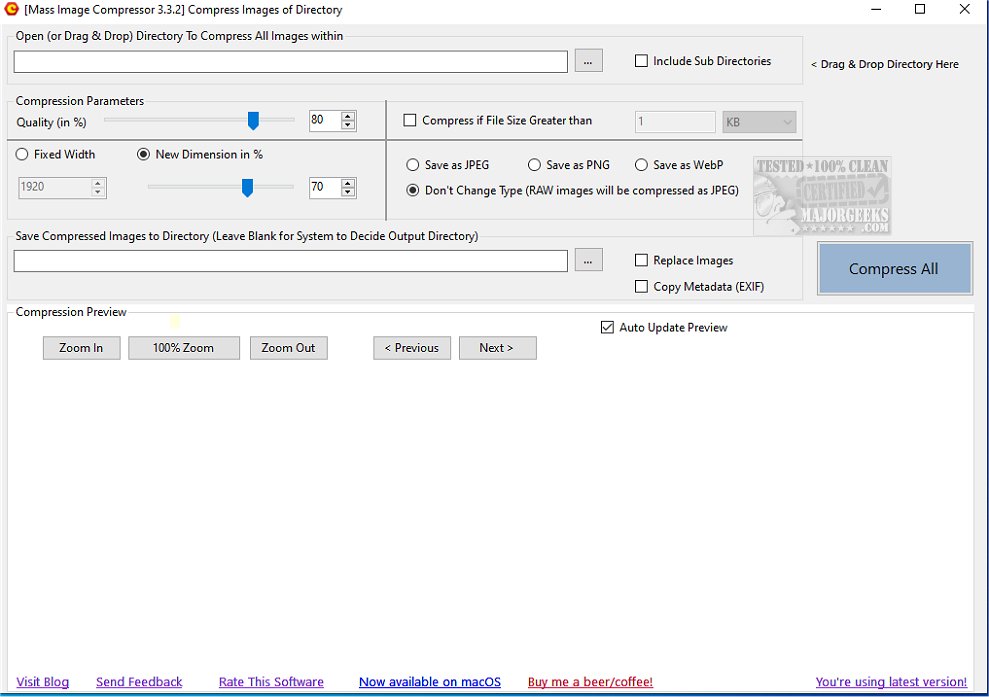
Mass Image Compressor has launched its latest version, 4.2.2, an advanced tool designed to facilitate the simultaneous compression and resizing of multiple images. This software is particularly beneficial for users aiming to optimize storage or enhance web performance without compromising image quality.
User-Friendly Interface and Customization Options
The application boasts a user-friendly interface that makes it easy for users to select numerous images, customize their compression settings, and apply resizing preferences effortlessly. Whether for personal use, professional projects, or website optimization, Mass Image Compressor serves as a practical solution for bulk image processing tasks. Users can adjust compression parameters to fine-tune the quality, resolution, and file size of their output images, with the added advantage of a preview feature to assess the effects of adjustments before finalizing.
One-Click Bulk Processing
Designed for efficiency, Mass Image Compressor allows users to reduce image file sizes with a single click. Users can compress all images within a selected folder and its sub-folders, saving time and effort compared to traditional methods that require individual image processing. Simply drag and drop a folder into the interface, and the software automatically scans all images, making it an ideal tool for managing extensive photo collections.
Comprehensive Format Support and Advanced Features
Mass Image Compressor supports a wide array of image formats, including WebP, JPEG, BMP, TIFF, and RAW files from various camera models. Key features include significant size reduction (over 90%), recursive processing, preservation of metadata (EXIF tags), high-quality compression, improved algorithms for resizing, and the ability to save progressive JPEG images for enhanced web performance.
Conclusion and Future Prospects
Mass Image Compressor 4.2.2 is designed to simplify and expedite the process of managing image files, making it a valuable asset for anyone needing to optimize images for storage or web use. With its intuitive design and robust functionality, this tool is poised to become an essential resource for photographers, web developers, and anyone dealing with large volumes of images. The ongoing development and updates promise to further enhance its capabilities in future versions
User-Friendly Interface and Customization Options
The application boasts a user-friendly interface that makes it easy for users to select numerous images, customize their compression settings, and apply resizing preferences effortlessly. Whether for personal use, professional projects, or website optimization, Mass Image Compressor serves as a practical solution for bulk image processing tasks. Users can adjust compression parameters to fine-tune the quality, resolution, and file size of their output images, with the added advantage of a preview feature to assess the effects of adjustments before finalizing.
One-Click Bulk Processing
Designed for efficiency, Mass Image Compressor allows users to reduce image file sizes with a single click. Users can compress all images within a selected folder and its sub-folders, saving time and effort compared to traditional methods that require individual image processing. Simply drag and drop a folder into the interface, and the software automatically scans all images, making it an ideal tool for managing extensive photo collections.
Comprehensive Format Support and Advanced Features
Mass Image Compressor supports a wide array of image formats, including WebP, JPEG, BMP, TIFF, and RAW files from various camera models. Key features include significant size reduction (over 90%), recursive processing, preservation of metadata (EXIF tags), high-quality compression, improved algorithms for resizing, and the ability to save progressive JPEG images for enhanced web performance.
Conclusion and Future Prospects
Mass Image Compressor 4.2.2 is designed to simplify and expedite the process of managing image files, making it a valuable asset for anyone needing to optimize images for storage or web use. With its intuitive design and robust functionality, this tool is poised to become an essential resource for photographers, web developers, and anyone dealing with large volumes of images. The ongoing development and updates promise to further enhance its capabilities in future versions
Mass Image Compressor 4.2.2 released
Mass Image Compressor efficiently compresses and resizes multiple images simultaneously.