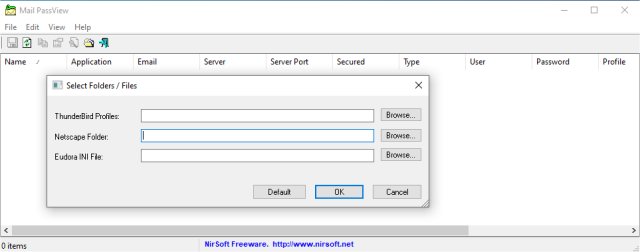
Mail PassView, a user-friendly password recovery tool, has recently been updated to version 1.93. This lightweight application is designed to help users recover lost passwords and account details from a variety of popular email clients. A portable version is also available for added convenience.
Why Mail PassView is Essential
Have you ever forgotten your email password and found yourself in a frustrating loop of password resets? Mail PassView acts like a personal assistant, effortlessly retrieving saved passwords from various email clients including Microsoft Outlook, Gmail, Yahoo! Mail, and Thunderbird. Its comprehensive functionality allows users to regain access to their email accounts without the hassle of remembering complex passwords.
Key Features of Mail PassView:
- Extensive Email Client Support: Compatible with numerous email clients such as Microsoft Outlook (all versions from 2000 to 2016), Outlook Express, Windows Mail, and others. It even supports Gmail and Yahoo! accounts saved in desktop applications.
- Detailed Account Information: Displays application names, email addresses, server types (POP3, IMAP, SMTP), server details, usernames, and passwords for each account.
- No Installation Needed: The tool is portable; users can run it directly from an executable file without any installation process.
- User-Friendly Interface: Designed for both tech-savvy individuals and casual users, the clean interface ensures easy navigation.
- Export and Backup Options: Users can save recovered information to text or HTML files or copy details to their clipboard with ease.
Practical Advantages:
- Instant Access to Passwords: Quickly retrieve lost passwords, minimizing downtime and maximizing productivity.
- Seamless Email Migration: Simplifies the process of transferring email accounts to new devices without missing any account details.
- Portability: The tool can be run from a USB drive on any Windows computer, making it ideal for users on the go.
- Enhanced Security: Eliminates the need to search through old notebooks or files for forgotten passwords, providing peace of mind.
Important Consideration
While Mail PassView is a powerful tool, it may not work with email clients that use encryption with a master password, such as certain configurations in Mozilla Thunderbird or Netscape. Users should be aware of this limitation, which highlights the importance of security measures in modern email services.
Final Thoughts
Mail PassView 1.93 showcases a blend of simplicity and effective functionality, making it an invaluable resource for anyone struggling with forgotten email passwords. With its intuitive design and robust capabilities, it caters to a wide range of users, from casual emailers to IT professionals. Just remember to use this tool ethically and responsibly, respecting both your privacy and that of others.
Ready to streamline your password management? Give Mail PassView a try and eliminate the stress of forgotten passwords today!
Related Resources:
- How to View Hidden Passwords Behind Asterisks
- Managing Your Google Chrome Passwords
- Changing or Recovering Your Windows 10 Password
- Securing Your Facebook Account
- Fixing Username or Password Errors
- Finding Your Wi-Fi Passwor
Why Mail PassView is Essential
Have you ever forgotten your email password and found yourself in a frustrating loop of password resets? Mail PassView acts like a personal assistant, effortlessly retrieving saved passwords from various email clients including Microsoft Outlook, Gmail, Yahoo! Mail, and Thunderbird. Its comprehensive functionality allows users to regain access to their email accounts without the hassle of remembering complex passwords.
Key Features of Mail PassView:
- Extensive Email Client Support: Compatible with numerous email clients such as Microsoft Outlook (all versions from 2000 to 2016), Outlook Express, Windows Mail, and others. It even supports Gmail and Yahoo! accounts saved in desktop applications.
- Detailed Account Information: Displays application names, email addresses, server types (POP3, IMAP, SMTP), server details, usernames, and passwords for each account.
- No Installation Needed: The tool is portable; users can run it directly from an executable file without any installation process.
- User-Friendly Interface: Designed for both tech-savvy individuals and casual users, the clean interface ensures easy navigation.
- Export and Backup Options: Users can save recovered information to text or HTML files or copy details to their clipboard with ease.
Practical Advantages:
- Instant Access to Passwords: Quickly retrieve lost passwords, minimizing downtime and maximizing productivity.
- Seamless Email Migration: Simplifies the process of transferring email accounts to new devices without missing any account details.
- Portability: The tool can be run from a USB drive on any Windows computer, making it ideal for users on the go.
- Enhanced Security: Eliminates the need to search through old notebooks or files for forgotten passwords, providing peace of mind.
Important Consideration
While Mail PassView is a powerful tool, it may not work with email clients that use encryption with a master password, such as certain configurations in Mozilla Thunderbird or Netscape. Users should be aware of this limitation, which highlights the importance of security measures in modern email services.
Final Thoughts
Mail PassView 1.93 showcases a blend of simplicity and effective functionality, making it an invaluable resource for anyone struggling with forgotten email passwords. With its intuitive design and robust capabilities, it caters to a wide range of users, from casual emailers to IT professionals. Just remember to use this tool ethically and responsibly, respecting both your privacy and that of others.
Ready to streamline your password management? Give Mail PassView a try and eliminate the stress of forgotten passwords today!
Related Resources:
- How to View Hidden Passwords Behind Asterisks
- Managing Your Google Chrome Passwords
- Changing or Recovering Your Windows 10 Password
- Securing Your Facebook Account
- Fixing Username or Password Errors
- Finding Your Wi-Fi Passwor
Mail PassView 1.93 released
Mail PassView is a small password-recovery tool that reveals the passwords and other account details for all popular email clients. Portable version also available.