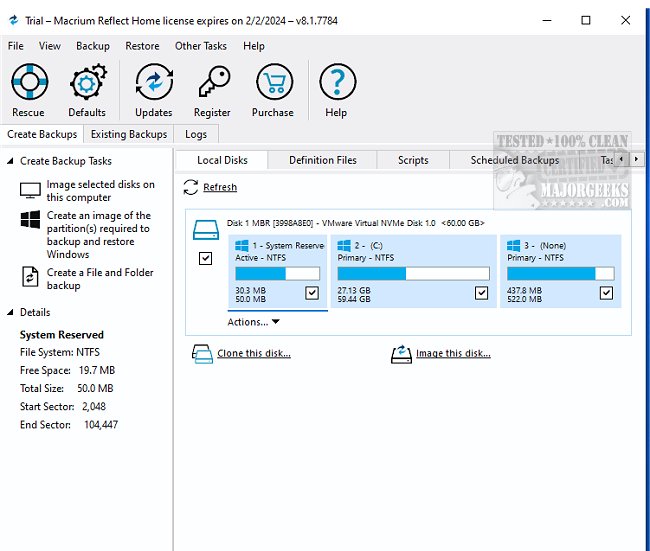
Macrium Reflect Home Edition 10.0.8843 is a robust and user-friendly tool designed for creating precise and reliable backups of hard drives and partitions. This software serves as an essential backup and recovery solution for Windows systems, enabling users to restore entire disks, partitions, or specific files and folders in the event of data loss, whether partial or complete.
The latest version incorporates advanced disk imaging technology, featuring Rapid Delta Cloning, which allows for efficient cloning of disks and partitions. Users benefit from Rapid Delta Restore, ensuring speedy recovery times within minutes or even seconds. Macrium Reflect offers customizable backup plans that enable flexible file and folder backups, along with the capability to mount backup images in Windows Explorer for straightforward item-level recovery.
Key Features of Macrium Reflect Home Edition:
1. File Backup:
- Create single backup files of multiple folders.
- Supports incremental and differential backups.
- Custom filters for file selection.
- Backup files can be browsed as virtual drives in Windows Explorer.
- Backs up files in use, including locked ones.
- Various compression levels available.
- Options for local, network, or optical storage backups.
- Password protection for enhanced security.
- Restore specific files or entire backups to any desired location.
2. Disk Imaging:
- Create complete hard disk or partition backup files.
- Options for incremental and differential imaging.
- Restore partitions in different formats and resize them as needed.
- Backups can be created while Windows is running without affecting the image's integrity.
- Automatic verification of images to ensure reliability.
- Excludes system files to reduce backup size.
- Offers AES 256-bit encryption for secure backups.
3. Scheduling Features:
- Schedule backups on a daily, weekly, or monthly basis.
- Supports unattended completion and automatic space management.
- Comprehensive logging of all backup activities with HTML reports.
Additional Functionalities:
The software also includes options for generating XML files for backup definitions, integration with VBScript for enhanced control over operations, and rescue disk options like Linux-based and Windows PE rescue CDs for recovery purposes.
In summary, Macrium Reflect Home Edition 10.0.8843 presents a comprehensive solution for users seeking to secure their data through efficient backup and restoration processes. Its combination of advanced features, ease of use, and strong security measures makes it an invaluable tool for both personal and professional use.
Future Enhancements:
As technology evolves, future updates may include enhanced cloud integration for off-site backups, improved AI-driven data recovery options, and expanded support for various file systems and storage devices, ensuring users can keep pace with changing technology and data security needs
The latest version incorporates advanced disk imaging technology, featuring Rapid Delta Cloning, which allows for efficient cloning of disks and partitions. Users benefit from Rapid Delta Restore, ensuring speedy recovery times within minutes or even seconds. Macrium Reflect offers customizable backup plans that enable flexible file and folder backups, along with the capability to mount backup images in Windows Explorer for straightforward item-level recovery.
Key Features of Macrium Reflect Home Edition:
1. File Backup:
- Create single backup files of multiple folders.
- Supports incremental and differential backups.
- Custom filters for file selection.
- Backup files can be browsed as virtual drives in Windows Explorer.
- Backs up files in use, including locked ones.
- Various compression levels available.
- Options for local, network, or optical storage backups.
- Password protection for enhanced security.
- Restore specific files or entire backups to any desired location.
2. Disk Imaging:
- Create complete hard disk or partition backup files.
- Options for incremental and differential imaging.
- Restore partitions in different formats and resize them as needed.
- Backups can be created while Windows is running without affecting the image's integrity.
- Automatic verification of images to ensure reliability.
- Excludes system files to reduce backup size.
- Offers AES 256-bit encryption for secure backups.
3. Scheduling Features:
- Schedule backups on a daily, weekly, or monthly basis.
- Supports unattended completion and automatic space management.
- Comprehensive logging of all backup activities with HTML reports.
Additional Functionalities:
The software also includes options for generating XML files for backup definitions, integration with VBScript for enhanced control over operations, and rescue disk options like Linux-based and Windows PE rescue CDs for recovery purposes.
In summary, Macrium Reflect Home Edition 10.0.8843 presents a comprehensive solution for users seeking to secure their data through efficient backup and restoration processes. Its combination of advanced features, ease of use, and strong security measures makes it an invaluable tool for both personal and professional use.
Future Enhancements:
As technology evolves, future updates may include enhanced cloud integration for off-site backups, improved AI-driven data recovery options, and expanded support for various file systems and storage devices, ensuring users can keep pace with changing technology and data security needs
Macrium Reflect Home Edition 10.0.8843 released
Macrium Reflect Home Edition allows you to easily make an accurate and reliable image of your HDD or individual partitions.
Macrium Reflect Home Edition 10.0.8843 released @ MajorGeeks