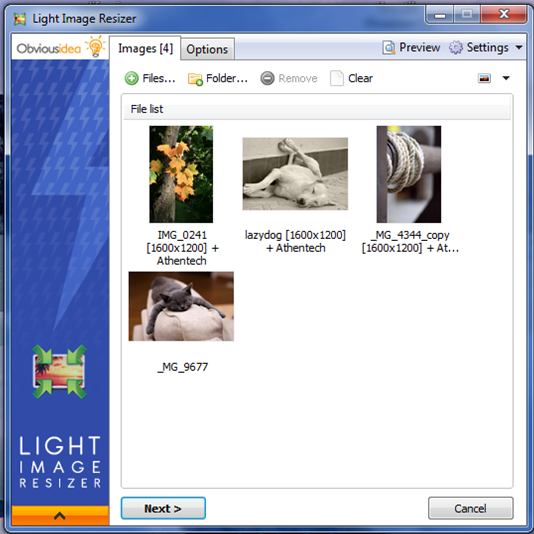
Light Image Resizer 7.6.0.159 has been released, enhancing your ability to manage images through an easy-to-use interface. This software allows users to resize, compress, and convert images into various formats swiftly and accurately. Utilizing advanced multi-core resizing technology, it ensures high-quality output, making it an ideal tool for both casual users and professionals.
Key features include the ability to add watermarks for intellectual property protection, customize images with filters like sepia, and utilize a live preview function to visualize the final result before processing. The software supports operations on files, folders, and subfolders, including RAW formats, facilitating efficient bulk processing. Users can quickly launch the application via Windows shell explorer with a right-click on an image or folder.
Light Image Resizer also offers functionality for exporting images, allowing for easy sharing via email with size restrictions in mind, and the capability to create PDFs from images. Pre-defined profiles for common resolutions make it convenient to select the right settings for specific needs, while the Digital Picture Frame Wizard helps optimize images for digital frames.
In summary, Light Image Resizer is not just about resizing; it's a comprehensive image management tool that simplifies the editing and organization of photos, catering to a wide range of user requirements. Its batch processing capability, along with various output options, makes it a powerful solution for anyone needing to handle images efficiently.
To extend its utility, future updates could focus on integrating cloud storage options, enabling users to save and access images directly from platforms like Google Drive or Dropbox. Additionally, advanced editing features such as filters, cropping, and color adjustments could further enhance the software's capabilities, making it a one-stop solution for all image-related tasks
Key features include the ability to add watermarks for intellectual property protection, customize images with filters like sepia, and utilize a live preview function to visualize the final result before processing. The software supports operations on files, folders, and subfolders, including RAW formats, facilitating efficient bulk processing. Users can quickly launch the application via Windows shell explorer with a right-click on an image or folder.
Light Image Resizer also offers functionality for exporting images, allowing for easy sharing via email with size restrictions in mind, and the capability to create PDFs from images. Pre-defined profiles for common resolutions make it convenient to select the right settings for specific needs, while the Digital Picture Frame Wizard helps optimize images for digital frames.
In summary, Light Image Resizer is not just about resizing; it's a comprehensive image management tool that simplifies the editing and organization of photos, catering to a wide range of user requirements. Its batch processing capability, along with various output options, makes it a powerful solution for anyone needing to handle images efficiently.
To extend its utility, future updates could focus on integrating cloud storage options, enabling users to save and access images directly from platforms like Google Drive or Dropbox. Additionally, advanced editing features such as filters, cropping, and color adjustments could further enhance the software's capabilities, making it a one-stop solution for all image-related tasks
Light Image Resizer 7.6.0.159 released
Light Image Resizer gives you the power to resize pictures or convert them into different formats easily and accurately.