LibreScroll 2.1.5 has been released, enhancing the scrolling experience on Windows by enabling smooth inertial scrolling with any standard mouse. This application provides a more natural and fluid movement, allowing users to navigate lengthy content with ease, closely mimicking the intuitive scrolling found on smartphones.
Overview of LibreScroll
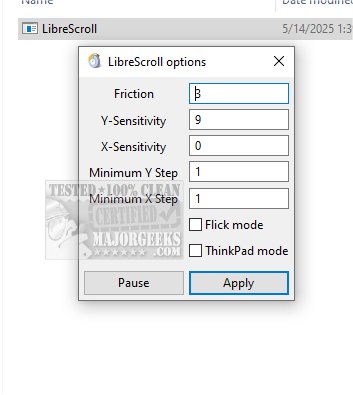
LibreScroll enhances your computer's scrolling capabilities, making it feel more seamless and responsive. It features a continuous scrolling effect, which greatly improves user navigation through extensive documents or web pages. The application operates without a conventional user interface, instead offering a compact settings window through the system tray. Users can customize various scrolling parameters such as friction, sensitivity for both X and Y axes, and minimum step sizes.
Key Features
One standout feature of LibreScroll is the flick mode, which creates a smooth scrolling experience. Users can make real-time adjustments to the settings without needing to restart the application, and they have the ability to pause the custom scroll functionality for better control. To initiate scrolling, users simply press and hold the middle mouse button while moving the mouse, allowing the cursor to remain stationary while the content scrolls. Upon releasing the button, scrolling ceases, and the cursor can move freely again. It's important to apply any changes made in the settings for them to take effect.
User Experience
The verdict on LibreScroll is overwhelmingly positive, as it transforms traditional scrolling into a more fluid and responsive experience akin to that of tablets. The ability for content to continue gliding momentarily after releasing the scroll provides a natural and intuitive navigation feel, allowing users to enjoy a touch-like experience even when using a standard mouse.
Conclusion
In summary, LibreScroll 2.1.5 is a powerful tool for enhancing scrolling on Windows, bringing the effortless elegance of smartphone scrolling to desktop environments. Its customization options and user-friendly features make it a valuable addition for anyone looking to improve their navigation efficiency.
Further Suggestions
For users interested in maximizing productivity, consider exploring keyboard shortcuts, adjusting accessibility features like Sticky Keys, and customizing the behavior of input devices to suit individual preferences, offering a more tailored computing experience
Overview of LibreScroll
LibreScroll enhances your computer's scrolling capabilities, making it feel more seamless and responsive. It features a continuous scrolling effect, which greatly improves user navigation through extensive documents or web pages. The application operates without a conventional user interface, instead offering a compact settings window through the system tray. Users can customize various scrolling parameters such as friction, sensitivity for both X and Y axes, and minimum step sizes.
Key Features
One standout feature of LibreScroll is the flick mode, which creates a smooth scrolling experience. Users can make real-time adjustments to the settings without needing to restart the application, and they have the ability to pause the custom scroll functionality for better control. To initiate scrolling, users simply press and hold the middle mouse button while moving the mouse, allowing the cursor to remain stationary while the content scrolls. Upon releasing the button, scrolling ceases, and the cursor can move freely again. It's important to apply any changes made in the settings for them to take effect.
User Experience
The verdict on LibreScroll is overwhelmingly positive, as it transforms traditional scrolling into a more fluid and responsive experience akin to that of tablets. The ability for content to continue gliding momentarily after releasing the scroll provides a natural and intuitive navigation feel, allowing users to enjoy a touch-like experience even when using a standard mouse.
Conclusion
In summary, LibreScroll 2.1.5 is a powerful tool for enhancing scrolling on Windows, bringing the effortless elegance of smartphone scrolling to desktop environments. Its customization options and user-friendly features make it a valuable addition for anyone looking to improve their navigation efficiency.
Further Suggestions
For users interested in maximizing productivity, consider exploring keyboard shortcuts, adjusting accessibility features like Sticky Keys, and customizing the behavior of input devices to suit individual preferences, offering a more tailored computing experience
LibreScroll 2.1.5 released
LibreScroll enables smooth inertial scrolling on Windows using any standard mouse. This feature enhances the scrolling experience by providing more fluid and natural movement, making it easier to navigate through content efficiently.