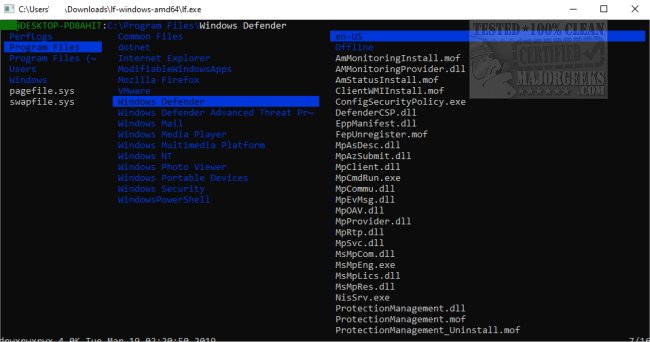
LF Terminal File Manager has recently released version r39. This open-source, cross-platform dual-pane file manager is designed for users who prefer a lightweight and efficient file management solution. It allows for keyboard-only navigation through a visually appealing, color-coded console, making it easy to access files and folders without the need for a mouse.
LF differentiates itself from other console file managers by streamlining features that are better suited for external tools, ensuring that it remains functional yet lightweight. The application can be easily integrated with other shell tools, offering flexibility for users.
Key features include:
- A single binary with no runtime dependencies (beyond the terminfo database).
- Quick startup times and a low memory footprint thanks to its native code and static binaries.
- A server/client architecture that enables file selection sharing across multiple instances.
- Customizable keybindings based on vi and readline defaults.
- Preview filtering for various file types, including source code, archives, and images.
To get started with LF, users can run the ‘lf’ command to launch the application in the current directory, access command-line options with ‘lf -help’, and view documentation using ‘lf -doc’. Additional integration guidance and example configuration files are available in the 'etc' directory.
LF Terminal File Manager serves as a robust alternative for those seeking a straightforward and effective method for file management, emphasizing performance and minimalism.
As technology continues to evolve, tools like LF are essential for users who value speed and efficiency in their workflow. With the constant updates and community-driven enhancements, LF is poised to remain a go-to file manager for terminal enthusiasts
LF differentiates itself from other console file managers by streamlining features that are better suited for external tools, ensuring that it remains functional yet lightweight. The application can be easily integrated with other shell tools, offering flexibility for users.
Key features include:
- A single binary with no runtime dependencies (beyond the terminfo database).
- Quick startup times and a low memory footprint thanks to its native code and static binaries.
- A server/client architecture that enables file selection sharing across multiple instances.
- Customizable keybindings based on vi and readline defaults.
- Preview filtering for various file types, including source code, archives, and images.
To get started with LF, users can run the ‘lf’ command to launch the application in the current directory, access command-line options with ‘lf -help’, and view documentation using ‘lf -doc’. Additional integration guidance and example configuration files are available in the 'etc' directory.
LF Terminal File Manager serves as a robust alternative for those seeking a straightforward and effective method for file management, emphasizing performance and minimalism.
As technology continues to evolve, tools like LF are essential for users who value speed and efficiency in their workflow. With the constant updates and community-driven enhancements, LF is poised to remain a go-to file manager for terminal enthusiasts
LF Terminal File Manager r39 released
LF Terminal File Manager is a portable, Open Source, cross-platform dual-pane file manager.