Lessmsi version 2.12.3 has been released, enhancing its capabilities as a portable application that provides both a graphical user interface (GUI) and command-line options for users to view and extract the contents of Microsoft Installer (MSI) files. MSI files serve as installation packages for software on Windows systems, functioning similarly to executable files. Upon double-clicking an MSI file, the installation process begins.
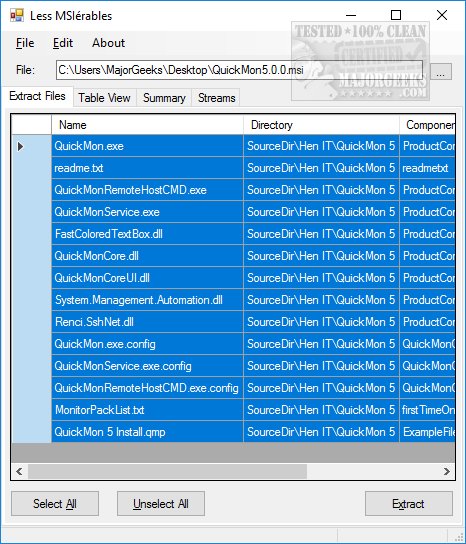
While various tools exist for handling MSI files, Lessmsi stands out due to its user-friendly approach and comprehensive features. Users can easily open an MSI file by selecting it through the file menu or dragging and dropping it into the application. By default, all contents are selected for extraction, allowing users to specify a destination folder quickly.
Lessmsi offers additional functionality through its interface, which includes tabs for Table View, Summary, and Streams. The Summary tab, in particular, provides an extensive amount of information about the MSI file, including details such as the title, subject, keywords, comments, revision number, and creation date.
Overall, Lessmsi is a versatile tool that not only simplifies the extraction of MSI contents but also caters to the needs of power users seeking detailed information about the files.
Going forward, users can expect continued improvements and updates to enhance the functionality of Lessmsi, ensuring it remains a valuable resource for managing and extracting MSI files. Additionally, users might also explore related tools and methods for handling compressed files, such as creating self-extracting archives or working with various archive formats like CAB and RAR, further expanding their software management capabilities
While various tools exist for handling MSI files, Lessmsi stands out due to its user-friendly approach and comprehensive features. Users can easily open an MSI file by selecting it through the file menu or dragging and dropping it into the application. By default, all contents are selected for extraction, allowing users to specify a destination folder quickly.
Lessmsi offers additional functionality through its interface, which includes tabs for Table View, Summary, and Streams. The Summary tab, in particular, provides an extensive amount of information about the MSI file, including details such as the title, subject, keywords, comments, revision number, and creation date.
Overall, Lessmsi is a versatile tool that not only simplifies the extraction of MSI contents but also caters to the needs of power users seeking detailed information about the files.
Going forward, users can expect continued improvements and updates to enhance the functionality of Lessmsi, ensuring it remains a valuable resource for managing and extracting MSI files. Additionally, users might also explore related tools and methods for handling compressed files, such as creating self-extracting archives or working with various archive formats like CAB and RAR, further expanding their software management capabilities
lessmsi 2.12.3 released
Lessmsi (Less MSIerables) is a portable app with a GUI or Command Line that allows users to view and extract the contents of an MSI file..