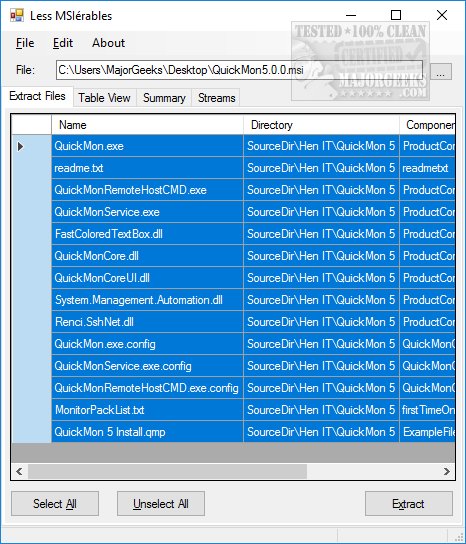
Lessmsi version 2.11.9 has been released, enhancing the functionality of this portable application designed for viewing and extracting files from Microsoft Installer (MSI) packages. An MSI file operates similarly to an executable, initiating an installation process upon double-clicking. Although Microsoft now refers to it as Windows Installer, Lessmsi remains a unique tool in its ability to extract contents without the complexities some other utilities may present.
Users can easily get started by selecting "File" and then "Open," or by simply dragging and dropping an MSI file into the application window. By default, all contents within the MSI are selected for extraction, allowing users to choose a target folder before initiating the process. The application features four main tabs: the File view for extraction, a Table View for detailed content examination, a Summary tab that provides an overview of essential file metadata (like Title, Subject, Keywords, and Revision Number), and a Streams tab for advanced file manipulation.
Lessmsi is not only user-friendly for beginners but also offers robust features for power users, making it a versatile tool for anyone dealing with MSI files.
In addition to its extraction capabilities, Lessmsi can be compared with other utilities that handle different archive formats, such as CAB files or self-extracting archives. As the software landscape evolves, tools like Lessmsi ensure that users have access to powerful, efficient methods for managing installation files, catering to both casual users and IT professionals alike
Users can easily get started by selecting "File" and then "Open," or by simply dragging and dropping an MSI file into the application window. By default, all contents within the MSI are selected for extraction, allowing users to choose a target folder before initiating the process. The application features four main tabs: the File view for extraction, a Table View for detailed content examination, a Summary tab that provides an overview of essential file metadata (like Title, Subject, Keywords, and Revision Number), and a Streams tab for advanced file manipulation.
Lessmsi is not only user-friendly for beginners but also offers robust features for power users, making it a versatile tool for anyone dealing with MSI files.
In addition to its extraction capabilities, Lessmsi can be compared with other utilities that handle different archive formats, such as CAB files or self-extracting archives. As the software landscape evolves, tools like Lessmsi ensure that users have access to powerful, efficient methods for managing installation files, catering to both casual users and IT professionals alike
lessmsi 2.11.9 released
Lessmsi (Less MSIerables) is a portable app with a GUI or Command Line that allows users to view and extract the contents of an MSI file..