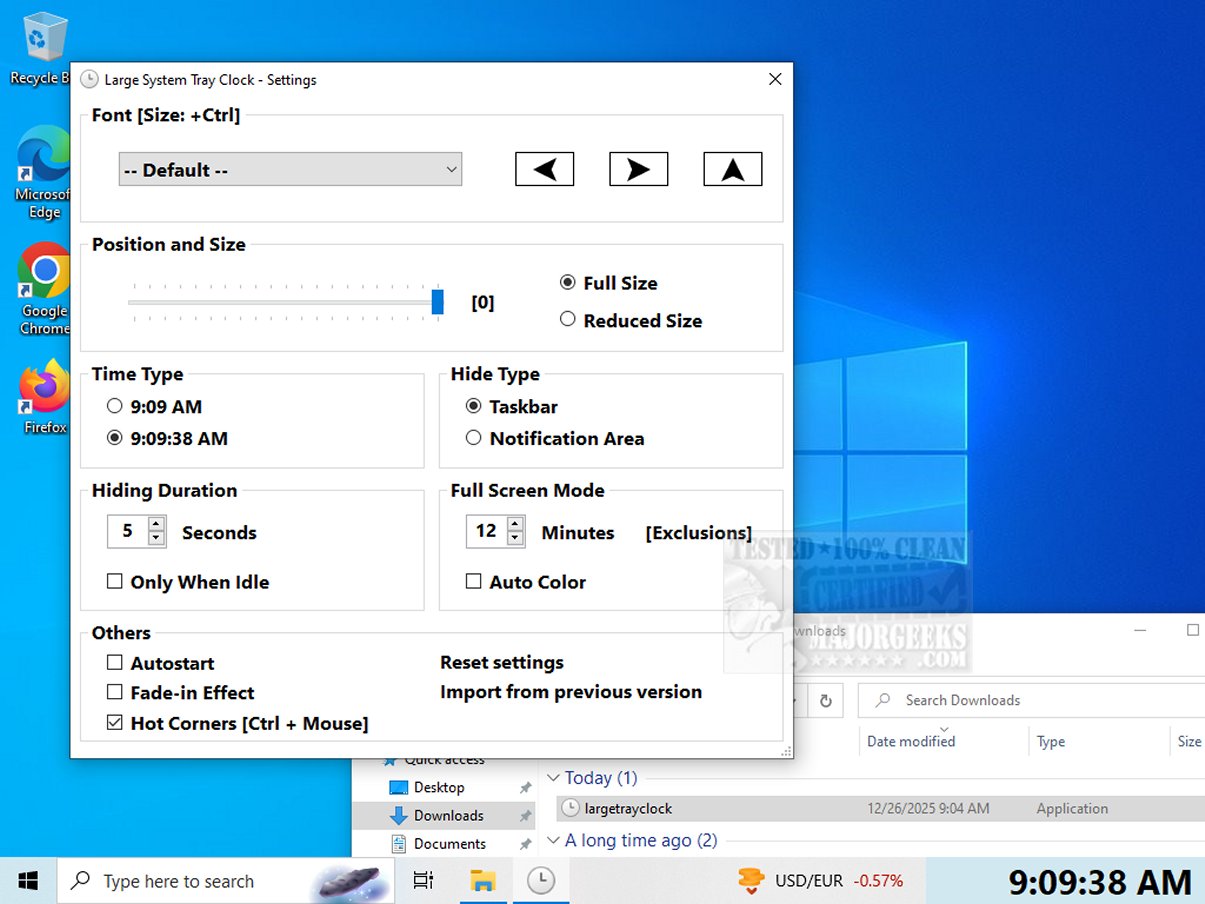
The Large System Tray Clock is a newly released utility aimed at enhancing the visibility of the clock in the system tray for Windows 10 and 11 users. This tool addresses the limitations in customization and accessibility features found in Microsoft’s default clock.
Enhanced Visibility for All Users
Designed with the visually impaired in mind, the Large System Tray Clock features a larger, more legible display that replaces the standard small clock. This enlargement makes it significantly easier for users to check the time without straining their vision.
Customization Options
Users can personalize various elements of the clock, including font style, size, and position on the screen. The software also offers an option to display the time with or without seconds, catering to individual preferences. Additionally, it can be set to launch automatically with Windows, which streamlines the user experience by eliminating the need for manual activation.
Innovative Full-Screen Mode
A standout feature of the Large System Tray Clock is its full-screen mode. This mode can be activated to show the time prominently across the entire screen after a designated period of inactivity, which is especially useful for users who may not be directly in front of their computers. The application is designed for ease of use, allowing users to toggle full-screen mode with minimal effort. Furthermore, the clock can be displayed in any corner of the screen, facilitating quick time checks from various viewing angles.
Key Features:
- The clock is always visible in the taskbar notification area, ensuring accessibility at all times.
- In full-screen mode (such as during video playback), the clock and taskbar will be hidden, while all taskbar functions remain accessible.
- The software can display the clock in the corners of the screen or in full-screen mode, depending on user preference.
- The application is portable and does not require installation.
Final Thoughts
The Large System Tray Clock is more than just a timekeeping tool; it serves as an essential companion for users seeking improved visibility and accessibility. Its thoughtfully crafted interface makes it a valuable asset for individuals with visual impairments, promoting a more inclusive computing experience. With this utility, users can enhance their productivity and ensure they never lose track of time.
Related Topics:
- How to Show Multiple Clocks on Windows
- How to Fix Incorrect Date or Time With Windows Clock
- How to Show Time Only on the Windows 10 & 11 Taskbar
- How to Remove the Clock From Windows 10 & 11 Taskbar
Extension Ideas:
Future updates could include additional features such as customizable color schemes for different times of day, integration with voice assistants for time inquiries, or even the ability to set alarms and reminders. Enhanced compatibility with other applications could also be explored, allowing for synchronization of time displays across multiple devices
Enhanced Visibility for All Users
Designed with the visually impaired in mind, the Large System Tray Clock features a larger, more legible display that replaces the standard small clock. This enlargement makes it significantly easier for users to check the time without straining their vision.
Customization Options
Users can personalize various elements of the clock, including font style, size, and position on the screen. The software also offers an option to display the time with or without seconds, catering to individual preferences. Additionally, it can be set to launch automatically with Windows, which streamlines the user experience by eliminating the need for manual activation.
Innovative Full-Screen Mode
A standout feature of the Large System Tray Clock is its full-screen mode. This mode can be activated to show the time prominently across the entire screen after a designated period of inactivity, which is especially useful for users who may not be directly in front of their computers. The application is designed for ease of use, allowing users to toggle full-screen mode with minimal effort. Furthermore, the clock can be displayed in any corner of the screen, facilitating quick time checks from various viewing angles.
Key Features:
- The clock is always visible in the taskbar notification area, ensuring accessibility at all times.
- In full-screen mode (such as during video playback), the clock and taskbar will be hidden, while all taskbar functions remain accessible.
- The software can display the clock in the corners of the screen or in full-screen mode, depending on user preference.
- The application is portable and does not require installation.
Final Thoughts
The Large System Tray Clock is more than just a timekeeping tool; it serves as an essential companion for users seeking improved visibility and accessibility. Its thoughtfully crafted interface makes it a valuable asset for individuals with visual impairments, promoting a more inclusive computing experience. With this utility, users can enhance their productivity and ensure they never lose track of time.
Related Topics:
- How to Show Multiple Clocks on Windows
- How to Fix Incorrect Date or Time With Windows Clock
- How to Show Time Only on the Windows 10 & 11 Taskbar
- How to Remove the Clock From Windows 10 & 11 Taskbar
Extension Ideas:
Future updates could include additional features such as customizable color schemes for different times of day, integration with voice assistants for time inquiries, or even the ability to set alarms and reminders. Enhanced compatibility with other applications could also be explored, allowing for synchronization of time displays across multiple devices
Large System Tray Clock 1.0.0.7 released
Large System Tray Clock is a utility designed to improve the visibility of the clock in the Windows 10 and 11 systray. It aims to address the limited customization and accessibility features of Microsoft's default system tray clock.