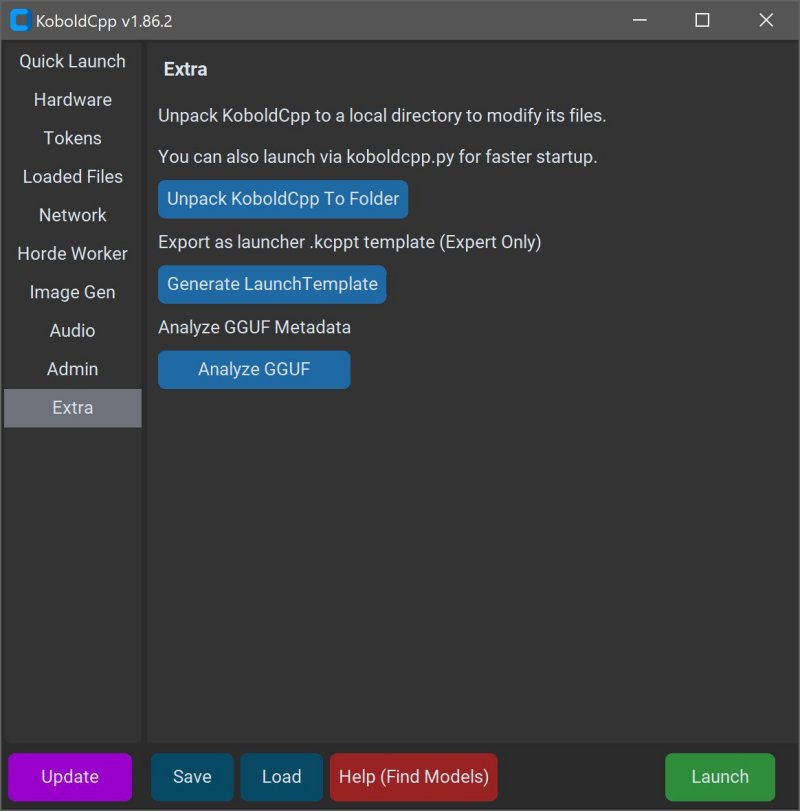
KoboldCPP is a user-friendly tool for running advanced AI models directly on your computer without the need for accounts, internet access, subscriptions, or compromising your privacy. This makes it an ideal choice for individuals who want to engage in AI-related activities, such as writing stories, developing game lore, or working on private business projects, all in a secure and offline environment.
What is KoboldCPP?
KoboldCPP is a lightweight, open-source application that allows users to run GGUF-format AI language models locally. It serves as a backend for the KoboldAI web interface, providing a chat experience similar to ChatGPT, but entirely on your device. Users simply download a model file, launch KoboldCPP, and begin interacting with the AI. The software supports both CPU and GPU acceleration, making it adaptable to various hardware configurations.
Understanding GGUF
GGUF stands for GPT-Generated Unified Format, a newer file format designed for local use. It is optimized for speed and efficiency, particularly with quantized models such as 4-bit or 8-bit, which can run effectively on mid-range PCs. While many popular open-source models are available in GGUF format on platforms like Hugging Face, KoboldCPP does not support models in GPTQ, Safetensors, or proprietary OpenAI formats.
Who Can Benefit from KoboldCPP?
KoboldCPP is perfect for anyone interested in AI without wanting to rely on cloud services. It is particularly advantageous for writers looking to co-create stories, RPG developers aiming to create AI-driven NPCs, and tech enthusiasts wanting a private AI experience. It is also suited for users in areas with limited internet connectivity or those frustrated by subscription fees and data privacy concerns.
Key Features of KoboldCPP:
- Local LLM Execution: Run GGUF/LLAMA-based models on your PC.
- Offline Functionality: Completely private without the need for internet access.
- Performance: Supports Intel oneAPI and NVIDIA CUDA for enhanced GPU performance.
- User-Friendly Setup: Installation requires no coding—just download, unzip, and launch.
- Web UI Compatibility: Incorporates features like memory, world information, and character cards for an enhanced experience.
- Customization Options: Users can load LoRA adapters and modify settings for personalized interactions.
Acquiring AI Models for KoboldCPP
KoboldCPP does not come with pre-installed AI models, so users must download them separately, ensuring they are trustworthy sources. For optimal performance on mid-range PCs, it is recommended to choose 4-bit or 8-bit GGUF models.
Using KoboldCPP: A Step-by-Step Guide
1. Launch the KoboldCPP application.
2. Select the downloaded .gguf model file.
3. Choose the appropriate backend (CPU, CUDA for NVIDIA, or oneAPI for Intel).
4. Adjust settings such as context size and memory usage.
5. Click "Start" to open a local web chat in your browser.
6. Begin interacting with the AI.
System Requirements
KoboldCPP is compatible with both Windows and Linux operating systems, requiring a minimum of 8GB RAM (16GB recommended), a modern CPU with AVX2 support, and an optional GPU for enhanced performance. Users should ensure sufficient disk space to accommodate the potentially large LLM files.
Considerations and Recommendations
Initially, the setup process might seem technical, but it becomes simpler with experience. Users are encouraged to start with smaller models and gradually upgrade as needed, ensuring their system can handle larger files. Different versions of KoboldCPP cater to various hardware capabilities, allowing users to select the best fit for their setup.
Conclusion
KoboldCPP provides users with complete control over their AI experience without the drawbacks associated with cloud-based services. It is one of the most accessible methods for individuals interested in having a private, ChatGPT-like assistant on their desktop. Whether you're a writer, gamer, or simply curious about AI, KoboldCPP stands out as a robust solution. For assistance with model selection or setup customization, the community is ready to offer support
What is KoboldCPP?
KoboldCPP is a lightweight, open-source application that allows users to run GGUF-format AI language models locally. It serves as a backend for the KoboldAI web interface, providing a chat experience similar to ChatGPT, but entirely on your device. Users simply download a model file, launch KoboldCPP, and begin interacting with the AI. The software supports both CPU and GPU acceleration, making it adaptable to various hardware configurations.
Understanding GGUF
GGUF stands for GPT-Generated Unified Format, a newer file format designed for local use. It is optimized for speed and efficiency, particularly with quantized models such as 4-bit or 8-bit, which can run effectively on mid-range PCs. While many popular open-source models are available in GGUF format on platforms like Hugging Face, KoboldCPP does not support models in GPTQ, Safetensors, or proprietary OpenAI formats.
Who Can Benefit from KoboldCPP?
KoboldCPP is perfect for anyone interested in AI without wanting to rely on cloud services. It is particularly advantageous for writers looking to co-create stories, RPG developers aiming to create AI-driven NPCs, and tech enthusiasts wanting a private AI experience. It is also suited for users in areas with limited internet connectivity or those frustrated by subscription fees and data privacy concerns.
Key Features of KoboldCPP:
- Local LLM Execution: Run GGUF/LLAMA-based models on your PC.
- Offline Functionality: Completely private without the need for internet access.
- Performance: Supports Intel oneAPI and NVIDIA CUDA for enhanced GPU performance.
- User-Friendly Setup: Installation requires no coding—just download, unzip, and launch.
- Web UI Compatibility: Incorporates features like memory, world information, and character cards for an enhanced experience.
- Customization Options: Users can load LoRA adapters and modify settings for personalized interactions.
Acquiring AI Models for KoboldCPP
KoboldCPP does not come with pre-installed AI models, so users must download them separately, ensuring they are trustworthy sources. For optimal performance on mid-range PCs, it is recommended to choose 4-bit or 8-bit GGUF models.
Using KoboldCPP: A Step-by-Step Guide
1. Launch the KoboldCPP application.
2. Select the downloaded .gguf model file.
3. Choose the appropriate backend (CPU, CUDA for NVIDIA, or oneAPI for Intel).
4. Adjust settings such as context size and memory usage.
5. Click "Start" to open a local web chat in your browser.
6. Begin interacting with the AI.
System Requirements
KoboldCPP is compatible with both Windows and Linux operating systems, requiring a minimum of 8GB RAM (16GB recommended), a modern CPU with AVX2 support, and an optional GPU for enhanced performance. Users should ensure sufficient disk space to accommodate the potentially large LLM files.
Considerations and Recommendations
Initially, the setup process might seem technical, but it becomes simpler with experience. Users are encouraged to start with smaller models and gradually upgrade as needed, ensuring their system can handle larger files. Different versions of KoboldCPP cater to various hardware capabilities, allowing users to select the best fit for their setup.
Conclusion
KoboldCPP provides users with complete control over their AI experience without the drawbacks associated with cloud-based services. It is one of the most accessible methods for individuals interested in having a private, ChatGPT-like assistant on their desktop. Whether you're a writer, gamer, or simply curious about AI, KoboldCPP stands out as a robust solution. For assistance with model selection or setup customization, the community is ready to offer support
KoboldCPP 1.108 released
KoboldCPP is a great choice for running powerful AI models on your computer with no accounts, internet, subscriptions, or privacy trade-offs.