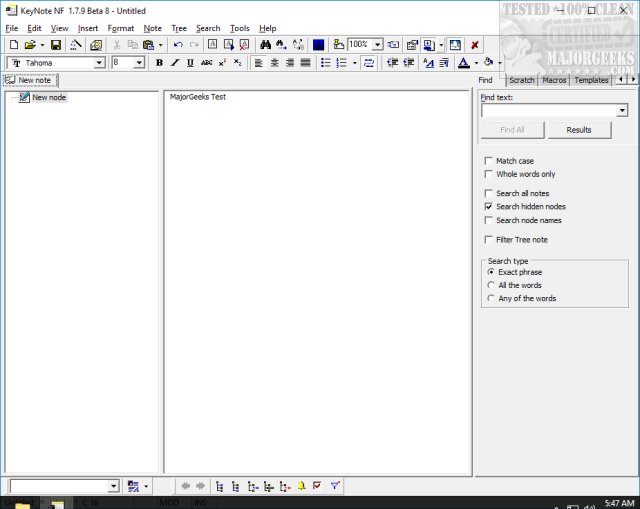
KeyNote NF 2.1.4.1 has been released as a versatile, portable, and multi-tabbed notebook application for Windows. Unlike basic note-taking apps, KeyNote NF serves as a robust organizational tool suitable for various tasks, from grocery lists to intricate research projects. It allows users to maintain multiple notes within a single file, featuring rich text formatting, a multi-level tree structure, and optional encryption for sensitive information.
The application utilizes the standard RichEdit control, enabling users to create content in Rich Text Format (RTF) with full formatting capabilities, including bold text, bullet lists, hyperlinks, and images—all without the need for a complicated installation or proprietary software. KeyNote NF operates from a single executable file, making it highly portable and easy to back up.
Key features include:
- A tabbed (folder-based) interface for seamless navigation between notes.
- Tree-structured organization for outlining and managing nested information.
- Strong encryption options (Blowfish and IDEA) for securing data.
- Hotkey access for quick retrieval of notes, even when using other applications.
- Built-in macro support for automating repetitive tasks.
KeyNote NF is particularly appealing for students, IT professionals, and writers who prefer a decluttered workspace without the hassle of managing multiple text files.
Pros:
- Lightweight and portable with optional installation.
- Deep organizational capabilities through a tree-based structure.
- Secure encryption features.
- Compatible with various Windows versions.
- Customizable interface and hotkey configurations.
Cons:
- Lacks mobile and cloud synchronization features.
- May have a learning curve for first-time users.
Overall Verdict:
KeyNote NF is a dream come true for productivity enthusiasts. It stands out as a powerful yet lightweight digital notebook, outperforming many free and even premium applications, especially considering its portability and encryption features. Users can carry it on a flash drive, providing a secure and flexible workspace on the go.
Extension:
In addition to its existing features, future updates for KeyNote NF could explore the integration of collaboration tools to enhance productivity in team environments or the inclusion of cloud synchronization options. These enhancements would allow users to easily share notes and access their work across multiple devices. Furthermore, the development of mobile versions could broaden its usability, catering to users who frequently work on the move. Lastly, a user-friendly tutorial or guided setup could assist new users in navigating the application more effectively, reducing the initial learning curve and fostering a more seamless onboarding experience
The application utilizes the standard RichEdit control, enabling users to create content in Rich Text Format (RTF) with full formatting capabilities, including bold text, bullet lists, hyperlinks, and images—all without the need for a complicated installation or proprietary software. KeyNote NF operates from a single executable file, making it highly portable and easy to back up.
Key features include:
- A tabbed (folder-based) interface for seamless navigation between notes.
- Tree-structured organization for outlining and managing nested information.
- Strong encryption options (Blowfish and IDEA) for securing data.
- Hotkey access for quick retrieval of notes, even when using other applications.
- Built-in macro support for automating repetitive tasks.
KeyNote NF is particularly appealing for students, IT professionals, and writers who prefer a decluttered workspace without the hassle of managing multiple text files.
Pros:
- Lightweight and portable with optional installation.
- Deep organizational capabilities through a tree-based structure.
- Secure encryption features.
- Compatible with various Windows versions.
- Customizable interface and hotkey configurations.
Cons:
- Lacks mobile and cloud synchronization features.
- May have a learning curve for first-time users.
Overall Verdict:
KeyNote NF is a dream come true for productivity enthusiasts. It stands out as a powerful yet lightweight digital notebook, outperforming many free and even premium applications, especially considering its portability and encryption features. Users can carry it on a flash drive, providing a secure and flexible workspace on the go.
Extension:
In addition to its existing features, future updates for KeyNote NF could explore the integration of collaboration tools to enhance productivity in team environments or the inclusion of cloud synchronization options. These enhancements would allow users to easily share notes and access their work across multiple devices. Furthermore, the development of mobile versions could broaden its usability, catering to users who frequently work on the move. Lastly, a user-friendly tutorial or guided setup could assist new users in navigating the application more effectively, reducing the initial learning curve and fostering a more seamless onboarding experience
KeyNote NF 2.1.4.1 released
KeyNote NF is a portable, flexible, multi-tabbed notebook, based on Windows standard RichEdit control.