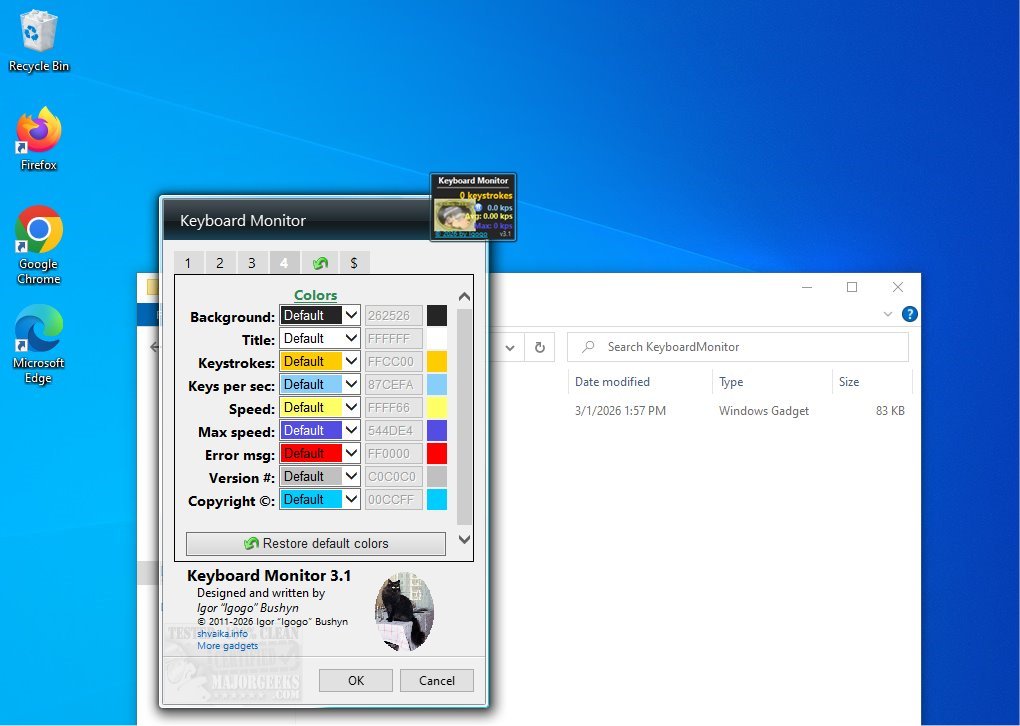
The latest version of Keyboard Monitor, 3.2, is a powerful desktop gadget designed to enhance your typing efficiency by providing detailed insights into your keyboard activity. This application measures both your average and maximum typing speeds, while also tracking the total number of keystrokes made. Such features offer valuable feedback for users seeking to improve their typing skills.
Real-Time Keyboard Statistics
Keyboard Monitor excels in delivering real-time statistics about your typing performance. It displays key metrics, including total keystrokes, current typing speed, and average speeds, all measured in keystrokes per second (kps). This functionality makes it an ideal tool for anyone aiming to evaluate and refine their typing capabilities.
User-Friendly Interface
The gadget features a small, movable interface that users can position anywhere on their screen, ensuring it remains accessible regardless of the applications in use. Once activated, Keyboard Monitor automatically begins tracking keyboard activity, providing continuous performance feedback.
Customizable Features
Keyboard Monitor is packed with useful features, including customizable counters and color schemes that enhance the user experience. Users can pause the kps display, choose to not retain counters post-shutdown, reset counters instantly, and save or load specific counter values. Extensive personalization options allow users to adjust the window size, opacity, and even assign a custom keyboard image. Background colors for various display elements—like titles and metric displays—can also be customized, with options to reset everything to default settings easily.
Empowering Typists of All Levels
The application is designed for typists of all experience levels, making it a valuable tool for both beginners and seasoned professionals. By providing an intuitive interface and comprehensive tracking features, Keyboard Monitor empowers users to enhance their typing skills confidently and efficiently.
Conclusion and Future Considerations
Keyboard Monitor 3.2 stands out as a robust solution for anyone looking to improve their typing efficiency. In future updates, the developers could consider adding features such as typing games or challenges to further engage users and make the learning process more interactive. Additionally, integration with other productivity tools or applications could expand its utility, making it an even more indispensable tool for typists everywhere.
In summary, whether you're looking to boost your speed or simply track your daily typing habits, Keyboard Monitor offers an effective and user-friendly solution
Real-Time Keyboard Statistics
Keyboard Monitor excels in delivering real-time statistics about your typing performance. It displays key metrics, including total keystrokes, current typing speed, and average speeds, all measured in keystrokes per second (kps). This functionality makes it an ideal tool for anyone aiming to evaluate and refine their typing capabilities.
User-Friendly Interface
The gadget features a small, movable interface that users can position anywhere on their screen, ensuring it remains accessible regardless of the applications in use. Once activated, Keyboard Monitor automatically begins tracking keyboard activity, providing continuous performance feedback.
Customizable Features
Keyboard Monitor is packed with useful features, including customizable counters and color schemes that enhance the user experience. Users can pause the kps display, choose to not retain counters post-shutdown, reset counters instantly, and save or load specific counter values. Extensive personalization options allow users to adjust the window size, opacity, and even assign a custom keyboard image. Background colors for various display elements—like titles and metric displays—can also be customized, with options to reset everything to default settings easily.
Empowering Typists of All Levels
The application is designed for typists of all experience levels, making it a valuable tool for both beginners and seasoned professionals. By providing an intuitive interface and comprehensive tracking features, Keyboard Monitor empowers users to enhance their typing skills confidently and efficiently.
Conclusion and Future Considerations
Keyboard Monitor 3.2 stands out as a robust solution for anyone looking to improve their typing efficiency. In future updates, the developers could consider adding features such as typing games or challenges to further engage users and make the learning process more interactive. Additionally, integration with other productivity tools or applications could expand its utility, making it an even more indispensable tool for typists everywhere.
In summary, whether you're looking to boost your speed or simply track your daily typing habits, Keyboard Monitor offers an effective and user-friendly solution
Keyboard Monitor 3.2 released
Keyboard Monitor desktop gadget will assess your typing efficiency by measuring both your average and maximum typing speeds. Additionally, it tracks the total number of keystrokes you have made, providing valuable insights into your typing habits.