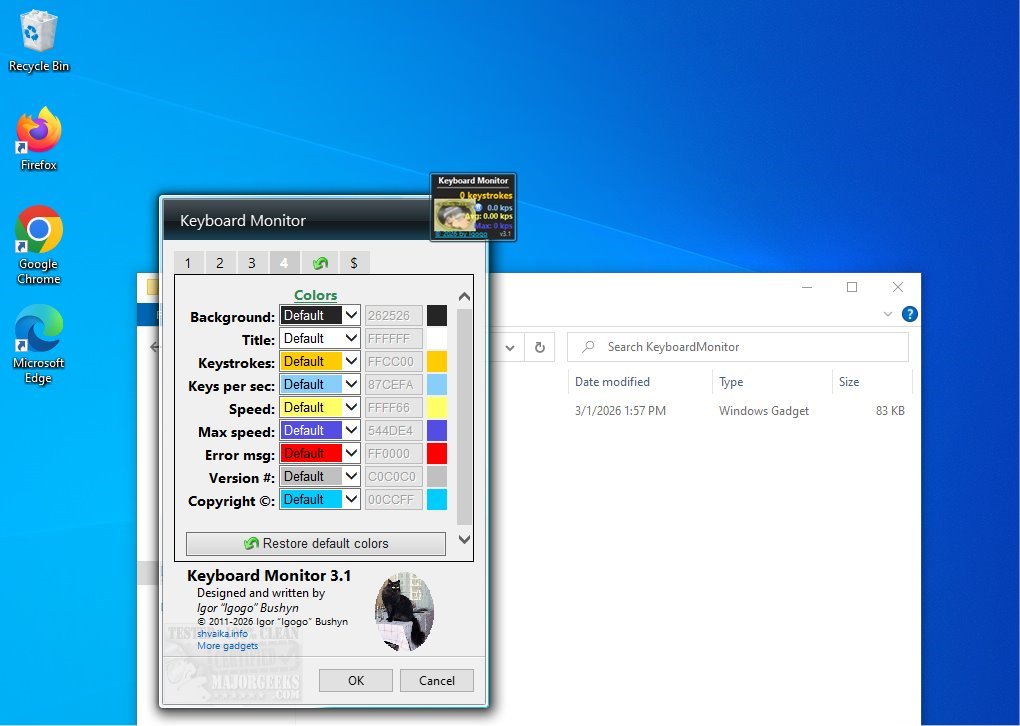
Keyboard Monitor 3.1 has been released, offering users a desktop gadget that evaluates typing efficiency by measuring both average and maximum typing speeds, alongside tracking the total keystrokes made. This tool provides real-time statistics, displaying vital information such as keystrokes per second (kps), making it beneficial for anyone looking to enhance their typing skills.
The application features a small, movable interface that can be placed anywhere on the screen, ensuring constant visibility while using other applications. Once activated, Keyboard Monitor continuously tracks keyboard activity, offering immediate feedback on typing performance.
Several useful features enhance the functionality of Keyboard Monitor. Users can enjoy customizable counters, color themes, and the ability to pause the kps display. The program also allows for specific counter management, such as not retaining counters after shutdown, instant resets, and saving/loading counter values. Furthermore, extensive personalization options are available, including adjusting window size and opacity, hiding the app's name, and using a custom keyboard image. Users can modify background colors for different display elements, with the option to reset all settings to their default configurations easily.
In conclusion, Keyboard Monitor is an excellent tool for anyone interested in tracking their typing habits and improving their skills. Its user-friendly design caters to all experience levels, making it accessible for both beginners and seasoned professionals. By providing real-time feedback and extensive customization options, Keyboard Monitor empowers users to optimize their typing efficiency confidently.
Moreover, future updates could potentially include additional features such as typing challenges, integration with online typing tests, and gamification elements to further engage users in their typing journey
The application features a small, movable interface that can be placed anywhere on the screen, ensuring constant visibility while using other applications. Once activated, Keyboard Monitor continuously tracks keyboard activity, offering immediate feedback on typing performance.
Several useful features enhance the functionality of Keyboard Monitor. Users can enjoy customizable counters, color themes, and the ability to pause the kps display. The program also allows for specific counter management, such as not retaining counters after shutdown, instant resets, and saving/loading counter values. Furthermore, extensive personalization options are available, including adjusting window size and opacity, hiding the app's name, and using a custom keyboard image. Users can modify background colors for different display elements, with the option to reset all settings to their default configurations easily.
In conclusion, Keyboard Monitor is an excellent tool for anyone interested in tracking their typing habits and improving their skills. Its user-friendly design caters to all experience levels, making it accessible for both beginners and seasoned professionals. By providing real-time feedback and extensive customization options, Keyboard Monitor empowers users to optimize their typing efficiency confidently.
Moreover, future updates could potentially include additional features such as typing challenges, integration with online typing tests, and gamification elements to further engage users in their typing journey
Keyboard Monitor 3.1 released
Keyboard Monitor desktop gadget will assess your typing efficiency by measuring both your average and maximum typing speeds. Additionally, it tracks the total number of keystrokes you have made, providing valuable insights into your typing habits.