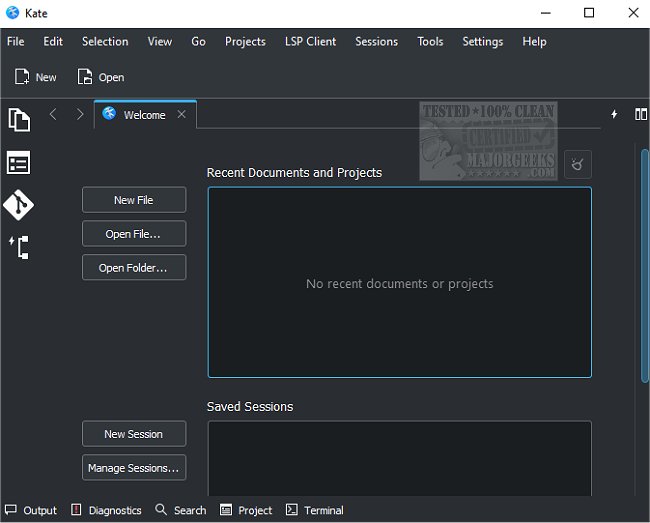
Kate, released on March 26, 1970, is a versatile text editor designed to cater to a wide range of users, from novices to experienced programmers. While there are many free and open-source text editors available, Kate stands out due to its comprehensive feature set and user-friendly interface.
Upon launching Kate, users are greeted with a straightforward interface that allows for immediate text entry. As users navigate the interface, they will discover various settings and a ribbon-style toolbar that enhances usability. One of Kate's standout features is its split-mode window capability, allowing users to view and edit multiple documents simultaneously either horizontally or vertically. Additionally, Kate supports multiple sessions, plug-ins, and file encoding, making it a robust tool for various tasks.
Kate provides advanced functionalities such as network file access, bookmarking for easy navigation, visible line numbers, and highlighting for specific words across more than 250 programming languages. The editor also features on-the-fly spell-checking and efficient search-and-replace options that enhance productivity.
For programmers, Kate includes features like scriptable auto-indentation, smart comment handling, auto-completion with argument hints, and a rectangular block selection mode. It also ensures data safety with its backup capability, allowing users to recover files in the event of a system crash and providing a reliable undo/redo system.
In summary, Kate is equipped with professional-grade functionalities typically found in premium text editors, making it an ideal choice for anyone looking for a feature-rich, user-friendly text editing experience. Key features include:
- Multi-document interface (MDI) with horizontal and vertical split modes
- Extensive plug-in support including an embedded terminal, SQL plug-in, and build tools
- Session and encoding support, including Unicode
- Bi-directional text rendering and line-ending support
- Network transparency for accessing remote files
- Customizable scripting capabilities
- Comprehensive bookmarking system and scroll bar indicators
- Line modification indicators and code folding
- Support for over 300 languages with advanced highlighting
- Bracket matching, smart spell checking, and highlighted selections
- Vi input mode and rectangular block selection capabilities
Overall, Kate is a powerful tool that adapts to the needs of its users, making it an excellent option for anyone in need of a sophisticated text editing solution
Upon launching Kate, users are greeted with a straightforward interface that allows for immediate text entry. As users navigate the interface, they will discover various settings and a ribbon-style toolbar that enhances usability. One of Kate's standout features is its split-mode window capability, allowing users to view and edit multiple documents simultaneously either horizontally or vertically. Additionally, Kate supports multiple sessions, plug-ins, and file encoding, making it a robust tool for various tasks.
Kate provides advanced functionalities such as network file access, bookmarking for easy navigation, visible line numbers, and highlighting for specific words across more than 250 programming languages. The editor also features on-the-fly spell-checking and efficient search-and-replace options that enhance productivity.
For programmers, Kate includes features like scriptable auto-indentation, smart comment handling, auto-completion with argument hints, and a rectangular block selection mode. It also ensures data safety with its backup capability, allowing users to recover files in the event of a system crash and providing a reliable undo/redo system.
In summary, Kate is equipped with professional-grade functionalities typically found in premium text editors, making it an ideal choice for anyone looking for a feature-rich, user-friendly text editing experience. Key features include:
- Multi-document interface (MDI) with horizontal and vertical split modes
- Extensive plug-in support including an embedded terminal, SQL plug-in, and build tools
- Session and encoding support, including Unicode
- Bi-directional text rendering and line-ending support
- Network transparency for accessing remote files
- Customizable scripting capabilities
- Comprehensive bookmarking system and scroll bar indicators
- Line modification indicators and code folding
- Support for over 300 languages with advanced highlighting
- Bracket matching, smart spell checking, and highlighted selections
- Vi input mode and rectangular block selection capabilities
Overall, Kate is a powerful tool that adapts to the needs of its users, making it an excellent option for anyone in need of a sophisticated text editing solution
Kate 26.03.70 released
Kate is a text editor with an enormous number of features for everyone, from beginners to programmers.