Kalmuri version 4.2.0 has been released, enhancing its usability as an intuitive screen capture application. With this tool, users can easily capture and record their screen activity, serving both as a snapshot utility and a screen recorder. Kalmuri operates discreetly in the system tray, ensuring a seamless user experience without hindering workflow.
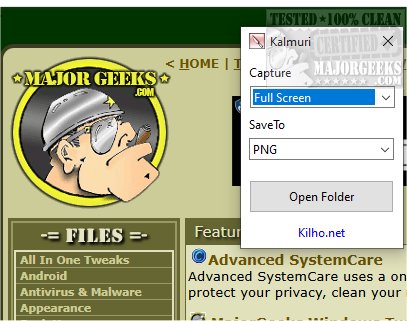
The application features a straightforward interface with two primary drop-down menus: one for selecting actions and another for output formats. While the initial options may appear limited, users can uncover a more comprehensive menu by right-clicking in the main window. This expanded menu grants access to various features, including naming output files, adjusting sound settings, and setting default hotkeys for screen captures, as well as designating folders for saving images or videos.
Kalmuri supports numerous output formats, including PNG for high-quality graphics, JPG for efficient compressed images, GIF for animations, and BMP for detailed uncompressed images. This versatility allows users to choose the most suitable format for their projects, whether saving screenshots locally, copying them to the clipboard, printing, or uploading to Imgbox. Additionally, the app includes a built-in browser for capturing website snapshots.
As a screen recorder, Kalmuri enables users to select MP4 for video recording, with options to capture either the full screen or specific areas while including the cursor. This functionality makes it a perfect tool for creating video tutorials or instructional content.
Overall, Kalmuri stands out as an efficient and user-friendly screen-capturing solution, featuring a minimalistic design that simplifies navigation. Whether for presentations, tutorials, or saving critical information, Kalmuri delivers reliable performance and is worth trying for anyone needing screen capture capabilities.
The advancements in Kalmuri 4.2.0 make it not only suitable for casual users but also beneficial for professionals who require quality screen captures and recordings. Future updates could potentially introduce enhanced editing tools, cloud integration for automatic backups, or advanced sharing options to further increase its utility in collaborative projects
The application features a straightforward interface with two primary drop-down menus: one for selecting actions and another for output formats. While the initial options may appear limited, users can uncover a more comprehensive menu by right-clicking in the main window. This expanded menu grants access to various features, including naming output files, adjusting sound settings, and setting default hotkeys for screen captures, as well as designating folders for saving images or videos.
Kalmuri supports numerous output formats, including PNG for high-quality graphics, JPG for efficient compressed images, GIF for animations, and BMP for detailed uncompressed images. This versatility allows users to choose the most suitable format for their projects, whether saving screenshots locally, copying them to the clipboard, printing, or uploading to Imgbox. Additionally, the app includes a built-in browser for capturing website snapshots.
As a screen recorder, Kalmuri enables users to select MP4 for video recording, with options to capture either the full screen or specific areas while including the cursor. This functionality makes it a perfect tool for creating video tutorials or instructional content.
Overall, Kalmuri stands out as an efficient and user-friendly screen-capturing solution, featuring a minimalistic design that simplifies navigation. Whether for presentations, tutorials, or saving critical information, Kalmuri delivers reliable performance and is worth trying for anyone needing screen capture capabilities.
The advancements in Kalmuri 4.2.0 make it not only suitable for casual users but also beneficial for professionals who require quality screen captures and recordings. Future updates could potentially introduce enhanced editing tools, cloud integration for automatic backups, or advanced sharing options to further increase its utility in collaborative projects
Kalmuri 4.2.0 released
Capture and record your screen with Kalmuri, the easy-to-use screen capture app.