Kalmuri version 4.1.8 has been released, enhancing its capabilities as a user-friendly screen capture application. This tool allows users to effortlessly capture and record screen activity, functioning as both a snapshot utility and a screen recorder. It runs discreetly in the system tray, minimizing disruptions during work.
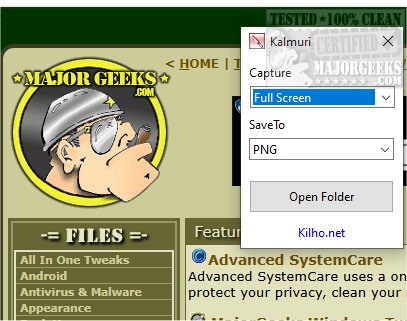
The interface of Kalmuri is straightforward, featuring two primary drop-down menus: one for selecting actions and another for choosing output formats. A right-click within the main window unveils a comprehensive menu with additional features, such as options for naming output files, adjusting sound settings, setting default hotkeys, and specifying the directory for saving captured images or videos.
Kalmuri supports multiple output formats, including PNG for high-quality graphics, JPG for compressed images, GIF for simple animations, and BMP for uncompressed files. This variety allows users to select the most appropriate format for their needs, whether for local storage, clipboard use, printing, or uploading to Imgbox. Additionally, Kalmuri includes a built-in browser feature that enables users to take snapshots of websites.
As a screen recorder, Kalmuri allows users to capture video in MP4 format, offering the ability to record the entire screen or specific areas, including cursor movement—ideal for creating instructional videos or tutorials.
In summary, Kalmuri is an efficient screen-capturing tool that combines a minimalistic design with robust functionalities, making it suitable for a wide range of users. Its ease of navigation allows for quick and high-quality screenshot captures, whether for presentations, tutorials, or preserving important information. As technology continues to evolve, Kalmuri's user-centric design and flexible features position it as a valuable asset for both casual and professional use. Furthermore, future updates could expand its capabilities, potentially integrating cloud storage options, enhanced editing tools, or advanced sharing features to further streamline the user experience
The interface of Kalmuri is straightforward, featuring two primary drop-down menus: one for selecting actions and another for choosing output formats. A right-click within the main window unveils a comprehensive menu with additional features, such as options for naming output files, adjusting sound settings, setting default hotkeys, and specifying the directory for saving captured images or videos.
Kalmuri supports multiple output formats, including PNG for high-quality graphics, JPG for compressed images, GIF for simple animations, and BMP for uncompressed files. This variety allows users to select the most appropriate format for their needs, whether for local storage, clipboard use, printing, or uploading to Imgbox. Additionally, Kalmuri includes a built-in browser feature that enables users to take snapshots of websites.
As a screen recorder, Kalmuri allows users to capture video in MP4 format, offering the ability to record the entire screen or specific areas, including cursor movement—ideal for creating instructional videos or tutorials.
In summary, Kalmuri is an efficient screen-capturing tool that combines a minimalistic design with robust functionalities, making it suitable for a wide range of users. Its ease of navigation allows for quick and high-quality screenshot captures, whether for presentations, tutorials, or preserving important information. As technology continues to evolve, Kalmuri's user-centric design and flexible features position it as a valuable asset for both casual and professional use. Furthermore, future updates could expand its capabilities, potentially integrating cloud storage options, enhanced editing tools, or advanced sharing features to further streamline the user experience
Kalmuri 4.1.8 released
Capture and record your screen with Kalmuri, the easy-to-use screen capture app.