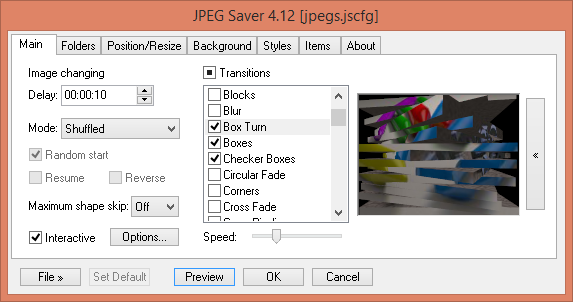
The newly released JPEGSaver 5.44 is an advanced image-displaying screensaver, reminiscent of the classic My Pictures screensaver from Windows XP and the Photos screensaver from Windows 7. This software allows users to curate their digital photo experience by configuring the delay between image displays, which can range from as short as one second to as long as 24 hours.
JPEGSaver offers various display modes, enabling users to select how images are shown in sequence. The interactive features allow for a slideshow-like experience, where users can manually control the presentation. Additionally, users can personalize their displays with a wide array of transition effects, which can be individually toggled on or off.
One of the standout features of JPEGSaver is its ability to search multiple folders for images, creating a database for quicker access during future sessions. Users can also apply filters to limit the displayed images based on criteria such as filename, path, creation/modification dates, and file sizes.
The screensaver provides flexibility in image positioning, allowing images to be displayed randomly or arranged in a specific manner, along with resizing options including simple, bilinear, and bicubic methods. For those with images containing EXIF orientation data, an auto-rotation feature ensures proper alignment.
JPEGSaver also supports color management and gamma adjustments, with options for timed screen dimming. Users can enhance their experience by choosing various colors, gradients, or images as backgrounds behind the main display image. Additional customizable items such as a clock, borders around images, image information, or track information from popular media players can also be integrated into the screensaver.
This release not only enhances the visual appeal of your workspace but also provides an array of features that cater to individual preferences and needs. For users looking to personalize their screensaver experience, JPEGSaver 5.44 presents an excellent option.
Extensions and Tips:
- Explore the transition effects to find the ones that best match your aesthetic preferences.
- Utilize the filtering options to create themed displays for occasions or events.
- Consider integrating music or audio playlists to accompany your image slideshow for a more immersive experience.
- Share your custom settings with friends or family to enhance their screensaver experience as well.
Overall, JPEGSaver 5.44 is a feature-rich screensaver that not only showcases your favorite images but also allows for extensive customization, making it a must-try for anyone looking to refresh their digital display
JPEGSaver offers various display modes, enabling users to select how images are shown in sequence. The interactive features allow for a slideshow-like experience, where users can manually control the presentation. Additionally, users can personalize their displays with a wide array of transition effects, which can be individually toggled on or off.
One of the standout features of JPEGSaver is its ability to search multiple folders for images, creating a database for quicker access during future sessions. Users can also apply filters to limit the displayed images based on criteria such as filename, path, creation/modification dates, and file sizes.
The screensaver provides flexibility in image positioning, allowing images to be displayed randomly or arranged in a specific manner, along with resizing options including simple, bilinear, and bicubic methods. For those with images containing EXIF orientation data, an auto-rotation feature ensures proper alignment.
JPEGSaver also supports color management and gamma adjustments, with options for timed screen dimming. Users can enhance their experience by choosing various colors, gradients, or images as backgrounds behind the main display image. Additional customizable items such as a clock, borders around images, image information, or track information from popular media players can also be integrated into the screensaver.
This release not only enhances the visual appeal of your workspace but also provides an array of features that cater to individual preferences and needs. For users looking to personalize their screensaver experience, JPEGSaver 5.44 presents an excellent option.
Extensions and Tips:
- Explore the transition effects to find the ones that best match your aesthetic preferences.
- Utilize the filtering options to create themed displays for occasions or events.
- Consider integrating music or audio playlists to accompany your image slideshow for a more immersive experience.
- Share your custom settings with friends or family to enhance their screensaver experience as well.
Overall, JPEGSaver 5.44 is a feature-rich screensaver that not only showcases your favorite images but also allows for extensive customization, making it a must-try for anyone looking to refresh their digital display
JPEGSaver 5.44 released
JPEGSaver is an image-displaying screensaver similar to the Windows XP My Pictures screen saver or the Photos screensaver on Windows 7.