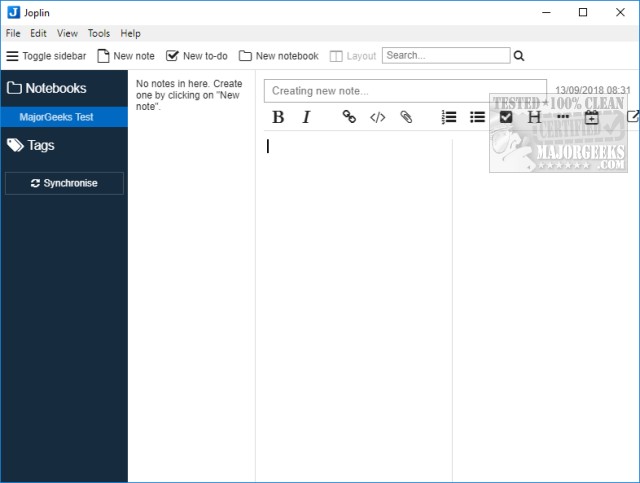
Joplin version 3.5.13 has been released, enhancing its functionality as an Open Source note-taking application that efficiently manages a vast array of notes organized into customizable notebooks. The application stores notes in markdown format, allowing for easy searching, modification, and tagging either directly within Joplin or through any text editor. Notably, it offers an import feature for Evernote users, making the transition seamless.
One of Joplin's standout features is its user-friendly interface, which requires no prior experience to navigate. Users can quickly create new notes, to-dos, or notebooks, and can easily toggle the sidebar or modify the layout to suit their preferences. The text editor includes a variety of font options and editing tools such as bold and italic, ensuring users have the flexibility to format their notes as desired.
Additionally, Joplin supports syncing with popular cloud services like Dropbox and OneDrive, granting users the convenience of accessing their notes from anywhere by utilizing the portable version of the application. Its intuitive design and straightforward layout make it an ideal choice for anyone needing to organize and back up numerous notes.
The developers of Joplin invite donations to support the ongoing development of the application, which can be made through the program's Help section.
To further enhance your note-taking experience, users can also explore additional tips and guides, such as modifying font size and style in Notepad or managing text in WordPad, which can complement the functionality offered by Joplin.
In conclusion, Joplin stands out as a robust and well-designed note-taking solution that caters to both casual and power users, making it a top recommendation for anyone looking to streamline their note management process
One of Joplin's standout features is its user-friendly interface, which requires no prior experience to navigate. Users can quickly create new notes, to-dos, or notebooks, and can easily toggle the sidebar or modify the layout to suit their preferences. The text editor includes a variety of font options and editing tools such as bold and italic, ensuring users have the flexibility to format their notes as desired.
Additionally, Joplin supports syncing with popular cloud services like Dropbox and OneDrive, granting users the convenience of accessing their notes from anywhere by utilizing the portable version of the application. Its intuitive design and straightforward layout make it an ideal choice for anyone needing to organize and back up numerous notes.
The developers of Joplin invite donations to support the ongoing development of the application, which can be made through the program's Help section.
To further enhance your note-taking experience, users can also explore additional tips and guides, such as modifying font size and style in Notepad or managing text in WordPad, which can complement the functionality offered by Joplin.
In conclusion, Joplin stands out as a robust and well-designed note-taking solution that caters to both casual and power users, making it a top recommendation for anyone looking to streamline their note management process
Joplin 3.5.13 released
Joplin is an Open Source note-taking application that can handle a large number of notes organized into notebooks.