Joplin version 3.5.11 has been released, enhancing its capabilities as an Open Source note-taking application designed to manage a significant number of notes organized into notebooks. Users can store notes in markdown format, which allows for easy searching, modification, and tagging, either directly within Joplin or through any text editor. For those migrating from Evernote, there's a convenient import feature to transfer existing notes seamlessly.
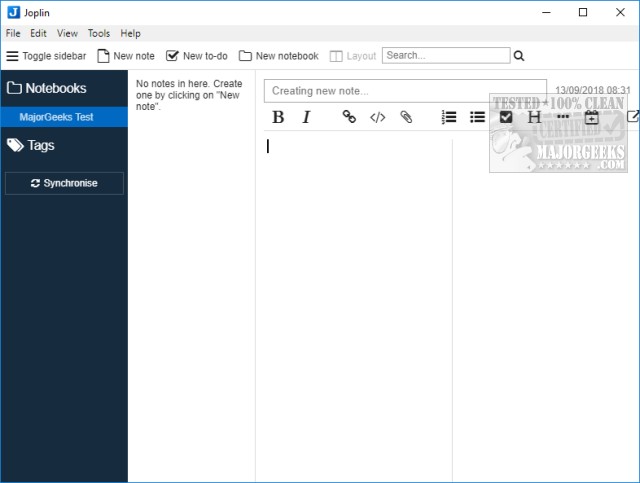
One of Joplin's standout features is its user-friendly interface, which requires no learning curve, enabling users to start immediately. The layout allows for quick creation of notes, to-dos, or notebooks, and users can easily toggle the sidebar and adjust the layout to their preference. The text editor offers various formatting options such as bold and italic, alongside standard editing functions like copy and paste.
Moreover, Joplin offers flexibility with a portable version for on-the-go access and synchronization options with popular cloud services such as Dropbox and OneDrive. Overall, Joplin is recognized for its thoughtful design and intuitive functionality, making it an ideal choice for anyone needing to organize and back up a substantial amount of notes.
Additionally, users can support the development of Joplin through donations, which can be made via the program or the author's website.
In conclusion, Joplin 3.5.11 continues to stand out as a robust note-taking solution, suitable for students, professionals, and anyone who values organized note management. With its user-centric design, markdown support, and cloud synchronization, Joplin remains a top contender in the realm of digital note-taking applications. As the application evolves, users can anticipate further enhancements that will continue to cater to their note-taking needs
One of Joplin's standout features is its user-friendly interface, which requires no learning curve, enabling users to start immediately. The layout allows for quick creation of notes, to-dos, or notebooks, and users can easily toggle the sidebar and adjust the layout to their preference. The text editor offers various formatting options such as bold and italic, alongside standard editing functions like copy and paste.
Moreover, Joplin offers flexibility with a portable version for on-the-go access and synchronization options with popular cloud services such as Dropbox and OneDrive. Overall, Joplin is recognized for its thoughtful design and intuitive functionality, making it an ideal choice for anyone needing to organize and back up a substantial amount of notes.
Additionally, users can support the development of Joplin through donations, which can be made via the program or the author's website.
In conclusion, Joplin 3.5.11 continues to stand out as a robust note-taking solution, suitable for students, professionals, and anyone who values organized note management. With its user-centric design, markdown support, and cloud synchronization, Joplin remains a top contender in the realm of digital note-taking applications. As the application evolves, users can anticipate further enhancements that will continue to cater to their note-taking needs
Joplin 3.5.11 released
Joplin is an Open Source note-taking application that can handle a large number of notes organized into notebooks.