JMoveIt (Just Move It) has officially launched, offering a practical solution for users navigating the complexities of multi-monitor setups. This utility adeptly addresses two prevalent challenges: resizing applications when they are transferred across monitors and preventing accidental movements due to changes in a monitor's power state. By ensuring applications retain their designated sizes and positions, JMoveIt enhances the overall user experience significantly.
User-Friendly and Portable Utility
Designed with convenience in mind, JMoveIt requires no installation; users can launch it directly from the downloaded archive. Once activated, it runs quietly in the background, accessible via the system tray, allowing users to maintain focus on their tasks without disruption. For those who prefer a traditional installation, an installation option is also included in the archive.
How JMoveIt Operates
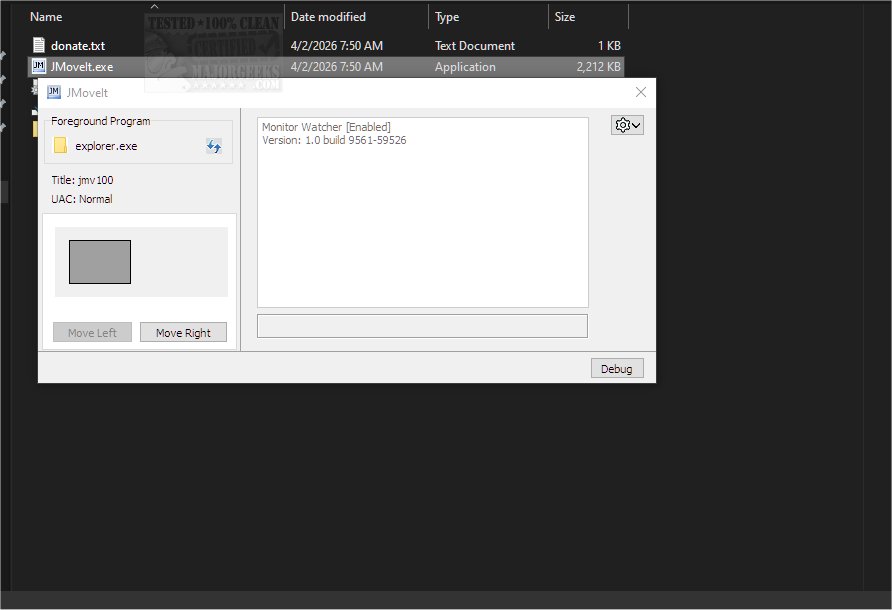
JMoveIt functions by detecting the foreground application, its title, and the User Account Control (UAC) status. It displays the current position of the selected window, providing options to move it seamlessly between monitors. With just a click, users can transfer windows to adjacent screens, eliminating the need for manual adjustments or keyboard shortcuts like Win+Shift+[Left/Right].
Monitor Watcher Feature
An integral aspect of JMoveIt is its Monitor Watcher feature, which actively monitors the power states of connected monitors. This functionality helps restore the original positions of applications when a monitor is powered off or enters sleep mode, ensuring that users can easily return to their prior workflow without disruption.
Key Features of JMoveIt:
- Command line options for program movement.
- Global hotkeys for quick window transfers.
- Automatic monitoring of monitor states.
Additionally, users can retrieve off-screen applications using keyboard shortcuts or by enabling the "Remember window locations" feature in Windows 11 display settings. This feature can be disabled via the right-click menu in the tray area if not needed.
Conclusion: The Geek Verdict
Overall, JMoveIt presents an innovative approach to simplifying window management in multi-monitor environments. Its capability to transfer windows without altering their sizes, along with restoring positions after power state changes, marks it as a valuable tool for both casual and professional users. While feedback has been largely positive, it is worth noting that JMoveIt is still in its early stages of development, suggesting there may be opportunities for further enhancements and refinements in future updates. As multi-monitor setups become increasingly common in both home and office settings, tools like JMoveIt are positioned to play an essential role in optimizing user productivity and experience
User-Friendly and Portable Utility
Designed with convenience in mind, JMoveIt requires no installation; users can launch it directly from the downloaded archive. Once activated, it runs quietly in the background, accessible via the system tray, allowing users to maintain focus on their tasks without disruption. For those who prefer a traditional installation, an installation option is also included in the archive.
How JMoveIt Operates
JMoveIt functions by detecting the foreground application, its title, and the User Account Control (UAC) status. It displays the current position of the selected window, providing options to move it seamlessly between monitors. With just a click, users can transfer windows to adjacent screens, eliminating the need for manual adjustments or keyboard shortcuts like Win+Shift+[Left/Right].
Monitor Watcher Feature
An integral aspect of JMoveIt is its Monitor Watcher feature, which actively monitors the power states of connected monitors. This functionality helps restore the original positions of applications when a monitor is powered off or enters sleep mode, ensuring that users can easily return to their prior workflow without disruption.
Key Features of JMoveIt:
- Command line options for program movement.
- Global hotkeys for quick window transfers.
- Automatic monitoring of monitor states.
Additionally, users can retrieve off-screen applications using keyboard shortcuts or by enabling the "Remember window locations" feature in Windows 11 display settings. This feature can be disabled via the right-click menu in the tray area if not needed.
Conclusion: The Geek Verdict
Overall, JMoveIt presents an innovative approach to simplifying window management in multi-monitor environments. Its capability to transfer windows without altering their sizes, along with restoring positions after power state changes, marks it as a valuable tool for both casual and professional users. While feedback has been largely positive, it is worth noting that JMoveIt is still in its early stages of development, suggesting there may be opportunities for further enhancements and refinements in future updates. As multi-monitor setups become increasingly common in both home and office settings, tools like JMoveIt are positioned to play an essential role in optimizing user productivity and experience
JMoveIt 1.00 released
JMoveIt (Just Move It) is a versatile utility specifically created to address two common issues encountered with multi-monitor setups. It effectively manages program resizing when programs are moved between monitors, as well as preventing unintended program movements caused by changes in a monitor's power state.