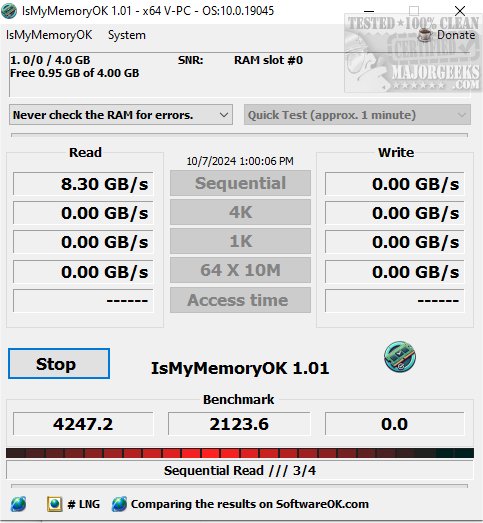
IsMyMemoryOK is a newly released software designed to efficiently evaluate the performance and reliability of your computer's Random Access Memory (RAM). This compact yet powerful application allows users to conduct swift and accurate tests on various types of RAM, including DDR5, DDR4, and DDR3, making it an essential tool for maintaining optimal system performance.
The program is user-friendly and does not require installation; simply place the executable file on your desktop to begin testing. This portability allows you to test RAM on different systems easily, and you can share the tool with friends and family to help them assess their memory performance as well.
Upon launching IsMyMemoryOK, the software automatically detects all memory modules in your system, providing a thorough evaluation. Users can save results as screenshots to compare future outcomes, making it easier to track RAM performance over time.
RAM Speed Insights:
- DDR3: Speeds range from 800 to 2133 MHz, suitable for everyday tasks.
- DDR4: Operates between 2133 MHz and 3200 MHz, with high-end versions reaching over 5000 MHz, ideal for gaming and resource-intensive applications.
- DDR5: The latest generation starts at 4800 MHz and can exceed 7000 MHz, perfect for high-performance systems.
The effective speed of your RAM can vary based on factors like motherboard compatibility, the number of installed modules, overclocking, and BIOS settings.
Key Features of IsMyMemoryOK:
- Compatibility with various RAM types: DDR5, DDR4, DDR3, etc.
- Memory benchmarking to evaluate RAM performance.
- Customizable test durations: Quick (1 minute), Short (2 minutes), Long (3 minutes), and Very long (4 minutes).
- Portable and multilingual interface.
- Screenshot capture for benchmarking results.
- Capability to compare RAM performance across different systems.
Why Use IsMyMemoryOK?
This innovative software provides a detailed analysis of RAM performance, utilizing advanced algorithms and diagnostic features to enhance your system's memory efficiency and reliability. By diagnosing potential issues, users can take proactive measures to optimize their computer's performance.
In addition to IsMyMemoryOK, users are encouraged to explore other memory-related tools and resources, such as the Windows Memory Diagnostic Tool and guides on checking RAM speed and fixing memory errors in Windows 10.
With IsMyMemoryOK, ensuring the health and efficiency of your RAM has never been easier
The program is user-friendly and does not require installation; simply place the executable file on your desktop to begin testing. This portability allows you to test RAM on different systems easily, and you can share the tool with friends and family to help them assess their memory performance as well.
Upon launching IsMyMemoryOK, the software automatically detects all memory modules in your system, providing a thorough evaluation. Users can save results as screenshots to compare future outcomes, making it easier to track RAM performance over time.
RAM Speed Insights:
- DDR3: Speeds range from 800 to 2133 MHz, suitable for everyday tasks.
- DDR4: Operates between 2133 MHz and 3200 MHz, with high-end versions reaching over 5000 MHz, ideal for gaming and resource-intensive applications.
- DDR5: The latest generation starts at 4800 MHz and can exceed 7000 MHz, perfect for high-performance systems.
The effective speed of your RAM can vary based on factors like motherboard compatibility, the number of installed modules, overclocking, and BIOS settings.
Key Features of IsMyMemoryOK:
- Compatibility with various RAM types: DDR5, DDR4, DDR3, etc.
- Memory benchmarking to evaluate RAM performance.
- Customizable test durations: Quick (1 minute), Short (2 minutes), Long (3 minutes), and Very long (4 minutes).
- Portable and multilingual interface.
- Screenshot capture for benchmarking results.
- Capability to compare RAM performance across different systems.
Why Use IsMyMemoryOK?
This innovative software provides a detailed analysis of RAM performance, utilizing advanced algorithms and diagnostic features to enhance your system's memory efficiency and reliability. By diagnosing potential issues, users can take proactive measures to optimize their computer's performance.
In addition to IsMyMemoryOK, users are encouraged to explore other memory-related tools and resources, such as the Windows Memory Diagnostic Tool and guides on checking RAM speed and fixing memory errors in Windows 10.
With IsMyMemoryOK, ensuring the health and efficiency of your RAM has never been easier
IsMyMemoryOK 1.33 released
IsMyMemoryOK provides a compact yet powerful program designed to efficiently and precisely assess your computer's Random Access Memory (RAM).