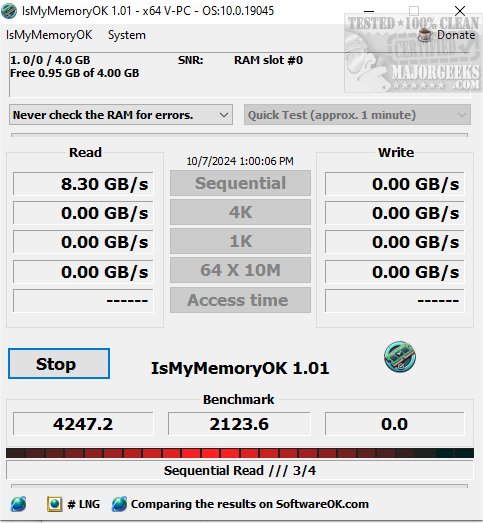
IsMyMemoryOK has launched its 1.28 version, offering a compact yet powerful application designed to efficiently test and evaluate your computer's Random Access Memory (RAM). This software enables users to swiftly and accurately assess RAM performance and reliability, ensuring optimal functioning of their systems.
Compatible with all common RAM types, including the latest DDR5, DDR4, and DDR3, IsMyMemoryOK is an excellent choice for performing regular performance checks on Windows systems. It measures not only the raw speed of RAM but also rigorously evaluates its stability, ensuring that the system remains dependable during heavy workloads. The tool is designed for rapid and effective results, allowing users to promptly identify and address any RAM issues.
User-Friendly and Portable
There’s no installation required; users can simply download the program file, place it on their desktop, and start testing their RAM immediately. This portability makes it perfect for testing RAM across different systems or while on the go. Users can easily share the tool with friends, family, and colleagues to help them evaluate their memory performance.
RAM Testing Capabilities
Upon launching IsMyMemoryOK, the program automatically detects and displays all memory modules available for testing. Users can save results as screenshots for future comparisons.
RAM Speed Insights:
- DDR3: Operates at speeds between 800 and 2133 MHz, suitable for everyday tasks.
- DDR4: Runs at speeds ranging from 2133 MHz to 3200 MHz, with high-end modules achieving over 5000 MHz, ideal for gaming and resource-intensive applications.
- DDR5: The latest generation, with speeds starting at 4800 MHz and exceeding 7000 MHz for high-performance modules, perfect for cutting-edge systems.
It is important to note that the effective speed of RAM can be influenced by various factors, including motherboard compatibility, the number of installed modules, potential overclocking, and BIOS settings.
Advanced Features
IsMyMemoryOK employs advanced algorithms and diagnostic features that provide valuable insights into system memory efficiency and reliability, enabling users to diagnose and resolve potential issues to optimize performance. Key features include:
- Compatibility with various RAM types (DDR5, DDR4, DDR3, etc.)
- Memory benchmarking capabilities
- Customizable test durations ranging from 1 to 4 minutes
- A small, portable program with a multilingual interface
- Screenshot capture post-benchmark for performance comparison
Conclusion
IsMyMemoryOK 1.28 stands out as a cutting-edge, reliable software tool for thorough RAM performance analysis. Its user-friendly design and advanced diagnostic capabilities make it an essential utility for anyone looking to ensure their computer's memory is operating at its best.
As technology continues to evolve, tools like IsMyMemoryOK will remain crucial for maintaining system performance, and users are encouraged to take advantage of its comprehensive testing features. For additional resources, users can explore similar tools such as the Windows Memory Diagnostic Tool or guides on checking memory speed and resolving memory-related errors
Compatible with all common RAM types, including the latest DDR5, DDR4, and DDR3, IsMyMemoryOK is an excellent choice for performing regular performance checks on Windows systems. It measures not only the raw speed of RAM but also rigorously evaluates its stability, ensuring that the system remains dependable during heavy workloads. The tool is designed for rapid and effective results, allowing users to promptly identify and address any RAM issues.
User-Friendly and Portable
There’s no installation required; users can simply download the program file, place it on their desktop, and start testing their RAM immediately. This portability makes it perfect for testing RAM across different systems or while on the go. Users can easily share the tool with friends, family, and colleagues to help them evaluate their memory performance.
RAM Testing Capabilities
Upon launching IsMyMemoryOK, the program automatically detects and displays all memory modules available for testing. Users can save results as screenshots for future comparisons.
RAM Speed Insights:
- DDR3: Operates at speeds between 800 and 2133 MHz, suitable for everyday tasks.
- DDR4: Runs at speeds ranging from 2133 MHz to 3200 MHz, with high-end modules achieving over 5000 MHz, ideal for gaming and resource-intensive applications.
- DDR5: The latest generation, with speeds starting at 4800 MHz and exceeding 7000 MHz for high-performance modules, perfect for cutting-edge systems.
It is important to note that the effective speed of RAM can be influenced by various factors, including motherboard compatibility, the number of installed modules, potential overclocking, and BIOS settings.
Advanced Features
IsMyMemoryOK employs advanced algorithms and diagnostic features that provide valuable insights into system memory efficiency and reliability, enabling users to diagnose and resolve potential issues to optimize performance. Key features include:
- Compatibility with various RAM types (DDR5, DDR4, DDR3, etc.)
- Memory benchmarking capabilities
- Customizable test durations ranging from 1 to 4 minutes
- A small, portable program with a multilingual interface
- Screenshot capture post-benchmark for performance comparison
Conclusion
IsMyMemoryOK 1.28 stands out as a cutting-edge, reliable software tool for thorough RAM performance analysis. Its user-friendly design and advanced diagnostic capabilities make it an essential utility for anyone looking to ensure their computer's memory is operating at its best.
As technology continues to evolve, tools like IsMyMemoryOK will remain crucial for maintaining system performance, and users are encouraged to take advantage of its comprehensive testing features. For additional resources, users can explore similar tools such as the Windows Memory Diagnostic Tool or guides on checking memory speed and resolving memory-related errors
IsMyMemoryOK 1.28 released
IsMyMemoryOK provides a compact yet powerful program designed to efficiently and precisely assess your computer's Random Access Memory (RAM).