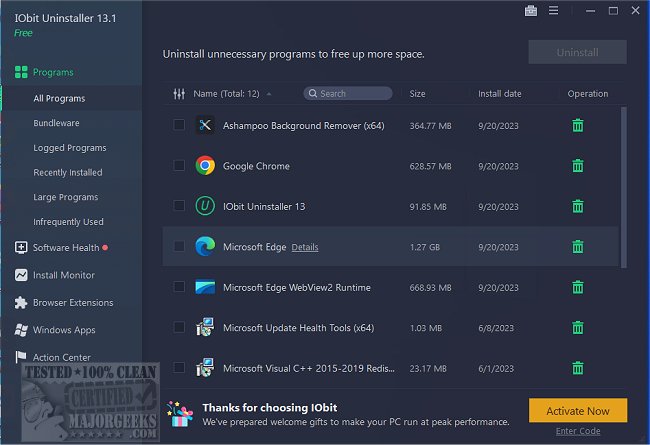
IObit Uninstaller 15.2.0.2 has been released, offering users a comprehensive solution for removing unwanted programs, Windows apps, and browser plug-ins/toolbars. Unlike the built-in Windows Add or Remove Programs feature, IObit Uninstaller ensures complete removal of applications, addressing the common issue of leftover files and registry entries that can clutter a system after uninstallation.
This tool excels in fully erasing stubborn and broken programs that often leave behind fragments, thereby potentially slowing down the computer. IObit Uninstaller goes beyond simply uninstalling the main application; it also eliminates associated files, folders, and registry entries, ensuring a thorough cleanup. Additionally, it provides safeguards against bundled software by detecting and allowing users to uninstall unwanted extras during installation, preventing issues related to toolbars, adware, and bloatware.
One standout feature is the real-time installation monitoring, which tracks changes made by a program upon installation. This capability allows for a complete rollback during uninstallation, ensuring that no traces are left behind—a feature particularly beneficial for users testing new software.
Moreover, IObit Uninstaller is effective in removing Windows apps, Universal Windows Platform (UWP) applications, and stubborn browser extensions. This broad functionality empowers users to take control of their software environment, even dealing with applications like Edge and Cortana.
In addition to its uninstallation capabilities, IObit Uninstaller includes a Software Health feature that manages software permissions, blocks annoying pop-ups, and cleans up unnecessary files. It also features a Software Updater that keeps popular applications updated automatically, sparing users the hassle of manual checks.
Pros of IObit Uninstaller:
- Completely removes stubborn or broken programs.
- Detects and uninstalls bundled software before it can cause problems.
- Offers real-time installation monitoring for full rollback capabilities.
- Capable of removing Windows apps and browser extensions.
- Includes a Software Updater for automatic updates of popular applications.
- Cleans up leftover files, registry entries, and junk that Windows may leave behind.
Cons:
- The free version has limitations, with advanced features available only in the Pro version.
- May incorrectly flag some legitimate software as bundleware, requiring user attention.
- The Software Updater does not support every program.
Geek Verdict:
IObit Uninstaller is an excellent choice for users seeking a thoroughly clean PC. It effectively addresses the shortcomings of the built-in Windows uninstaller, providing a reliable way to remove applications completely. Its features for handling stubborn programs, detecting bundleware, and rolling back installations make it a leading option among uninstaller tools.
Extension:
As technology continues to evolve, the need for efficient software management tools like IObit Uninstaller becomes increasingly important. Users are constantly downloading new applications, often leading to clutter and performance issues. The demand for tools that not only uninstall but also monitor installations and manage updates will likely grow. Future iterations of IObit Uninstaller could potentially integrate more advanced AI capabilities for smarter detection of unwanted software, as well as deeper system optimization features to enhance overall performance. As a result, IObit Uninstaller is not just a tool for removing programs; it is an essential part of maintaining an efficient and streamlined computing experience in a world increasingly filled with software options
This tool excels in fully erasing stubborn and broken programs that often leave behind fragments, thereby potentially slowing down the computer. IObit Uninstaller goes beyond simply uninstalling the main application; it also eliminates associated files, folders, and registry entries, ensuring a thorough cleanup. Additionally, it provides safeguards against bundled software by detecting and allowing users to uninstall unwanted extras during installation, preventing issues related to toolbars, adware, and bloatware.
One standout feature is the real-time installation monitoring, which tracks changes made by a program upon installation. This capability allows for a complete rollback during uninstallation, ensuring that no traces are left behind—a feature particularly beneficial for users testing new software.
Moreover, IObit Uninstaller is effective in removing Windows apps, Universal Windows Platform (UWP) applications, and stubborn browser extensions. This broad functionality empowers users to take control of their software environment, even dealing with applications like Edge and Cortana.
In addition to its uninstallation capabilities, IObit Uninstaller includes a Software Health feature that manages software permissions, blocks annoying pop-ups, and cleans up unnecessary files. It also features a Software Updater that keeps popular applications updated automatically, sparing users the hassle of manual checks.
Pros of IObit Uninstaller:
- Completely removes stubborn or broken programs.
- Detects and uninstalls bundled software before it can cause problems.
- Offers real-time installation monitoring for full rollback capabilities.
- Capable of removing Windows apps and browser extensions.
- Includes a Software Updater for automatic updates of popular applications.
- Cleans up leftover files, registry entries, and junk that Windows may leave behind.
Cons:
- The free version has limitations, with advanced features available only in the Pro version.
- May incorrectly flag some legitimate software as bundleware, requiring user attention.
- The Software Updater does not support every program.
Geek Verdict:
IObit Uninstaller is an excellent choice for users seeking a thoroughly clean PC. It effectively addresses the shortcomings of the built-in Windows uninstaller, providing a reliable way to remove applications completely. Its features for handling stubborn programs, detecting bundleware, and rolling back installations make it a leading option among uninstaller tools.
Extension:
As technology continues to evolve, the need for efficient software management tools like IObit Uninstaller becomes increasingly important. Users are constantly downloading new applications, often leading to clutter and performance issues. The demand for tools that not only uninstall but also monitor installations and manage updates will likely grow. Future iterations of IObit Uninstaller could potentially integrate more advanced AI capabilities for smarter detection of unwanted software, as well as deeper system optimization features to enhance overall performance. As a result, IObit Uninstaller is not just a tool for removing programs; it is an essential part of maintaining an efficient and streamlined computing experience in a world increasingly filled with software options
IObit Uninstaller 15.2.0.2 released
IObit Uninstaller helps you remove unwanted programs, Windows apps, and browser plug-ins/toolbars entirely, even when Windows Add or Remove Programs fails.