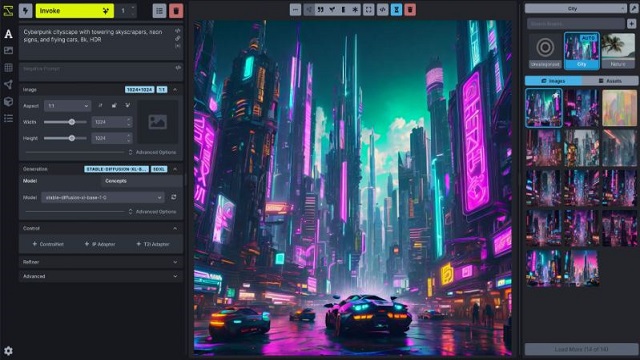
InvokeAI is a robust open-source AI image generation toolkit designed to function locally on Windows, macOS, and Linux systems. Unlike cloud-based solutions, InvokeAI allows users to maintain full control over their images and prompts, ensuring privacy and eliminating subscription fees.
Key Features of InvokeAI:
- Image Generation: Create images from text prompts using Stable Diffusion models.
- In-painting and Out-painting: Edit specific areas of an image without regenerating the entire composition.
- Advanced Control: Adjust various settings like samplers, seeds, steps, and CFG scale.
- Local Model Management: Run multiple models on your machine without limitations imposed by cloud services.
- Image Upscaling: Enhance image resolution locally.
Using InvokeAI: A User's Perspective
While InvokeAI provides significant advantages for those wishing to avoid cloud services, it requires a level of technical skill that may deter beginners. Users may encounter challenges during installation and model management, including vague error messages when attempting to use Hugging Face models directly. A reliable workaround involves manually downloading models and installing them via the interface.
Installation involves setting up a Launcher, which can occasionally fail, but restarting the process typically resolves issues. However, updates can necessitate manual downloads and replacements of files, adding complexity to the maintenance of the software.
User Interface and Workflow
InvokeAI features a clean and responsive interface, albeit one that might not be intuitive for all users. The “INVOKE” button, for instance, is vital for generating images but may not be immediately recognized as such.
The software enables users to establish workflows, allowing for consistent image generation. This feature is particularly useful for professionals who require uniformity in their outputs, such as those in photography or graphic design. Users can create a repeatable process that saves time and ensures consistency across projects.
Pros and Cons
Pros:
- Complete local operation for enhanced privacy and control.
- Open-source nature permits commercial use.
- Advanced editing capabilities with the Unified Canvas.
- Strong support for various models.
Cons:
- Initial setup can be challenging for newcomers.
- Model installation may be unreliable.
- Lack of an integrated file manager.
- High GPU and VRAM requirements.
Conclusion
InvokeAI is a powerful tool for those comfortable navigating technical challenges in image generation. It offers creative freedom and robust functionality for users who need to manage images regularly and efficiently. While it may not be the best fit for complete novices, those with a solid technical foundation will find it to be a valuable asset in their creative toolkit. The community, particularly forums like MajorGeeks, provides support for users encountering difficulties, making it easier to overcome initial hurdles. Overall, InvokeAI stands out as an innovative solution for AI-driven image creation, balancing flexibility with privacy concerns.
Future Extensions
As the landscape of AI image generation continues to evolve, future updates to InvokeAI could focus on enhancing user-friendliness, streamlining the installation and update processes, and expanding model management capabilities. Additionally, integrating a more robust file management system could significantly improve usability for all skill levels. Emphasizing community feedback in future releases may also foster a more inclusive environment where new users can thrive alongside experienced ones
Key Features of InvokeAI:
- Image Generation: Create images from text prompts using Stable Diffusion models.
- In-painting and Out-painting: Edit specific areas of an image without regenerating the entire composition.
- Advanced Control: Adjust various settings like samplers, seeds, steps, and CFG scale.
- Local Model Management: Run multiple models on your machine without limitations imposed by cloud services.
- Image Upscaling: Enhance image resolution locally.
Using InvokeAI: A User's Perspective
While InvokeAI provides significant advantages for those wishing to avoid cloud services, it requires a level of technical skill that may deter beginners. Users may encounter challenges during installation and model management, including vague error messages when attempting to use Hugging Face models directly. A reliable workaround involves manually downloading models and installing them via the interface.
Installation involves setting up a Launcher, which can occasionally fail, but restarting the process typically resolves issues. However, updates can necessitate manual downloads and replacements of files, adding complexity to the maintenance of the software.
User Interface and Workflow
InvokeAI features a clean and responsive interface, albeit one that might not be intuitive for all users. The “INVOKE” button, for instance, is vital for generating images but may not be immediately recognized as such.
The software enables users to establish workflows, allowing for consistent image generation. This feature is particularly useful for professionals who require uniformity in their outputs, such as those in photography or graphic design. Users can create a repeatable process that saves time and ensures consistency across projects.
Pros and Cons
Pros:
- Complete local operation for enhanced privacy and control.
- Open-source nature permits commercial use.
- Advanced editing capabilities with the Unified Canvas.
- Strong support for various models.
Cons:
- Initial setup can be challenging for newcomers.
- Model installation may be unreliable.
- Lack of an integrated file manager.
- High GPU and VRAM requirements.
Conclusion
InvokeAI is a powerful tool for those comfortable navigating technical challenges in image generation. It offers creative freedom and robust functionality for users who need to manage images regularly and efficiently. While it may not be the best fit for complete novices, those with a solid technical foundation will find it to be a valuable asset in their creative toolkit. The community, particularly forums like MajorGeeks, provides support for users encountering difficulties, making it easier to overcome initial hurdles. Overall, InvokeAI stands out as an innovative solution for AI-driven image creation, balancing flexibility with privacy concerns.
Future Extensions
As the landscape of AI image generation continues to evolve, future updates to InvokeAI could focus on enhancing user-friendliness, streamlining the installation and update processes, and expanding model management capabilities. Additionally, integrating a more robust file management system could significantly improve usability for all skill levels. Emphasizing community feedback in future releases may also foster a more inclusive environment where new users can thrive alongside experienced ones
InvokeAI 6.12.0 released
InvokeAI is an open-source AI image generation and creative toolkit that runs on Windows, macOS, and Linux.