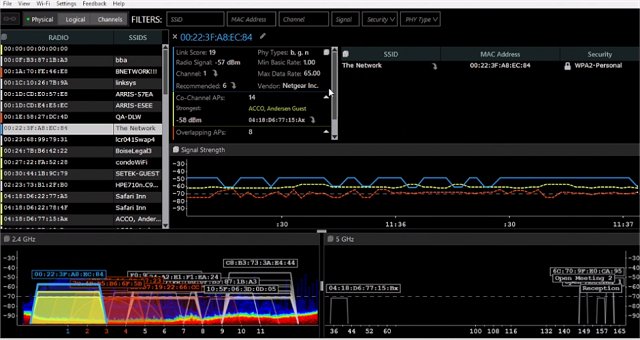
The latest version of inSSIDer, 5.6.1, has been released, offering users powerful tools for managing their Wi-Fi networks. This software allows you to thoroughly inspect both your own Wi-Fi network and those surrounding it. Users can efficiently scan and filter through hundreds of nearby access points, identify competing networks, and troubleshoot congested Wi-Fi channels.
Key Features of inSSIDer:
- Wi-Fi Inspection: Gain insights into your Wi-Fi and surrounding networks.
- Access Point Scanning: Scan and filter hundreds of nearby access points to assess network density.
- Troubleshooting Tools: Identify competing access points and diagnose issues with clogged channels.
- Signal Strength Tracking: Monitor the strength of received signals in dBm over time for better performance analysis.
- Data Sorting: Organize results based on various criteria, including MAC Address, SSID, Channel, RSSI, and Time Last Seen.
- Data Export: Export Wi-Fi and GPS data to KML files for use in Google Earth.
Technical Specifications:
- Utilizes the current wireless card and connection software.
- Compatible with Windows XP, Vista, and 7 (both 32 and 64 bit).
- Works with most GPS devices that adhere to NMEA v2.3 and above.
Related Resources:
For users looking to enhance their network experience further, inSSIDer also provides access to guides on improving wireless network performance, checking Wi-Fi security settings in Windows, changing preferred frequency bands for network adapters, and troubleshooting visibility issues with 5GHz Wi-Fi networks.
Conclusion:
With its comprehensive features, inSSIDer 5.6.1 stands out as an essential tool for anyone looking to optimize their wireless network performance. Whether you are a casual user or a network professional, this software can help you better understand your Wi-Fi environment and resolve connectivity issues effectively
Key Features of inSSIDer:
- Wi-Fi Inspection: Gain insights into your Wi-Fi and surrounding networks.
- Access Point Scanning: Scan and filter hundreds of nearby access points to assess network density.
- Troubleshooting Tools: Identify competing access points and diagnose issues with clogged channels.
- Signal Strength Tracking: Monitor the strength of received signals in dBm over time for better performance analysis.
- Data Sorting: Organize results based on various criteria, including MAC Address, SSID, Channel, RSSI, and Time Last Seen.
- Data Export: Export Wi-Fi and GPS data to KML files for use in Google Earth.
Technical Specifications:
- Utilizes the current wireless card and connection software.
- Compatible with Windows XP, Vista, and 7 (both 32 and 64 bit).
- Works with most GPS devices that adhere to NMEA v2.3 and above.
Related Resources:
For users looking to enhance their network experience further, inSSIDer also provides access to guides on improving wireless network performance, checking Wi-Fi security settings in Windows, changing preferred frequency bands for network adapters, and troubleshooting visibility issues with 5GHz Wi-Fi networks.
Conclusion:
With its comprehensive features, inSSIDer 5.6.1 stands out as an essential tool for anyone looking to optimize their wireless network performance. Whether you are a casual user or a network professional, this software can help you better understand your Wi-Fi environment and resolve connectivity issues effectively
inSSIDer 5.6.1 released
With inSSIDer, you can inspect your Wi-Fi and surrounding networks, scan and filter hundreds of nearby access points, troubleshot the competing access points and clogged Wi-Fi channels, and more.