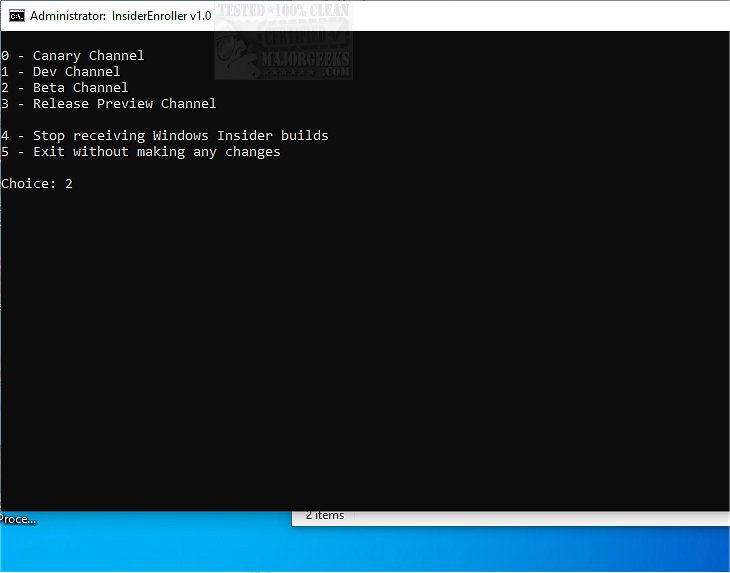
InsiderEnroller is a newly released batch script designed to facilitate access to the Windows Insider Program without the necessity of a Microsoft account. This tool is particularly beneficial for users who wish to explore and test upcoming Windows features and updates, making participation in the Insider Program more accessible.
The Windows Insider Program targets advanced users who are eager to try out pre-release versions of the Windows operating system. It allows participants to engage with upcoming features and enhancements that Microsoft is developing. InsiderEnroller specifically manipulates undocumented registry behaviors, such as the TestFlags value, to bypass the usual requirement for a Microsoft account, thus streamlining the enrollment process.
This script stands out from others available in the community due to its tailored design for improved compatibility with Windows 11 and versions 24H2 and later. It accounts for historical changes in registry keys and behaviors, providing a more reliable tool for users seeking the latest Insider builds.
Users should be aware that Microsoft may eventually close the loopholes that the script exploits, which could render its functionality temporary. However, as of now, the script operates smoothly, allowing users to join the Insider Program.
Windows Insider Builds are pre-release versions of Windows designed for users to experience new features early. The program consists of several channels, including the Dev Channel and Canary Channel, which are known for their instability and potential bugs. Given that these builds are primarily for testing and feedback, users are advised against using them on their primary computers; instead, utilizing a virtual machine, such as VMware Player, is recommended.
Supported Channels:
- 0 → Canary Channel (most unstable)
- 1 → Dev Channel
- 2 → Beta Channel
- 3 → Release Preview Channel (closest to stable)
- 4 → Stop receiving Insider builds (reverts changes)
- 5 → Exit
To use InsiderEnroller, users need to download the ZIP file, extract the batch file to their Desktop, and run it as an Administrator by right-clicking and selecting 'Run as admin.' It is also wise to create a system restore point before executing scripts like InsiderEnroller to safeguard against potential issues.
InsiderEnroller 1.0 is a powerful tool for tech enthusiasts eager to dive into the latest Microsoft innovations without the hassle of a Microsoft account. This innovative script not only simplifies participation in the Windows Insider Program but also enhances the user experience by offering early access to cutting-edge technology.
- How to Download Windows Insider Preview Builds
- How to Enable the Windows Insider Program When Grayed Out
- Resolving VMware Configuration File Lock Errors
In summary, InsiderEnroller represents a significant advancement for users looking to actively engage with the forefront of Windows development while navigating potential barriers with ease
Key Features of InsiderEnroller
The Windows Insider Program targets advanced users who are eager to try out pre-release versions of the Windows operating system. It allows participants to engage with upcoming features and enhancements that Microsoft is developing. InsiderEnroller specifically manipulates undocumented registry behaviors, such as the TestFlags value, to bypass the usual requirement for a Microsoft account, thus streamlining the enrollment process.
Enhanced Compatibility
This script stands out from others available in the community due to its tailored design for improved compatibility with Windows 11 and versions 24H2 and later. It accounts for historical changes in registry keys and behaviors, providing a more reliable tool for users seeking the latest Insider builds.
Temporary Functionality
Users should be aware that Microsoft may eventually close the loopholes that the script exploits, which could render its functionality temporary. However, as of now, the script operates smoothly, allowing users to join the Insider Program.
Understanding the Windows Insider Program
Windows Insider Builds are pre-release versions of Windows designed for users to experience new features early. The program consists of several channels, including the Dev Channel and Canary Channel, which are known for their instability and potential bugs. Given that these builds are primarily for testing and feedback, users are advised against using them on their primary computers; instead, utilizing a virtual machine, such as VMware Player, is recommended.
Supported Channels:
- 0 → Canary Channel (most unstable)
- 1 → Dev Channel
- 2 → Beta Channel
- 3 → Release Preview Channel (closest to stable)
- 4 → Stop receiving Insider builds (reverts changes)
- 5 → Exit
How to Use InsiderEnroller
To use InsiderEnroller, users need to download the ZIP file, extract the batch file to their Desktop, and run it as an Administrator by right-clicking and selecting 'Run as admin.' It is also wise to create a system restore point before executing scripts like InsiderEnroller to safeguard against potential issues.
Conclusion
InsiderEnroller 1.0 is a powerful tool for tech enthusiasts eager to dive into the latest Microsoft innovations without the hassle of a Microsoft account. This innovative script not only simplifies participation in the Windows Insider Program but also enhances the user experience by offering early access to cutting-edge technology.
Related Topics
- How to Enable or Disable Windows Insider Program in Windows 10/11- How to Download Windows Insider Preview Builds
- How to Enable the Windows Insider Program When Grayed Out
- Resolving VMware Configuration File Lock Errors
In summary, InsiderEnroller represents a significant advancement for users looking to actively engage with the forefront of Windows development while navigating potential barriers with ease
InsiderEnroller 1.0 released
InsiderEnroller is a batch script that enables access to the Windows Insider Program without requiring a Microsoft account.