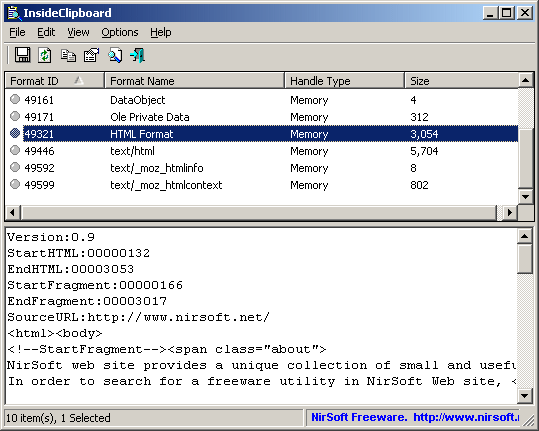
InsideClipboard version 1.30 has been released, offering users a handy utility for viewing and managing clipboard content. This application goes beyond the basic functionality of the native Windows clipboard, which typically only shows standard formats like text and images. InsideClipboard reveals the binary content of all formats currently stored in the clipboard, allowing users to save specific formats into binary files for further use.
One of the main advantages of InsideClipboard is its portability; users can extract and run the program from any location on their device without complex installation processes. This makes it a convenient tool for those who frequently work with diverse clipboard data formats.
In addition to its core functionality, users may find it helpful to explore related topics, such as enabling or disabling clipboard history in Windows 11, copying file paths to the clipboard, clearing clipboard history using shortcuts, and managing clipboard history in both Windows 10 and 11.
With the increasing prevalence of digital communication and data sharing, tools like InsideClipboard become invaluable for enhancing productivity and providing greater control over clipboard content. Future updates may include additional features such as enhanced user interface options, support for more file formats, and improved integration with other applications to streamline workflows
One of the main advantages of InsideClipboard is its portability; users can extract and run the program from any location on their device without complex installation processes. This makes it a convenient tool for those who frequently work with diverse clipboard data formats.
In addition to its core functionality, users may find it helpful to explore related topics, such as enabling or disabling clipboard history in Windows 11, copying file paths to the clipboard, clearing clipboard history using shortcuts, and managing clipboard history in both Windows 10 and 11.
With the increasing prevalence of digital communication and data sharing, tools like InsideClipboard become invaluable for enhancing productivity and providing greater control over clipboard content. Future updates may include additional features such as enhanced user interface options, support for more file formats, and improved integration with other applications to streamline workflows
InsideClipboard 1.30 released
InsideClipboard is a small utility that displays the binary content of all formats currently stored in the clipboard and allows you to save the content of a specific format into a binary file.