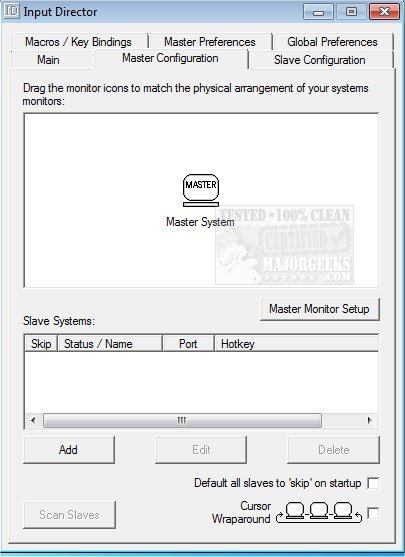
Input Director 2.4 has been released, a software solution that allows users to control multiple Windows systems using a single keyboard and mouse connected to one computer. This tool is ideal for individuals who operate two or more computers side by side and frequently switch between them. With Input Director, users can seamlessly share a keyboard and mouse among multiple systems and switch control using hotkeys or simply by moving the cursor across screens, similar to a multi-monitor setup.
The software allows users to arrange their monitors in a desired configuration by dragging them into place on a grid, facilitating an intuitive setup. Key features of Input Director include:
- User-friendly installation and quick setup guides that make it easy to get started.
- Multi-monitor support for enhanced productivity.
- A shared clipboard that enables users to copy data from one computer and paste it on another, including files.
- The ability to transition control to another system effortlessly by moving the cursor off the screen.
- Support for remote control of computers without the need for logging in first, enhancing convenience.
- Compatibility with Windows fast user switching and the ability to handle User Account Control pop-ups in Vista.
For users looking to boost their productivity, Input Director 2.4 offers an efficient solution to manage multiple systems with ease.
Additionally, as technology continues to evolve, software like Input Director could see further enhancements. Future versions may offer improved compatibility with more operating systems, increased customization options for user interfaces, or advanced features like voice control or gesture recognition to switch between systems more intuitively. These enhancements could further streamline the workflow for users who rely on multiple computers for their tasks
The software allows users to arrange their monitors in a desired configuration by dragging them into place on a grid, facilitating an intuitive setup. Key features of Input Director include:
- User-friendly installation and quick setup guides that make it easy to get started.
- Multi-monitor support for enhanced productivity.
- A shared clipboard that enables users to copy data from one computer and paste it on another, including files.
- The ability to transition control to another system effortlessly by moving the cursor off the screen.
- Support for remote control of computers without the need for logging in first, enhancing convenience.
- Compatibility with Windows fast user switching and the ability to handle User Account Control pop-ups in Vista.
For users looking to boost their productivity, Input Director 2.4 offers an efficient solution to manage multiple systems with ease.
Additionally, as technology continues to evolve, software like Input Director could see further enhancements. Future versions may offer improved compatibility with more operating systems, increased customization options for user interfaces, or advanced features like voice control or gesture recognition to switch between systems more intuitively. These enhancements could further streamline the workflow for users who rely on multiple computers for their tasks
Input Director 2.4 released
Input Director lets you control multiple Windows systems using the keyboard/mouse attached to one computer.