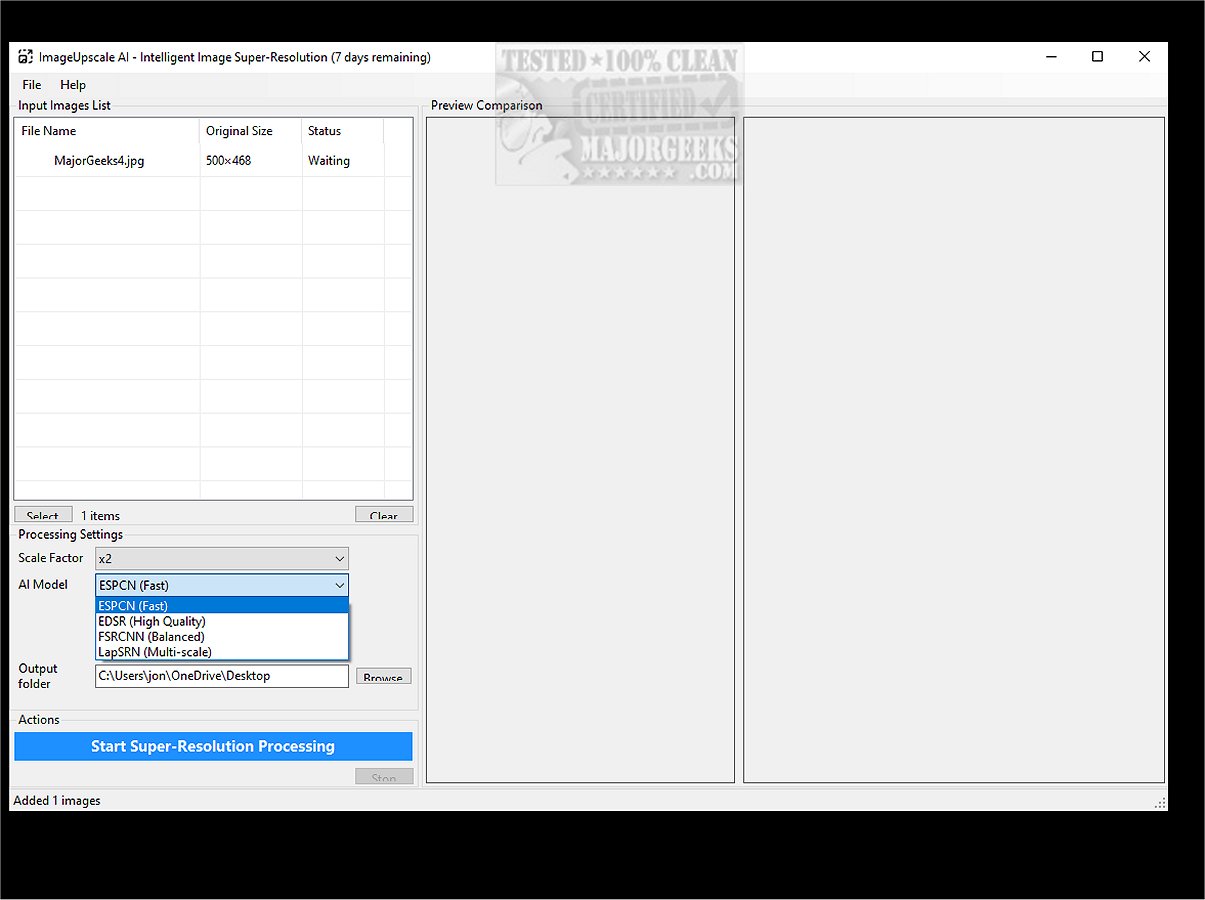
ImageUpscale AI is a powerful desktop application that specializes in converting low-resolution images into high-resolution versions using advanced artificial intelligence. The application is designed to provide a user-friendly experience, making it accessible for anyone looking to enhance their images into stunning visual masterpieces.
Key Features and Functionality:
1. Image Quality Enhancement: The software employs AI-powered super-resolution technology, which transforms low-resolution images into detailed high-resolution outputs. By utilizing sophisticated neural networks trained on millions of images, ImageUpscale AI delivers superior quality, preserving intricate details and textures.
2. User-Friendly Interface: The application boasts an intuitive interface with drag-and-drop functionality, a before-and-after comparison viewer, and smart file management tools. Users can customize output settings and take advantage of one-click processing for swift enhancements.
3. Versatile Upscaling Options: Users can select from multiple upscaling factors—2x, 3x, 4x, or 8x—ensuring optimal results tailored to their needs. The real-time preview feature allows for side-by-side comparisons, making it suitable for various types of digital content.
4. Performance Optimization: ImageUpscale AI is engineered for speed, featuring CPU acceleration for quick processing and batch processing capabilities to enhance multiple images simultaneously. Efficient memory management allows it to handle large files seamlessly, with background processing and progress tracking enhancing the user experience.
5. Advanced Features:
- Batch processing for entire folders at once
- Smart file management for automatic naming and organization
- Side-by-side preview with zoom capability for quality comparison
- Real-time progress monitoring with time estimates
- Flexible output options for destination folders and naming conventions
6. Technical Highlights:
- A variety of specialized AI models for different image types
- A focus on maintaining visual quality over mere pixel enlargement
- Resource efficiency designed for modern multi-core processors
- Consistent performance across various image types
- Ongoing updates to improve algorithms and features
7. Supported Formats: The application supports a range of input formats including JPG, JPEG, PNG, BMP, TIFF, and WEBP, ensuring lossless quality preservation during output. Users can process multiple formats in one operation.
Target Audience: ImageUpscale AI is tailored for a diverse group of users, including:
- Creative professionals like photographers and digital artists seeking to enhance or restore images.
- Casual users such as family historians looking to revive old photographs.
- Social media enthusiasts aiming to improve their online visuals.
- Hobbyists managing digital collections who want to refine their images.
Conclusion: ImageUpscale AI empowers users to elevate their images with the transformative capabilities of artificial intelligence. Whether you’re a professional in need of high-quality image enhancements or a casual user wanting to improve personal photos, ImageUpscale AI is a valuable tool for achieving breathtaking image quality. Download it today and experience professional-grade image upscaling with unparalleled ease
Key Features and Functionality:
1. Image Quality Enhancement: The software employs AI-powered super-resolution technology, which transforms low-resolution images into detailed high-resolution outputs. By utilizing sophisticated neural networks trained on millions of images, ImageUpscale AI delivers superior quality, preserving intricate details and textures.
2. User-Friendly Interface: The application boasts an intuitive interface with drag-and-drop functionality, a before-and-after comparison viewer, and smart file management tools. Users can customize output settings and take advantage of one-click processing for swift enhancements.
3. Versatile Upscaling Options: Users can select from multiple upscaling factors—2x, 3x, 4x, or 8x—ensuring optimal results tailored to their needs. The real-time preview feature allows for side-by-side comparisons, making it suitable for various types of digital content.
4. Performance Optimization: ImageUpscale AI is engineered for speed, featuring CPU acceleration for quick processing and batch processing capabilities to enhance multiple images simultaneously. Efficient memory management allows it to handle large files seamlessly, with background processing and progress tracking enhancing the user experience.
5. Advanced Features:
- Batch processing for entire folders at once
- Smart file management for automatic naming and organization
- Side-by-side preview with zoom capability for quality comparison
- Real-time progress monitoring with time estimates
- Flexible output options for destination folders and naming conventions
6. Technical Highlights:
- A variety of specialized AI models for different image types
- A focus on maintaining visual quality over mere pixel enlargement
- Resource efficiency designed for modern multi-core processors
- Consistent performance across various image types
- Ongoing updates to improve algorithms and features
7. Supported Formats: The application supports a range of input formats including JPG, JPEG, PNG, BMP, TIFF, and WEBP, ensuring lossless quality preservation during output. Users can process multiple formats in one operation.
Target Audience: ImageUpscale AI is tailored for a diverse group of users, including:
- Creative professionals like photographers and digital artists seeking to enhance or restore images.
- Casual users such as family historians looking to revive old photographs.
- Social media enthusiasts aiming to improve their online visuals.
- Hobbyists managing digital collections who want to refine their images.
Conclusion: ImageUpscale AI empowers users to elevate their images with the transformative capabilities of artificial intelligence. Whether you’re a professional in need of high-quality image enhancements or a casual user wanting to improve personal photos, ImageUpscale AI is a valuable tool for achieving breathtaking image quality. Download it today and experience professional-grade image upscaling with unparalleled ease
ImageUpscaleAI 1.0.0 released
ImageUpscale AI is a robust desktop application designed to enhance low-resolution images into high-resolution versions. Utilizing advanced artificial intelligence, it offers a user-friendly experience for transforming images into visually impressive masterpieces.