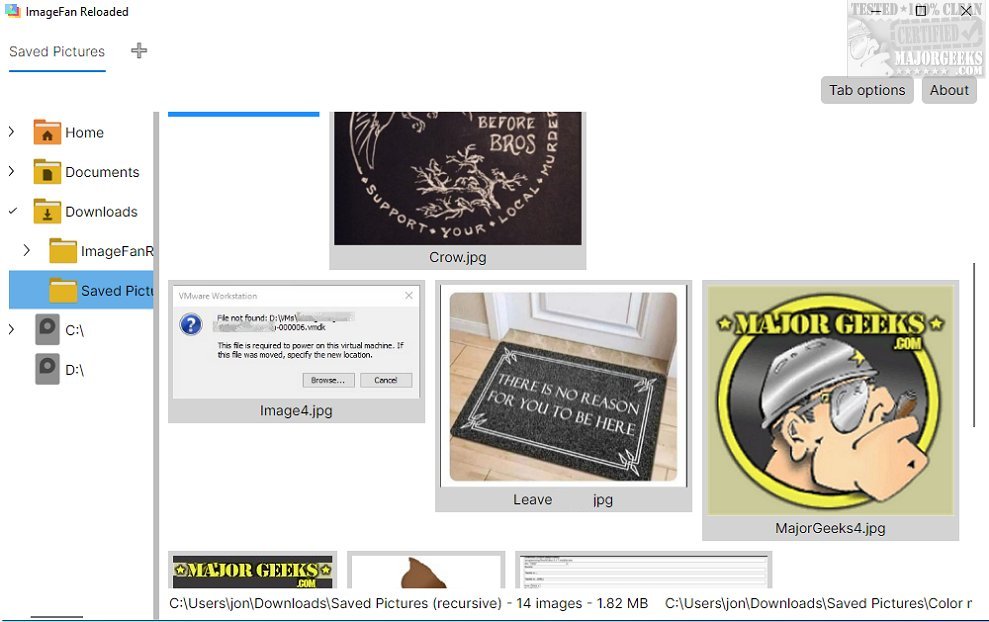
ImageFan Reloaded is a cross-platform image viewer that boasts a user-friendly, tab-based interface. This lightweight software has been optimized for multi-core processing, ensuring a fast and efficient experience for viewing images.
Simplicity is Key
Designed with simplicity in mind, ImageFan Reloaded allows for easy navigation through directories, enabling users to browse their preferred image folders with minimal effort. The inclusion of thumbnail previews enhances usability by allowing quick visual identification of images without cumbersome file management. The minimalist design philosophy focuses on essential functionalities, prioritizing an intuitive user experience. However, this simplicity may come at the cost of advanced features. Users looking for extensive image editing tools, batch processing capabilities, or detailed metadata support might find the software somewhat limiting.
Functional Features
Despite its straightforward design, ImageFan Reloaded incorporates useful features for image viewing. Users can manage tabs for their viewing sessions, allowing multiple images to be open simultaneously. This functionality promotes easy switching between images, improving overall efficiency and creating a seamless viewing experience.
Geek Verdict
ImageFan Reloaded is an excellent choice for those seeking a straightforward and user-friendly platform for navigating and viewing images. Its elegant minimalism appeals to users who appreciate simplicity in their digital tools. However, it is essential to recognize that this focus on simplicity might not meet the needs of advanced users who require a broader range of functionalities for managing their image collections. While ImageFan Reloaded excels in providing a basic, efficient experience, some users may find themselves desiring more robust capabilities.
Future Enhancements and Considerations
To further enhance ImageFan Reloaded, developers could consider integrating more advanced features such as basic editing tools, customizable viewing options, and enhanced file management capabilities. Additionally, improving metadata support and offering batch processing features could attract power users looking for a comprehensive solution for their image viewing and management needs.
In conclusion, ImageFan Reloaded serves as a solid option for casual users who value simplicity and efficiency. However, as user needs evolve, incorporating features that cater to a broader audience could position the software as a more versatile image viewing tool in the competitive landscape of digital image management.
Related Topics:
- How to Restore Windows Photo Viewer on Windows 10 & 11
- How to Add and Remove Folders in Windows 10 & 11 Photos App
- How to Add or Remove 'Edit With Photos' Context Menu in Windows 10 & 11
- What is a HEIC File
Simplicity is Key
Designed with simplicity in mind, ImageFan Reloaded allows for easy navigation through directories, enabling users to browse their preferred image folders with minimal effort. The inclusion of thumbnail previews enhances usability by allowing quick visual identification of images without cumbersome file management. The minimalist design philosophy focuses on essential functionalities, prioritizing an intuitive user experience. However, this simplicity may come at the cost of advanced features. Users looking for extensive image editing tools, batch processing capabilities, or detailed metadata support might find the software somewhat limiting.
Functional Features
Despite its straightforward design, ImageFan Reloaded incorporates useful features for image viewing. Users can manage tabs for their viewing sessions, allowing multiple images to be open simultaneously. This functionality promotes easy switching between images, improving overall efficiency and creating a seamless viewing experience.
Geek Verdict
ImageFan Reloaded is an excellent choice for those seeking a straightforward and user-friendly platform for navigating and viewing images. Its elegant minimalism appeals to users who appreciate simplicity in their digital tools. However, it is essential to recognize that this focus on simplicity might not meet the needs of advanced users who require a broader range of functionalities for managing their image collections. While ImageFan Reloaded excels in providing a basic, efficient experience, some users may find themselves desiring more robust capabilities.
Future Enhancements and Considerations
To further enhance ImageFan Reloaded, developers could consider integrating more advanced features such as basic editing tools, customizable viewing options, and enhanced file management capabilities. Additionally, improving metadata support and offering batch processing features could attract power users looking for a comprehensive solution for their image viewing and management needs.
In conclusion, ImageFan Reloaded serves as a solid option for casual users who value simplicity and efficiency. However, as user needs evolve, incorporating features that cater to a broader audience could position the software as a more versatile image viewing tool in the competitive landscape of digital image management.
Related Topics:
- How to Restore Windows Photo Viewer on Windows 10 & 11
- How to Add and Remove Folders in Windows 10 & 11 Photos App
- How to Add or Remove 'Edit With Photos' Context Menu in Windows 10 & 11
- What is a HEIC File
ImageFan Reloaded 1.2026.03.28 released
ImageFan Reloaded is a simple image viewer that operates across different platforms, featuring a user-friendly tab-based interface.