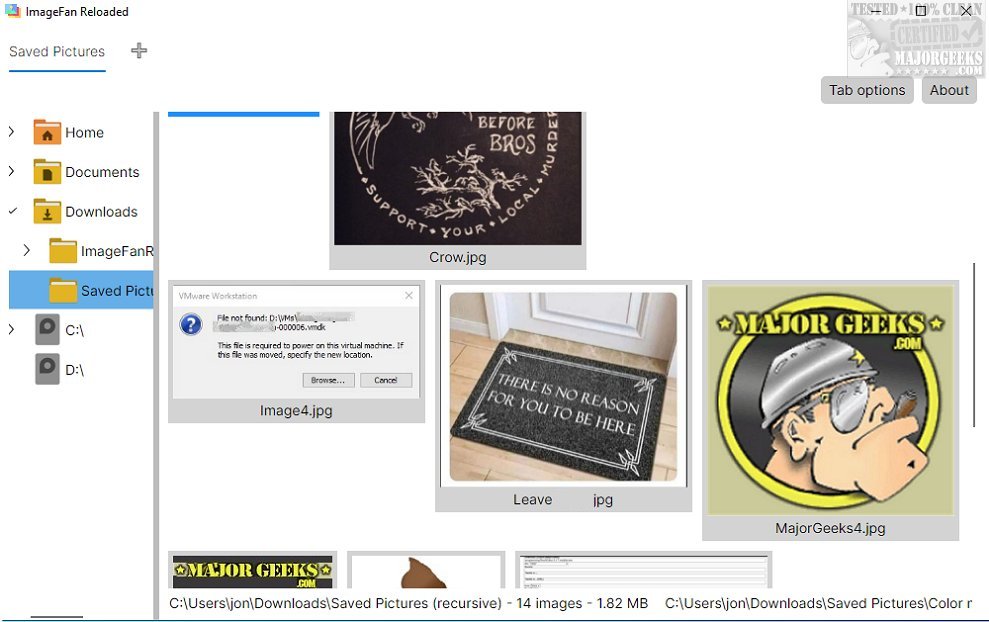
ImageFan Reloaded, a cross-platform image viewer, has recently launched its update, version 1.2026.02.26. This lightweight software boasts a user-friendly tab-based interface designed for seamless navigation and quick image viewing.
Overview of ImageFan Reloaded
For those unfamiliar with ImageFan Reloaded, it serves as a straightforward image viewer optimized for multi-core processors, enhancing the speed and practicality of image display. Its design emphasizes simplicity, allowing users to easily browse through their favorite image folders with minimal effort. The inclusion of thumbnail previews enables quick visual identification of images without the hassle of complex file management.
Emphasis on Simplicity
The core design philosophy of ImageFan Reloaded is rooted in minimalism, stripping away non-essential features to focus on the functionalities that genuinely improve user experience. This approach makes it an ideal tool for users who prefer a no-frills interface. However, advanced users may find the lack of features such as image editing, batch processing, or extensive metadata support to be limiting.
Key Features
Despite its simplicity, ImageFan Reloaded offers practical tools for image viewing. Its tab management system allows users to open and switch between multiple images effortlessly, which enhances workflow efficiency and provides a seamless viewing experience.
Conclusion and Verdict
In summary, ImageFan Reloaded is a commendable option for those looking for an easy-to-use image viewer. Its elegant simplicity is particularly appealing to individuals who appreciate minimalistic digital tools. However, it’s important to recognize that users with more advanced needs might find the software lacking in comprehensive functionalities for managing extensive image collections.
Looking Ahead
As ImageFan Reloaded continues to evolve, it would be beneficial for future updates to consider incorporating more advanced features to cater to a broader audience. This could include options for basic image editing, enhanced organizational tools, or even integration with cloud storage solutions to provide a more robust image management experience.
Related Topics:
- How to Restore Windows Photo Viewer on Windows 10 & 11
- How to Add and Remove Folders in Windows 10 & 11 Photos App
- How to Add or Remove 'Edit With Photos' Context Menu in Windows 10 & 11
- What is a HEIC File
Overview of ImageFan Reloaded
For those unfamiliar with ImageFan Reloaded, it serves as a straightforward image viewer optimized for multi-core processors, enhancing the speed and practicality of image display. Its design emphasizes simplicity, allowing users to easily browse through their favorite image folders with minimal effort. The inclusion of thumbnail previews enables quick visual identification of images without the hassle of complex file management.
Emphasis on Simplicity
The core design philosophy of ImageFan Reloaded is rooted in minimalism, stripping away non-essential features to focus on the functionalities that genuinely improve user experience. This approach makes it an ideal tool for users who prefer a no-frills interface. However, advanced users may find the lack of features such as image editing, batch processing, or extensive metadata support to be limiting.
Key Features
Despite its simplicity, ImageFan Reloaded offers practical tools for image viewing. Its tab management system allows users to open and switch between multiple images effortlessly, which enhances workflow efficiency and provides a seamless viewing experience.
Conclusion and Verdict
In summary, ImageFan Reloaded is a commendable option for those looking for an easy-to-use image viewer. Its elegant simplicity is particularly appealing to individuals who appreciate minimalistic digital tools. However, it’s important to recognize that users with more advanced needs might find the software lacking in comprehensive functionalities for managing extensive image collections.
Looking Ahead
As ImageFan Reloaded continues to evolve, it would be beneficial for future updates to consider incorporating more advanced features to cater to a broader audience. This could include options for basic image editing, enhanced organizational tools, or even integration with cloud storage solutions to provide a more robust image management experience.
Related Topics:
- How to Restore Windows Photo Viewer on Windows 10 & 11
- How to Add and Remove Folders in Windows 10 & 11 Photos App
- How to Add or Remove 'Edit With Photos' Context Menu in Windows 10 & 11
- What is a HEIC File
ImageFan Reloaded 1.2026.02.26 released
ImageFan Reloaded is a simple image viewer that operates across different platforms, featuring a user-friendly tab-based interface.