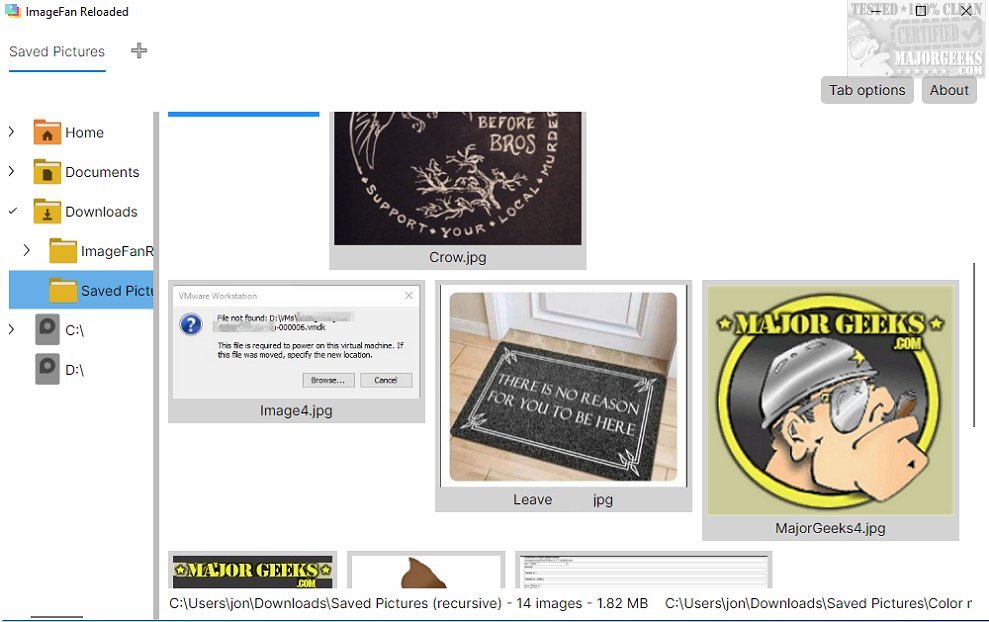
ImageFan Reloaded is a versatile and user-friendly image viewer that works seamlessly across various platforms. Its latest release continues to emphasize its simple, tab-based interface, making it accessible for users of all experience levels.
Overview of ImageFan Reloaded
For those unfamiliar with ImageFan Reloaded, it is designed to provide a lightweight, streamlined image viewing experience. The software is optimized for multi-core processors, enhancing speed and efficiency when displaying images. This focus on performance allows users to quickly navigate through their image libraries without lag.
User Experience Focus
Simplicity is at the core of ImageFan Reloaded’s design philosophy. The intuitive interface allows for easy navigation through image directories, offering thumbnail previews that enable users to identify images at a glance. This minimalist approach prioritizes essential functions, making it ideal for users who prefer straightforward tools without unnecessary distractions.
However, this simplicity may come at a cost. Users looking for advanced features, such as robust image editing capabilities, batch processing, or detailed metadata management, may find the software somewhat limiting. The design intentionally avoids complex functionalities to maintain a clean user experience.
Key Features
Despite its simplicity, ImageFan Reloaded includes practical tools that enhance image viewing. The tab management feature allows users to open multiple images simultaneously, enabling efficient switching between files and improving the overall viewing experience.
Conclusion
In summary, ImageFan Reloaded is an excellent choice for users seeking a sleek, user-friendly image viewer. Its elegant, minimal design caters to those who value simplicity in their digital tools. However, it’s important to note that more advanced users may find the software lacking in features that would facilitate comprehensive image management.
For users interested in similar tools or enhancements, resources such as guides on restoring Windows Photo Viewer, managing folders in the Windows Photos app, and understanding file formats like HEIC may also be beneficial.
Future Developments
Looking ahead, it would be advantageous for ImageFan Reloaded to consider integrating more advanced functionalities while maintaining its core user-friendly ethos. This balance could attract a broader range of users, from casual viewers to those with more demanding image management needs
Overview of ImageFan Reloaded
For those unfamiliar with ImageFan Reloaded, it is designed to provide a lightweight, streamlined image viewing experience. The software is optimized for multi-core processors, enhancing speed and efficiency when displaying images. This focus on performance allows users to quickly navigate through their image libraries without lag.
User Experience Focus
Simplicity is at the core of ImageFan Reloaded’s design philosophy. The intuitive interface allows for easy navigation through image directories, offering thumbnail previews that enable users to identify images at a glance. This minimalist approach prioritizes essential functions, making it ideal for users who prefer straightforward tools without unnecessary distractions.
However, this simplicity may come at a cost. Users looking for advanced features, such as robust image editing capabilities, batch processing, or detailed metadata management, may find the software somewhat limiting. The design intentionally avoids complex functionalities to maintain a clean user experience.
Key Features
Despite its simplicity, ImageFan Reloaded includes practical tools that enhance image viewing. The tab management feature allows users to open multiple images simultaneously, enabling efficient switching between files and improving the overall viewing experience.
Conclusion
In summary, ImageFan Reloaded is an excellent choice for users seeking a sleek, user-friendly image viewer. Its elegant, minimal design caters to those who value simplicity in their digital tools. However, it’s important to note that more advanced users may find the software lacking in features that would facilitate comprehensive image management.
For users interested in similar tools or enhancements, resources such as guides on restoring Windows Photo Viewer, managing folders in the Windows Photos app, and understanding file formats like HEIC may also be beneficial.
Future Developments
Looking ahead, it would be advantageous for ImageFan Reloaded to consider integrating more advanced functionalities while maintaining its core user-friendly ethos. This balance could attract a broader range of users, from casual viewers to those with more demanding image management needs
ImageFan Reloaded 1.2026.02.03 released
ImageFan Reloaded is a simple image viewer that operates across different platforms, featuring a user-friendly tab-based interface.