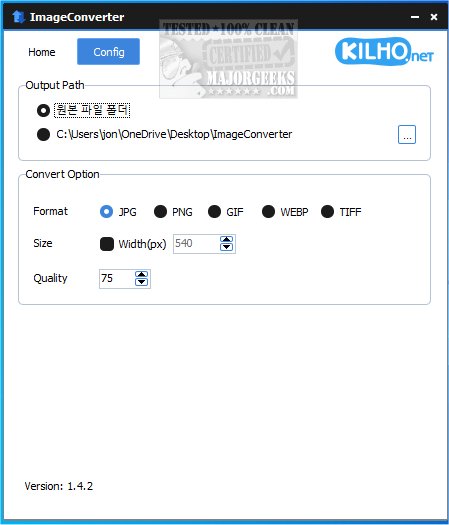
ImageConverter is an intuitive application designed for seamless image format conversion with just a single click. The latest version, 1.5.9, continues to prioritize user-friendliness, making it accessible to individuals of all technical backgrounds.
Why Choose ImageConverter?
This app simplifies the image conversion process. Users can easily drag and drop images into the interface and access a variety of configuration settings. These allow for customization of output formats, resolution adjustments, and the application of filters or enhancements, enabling efficient conversions tailored to specific needs. The output path can be customized, although many may prefer the default option of creating a new folder on their desktop for ease of access.
Resizing Feature
In addition to format conversion, ImageConverter includes a resizing tool. Users can specify desired dimensions, which is particularly useful for optimizing images for the web or different devices, ensuring quality is maintained while meeting size requirements.
Multi-Format Support
ImageConverter supports a wide range of graphic formats, including PDF, SVG, AI, PSD, PNG, JPG, GIF, WEBP, and TGA. Its standout feature is the ability to convert WEBP files, a format commonly used online that can pose compatibility issues with some applications and devices. This functionality makes ImageConverter an essential tool for managing and converting graphic files effortlessly.
Geek Verdict
ImageConverter is an invaluable resource for anyone engaged in image editing or manipulation. By streamlining the conversion process, it allows for quick and effective results. Its simple interface eliminates the need for complex software, making it suitable for both beginners and experienced users. Whether resizing, cropping, or changing formats, ImageConverter offers straightforward solutions that enhance productivity and save time.
Extended Features and Future Updates
Looking ahead, future updates to ImageConverter could include enhanced batch processing capabilities, allowing users to convert multiple images simultaneously, further improving efficiency. Additionally, integrating advanced editing tools could provide users with more creative options directly within the app. As technology evolves, ongoing support for emerging formats and compatibility with new devices will ensure that ImageConverter remains a top choice for image conversion needs.
As digital content continues to grow, having a reliable tool like ImageConverter can significantly streamline workflows for photographers, designers, and everyday users alike
Why Choose ImageConverter?
This app simplifies the image conversion process. Users can easily drag and drop images into the interface and access a variety of configuration settings. These allow for customization of output formats, resolution adjustments, and the application of filters or enhancements, enabling efficient conversions tailored to specific needs. The output path can be customized, although many may prefer the default option of creating a new folder on their desktop for ease of access.
Resizing Feature
In addition to format conversion, ImageConverter includes a resizing tool. Users can specify desired dimensions, which is particularly useful for optimizing images for the web or different devices, ensuring quality is maintained while meeting size requirements.
Multi-Format Support
ImageConverter supports a wide range of graphic formats, including PDF, SVG, AI, PSD, PNG, JPG, GIF, WEBP, and TGA. Its standout feature is the ability to convert WEBP files, a format commonly used online that can pose compatibility issues with some applications and devices. This functionality makes ImageConverter an essential tool for managing and converting graphic files effortlessly.
Geek Verdict
ImageConverter is an invaluable resource for anyone engaged in image editing or manipulation. By streamlining the conversion process, it allows for quick and effective results. Its simple interface eliminates the need for complex software, making it suitable for both beginners and experienced users. Whether resizing, cropping, or changing formats, ImageConverter offers straightforward solutions that enhance productivity and save time.
Extended Features and Future Updates
Looking ahead, future updates to ImageConverter could include enhanced batch processing capabilities, allowing users to convert multiple images simultaneously, further improving efficiency. Additionally, integrating advanced editing tools could provide users with more creative options directly within the app. As technology evolves, ongoing support for emerging formats and compatibility with new devices will ensure that ImageConverter remains a top choice for image conversion needs.
As digital content continues to grow, having a reliable tool like ImageConverter can significantly streamline workflows for photographers, designers, and everyday users alike
ImageConverter 1.5.9 released
ImageConverter lets you change image formats in one click; it is designed to be a user-friendly image conversion app.