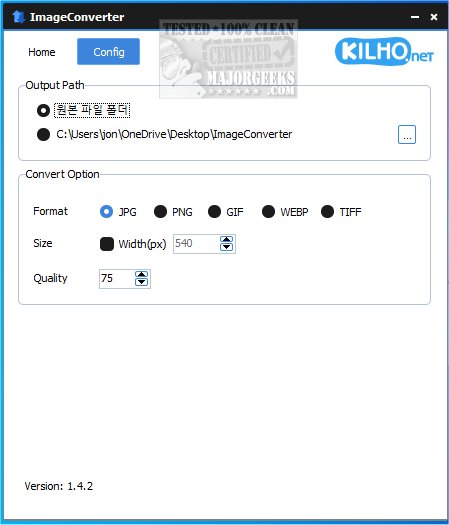
ImageConverter 1.5.7 has been released, providing users with a streamlined, one-click solution for changing image formats. This user-friendly application is designed to cater to individuals of all technical backgrounds, ensuring accessibility for everyone. Users can easily upload images by dragging and dropping them into the interface, after which they can customize various settings, including output format, resolution adjustments, and the application of filters or enhancements.
One notable feature of ImageConverter is its ability to set a personalized output path for saved files. While users can choose any location, the default option of creating a folder on the desktop is convenient for quick access. Additionally, the app includes a resizing feature that allows users to specify desired image dimensions, making it ideal for web preparation or device optimization without sacrificing quality.
ImageConverter supports a wide range of graphic formats, such as PDF, SVG, AI, PSD, PNG, JPG, GIF, WEBP, and TGA. Its compatibility with the WEBP format is particularly beneficial, as this format is commonly used online but may not be supported by all applications. By allowing seamless conversion to more widely accepted formats, ImageConverter proves to be an essential tool for managing graphic files.
In conclusion, ImageConverter is a practical application for anyone involved in image editing or manipulation. Its efficient conversion capabilities, user-friendly interface, and robust features make it suitable for both novices and experienced users alike. Whether resizing, cropping, or changing image formats, ImageConverter offers a straightforward solution that enhances productivity and allows users to focus on their creative endeavors without the burden of complex software.
As the landscape of image editing continues to evolve, updates such as ImageConverter 1.5.7 ensure that users have access to the latest tools and features to meet their needs. Future updates may further enhance functionality, potentially incorporating more advanced editing options, improved batch processing capabilities, or integration with cloud services for even greater convenience
One notable feature of ImageConverter is its ability to set a personalized output path for saved files. While users can choose any location, the default option of creating a folder on the desktop is convenient for quick access. Additionally, the app includes a resizing feature that allows users to specify desired image dimensions, making it ideal for web preparation or device optimization without sacrificing quality.
ImageConverter supports a wide range of graphic formats, such as PDF, SVG, AI, PSD, PNG, JPG, GIF, WEBP, and TGA. Its compatibility with the WEBP format is particularly beneficial, as this format is commonly used online but may not be supported by all applications. By allowing seamless conversion to more widely accepted formats, ImageConverter proves to be an essential tool for managing graphic files.
In conclusion, ImageConverter is a practical application for anyone involved in image editing or manipulation. Its efficient conversion capabilities, user-friendly interface, and robust features make it suitable for both novices and experienced users alike. Whether resizing, cropping, or changing image formats, ImageConverter offers a straightforward solution that enhances productivity and allows users to focus on their creative endeavors without the burden of complex software.
As the landscape of image editing continues to evolve, updates such as ImageConverter 1.5.7 ensure that users have access to the latest tools and features to meet their needs. Future updates may further enhance functionality, potentially incorporating more advanced editing options, improved batch processing capabilities, or integration with cloud services for even greater convenience
ImageConverter 1.5.7 released
ImageConverter lets you change image formats in one click; it is designed to be a user-friendly image conversion app.