ImageConverter 1.5.6 is now available, offering users a simple and efficient way to change image formats with just one click. This user-friendly application is perfect for individuals of all technical backgrounds, making image conversion accessible to everyone.
Why Choose ImageConverter?
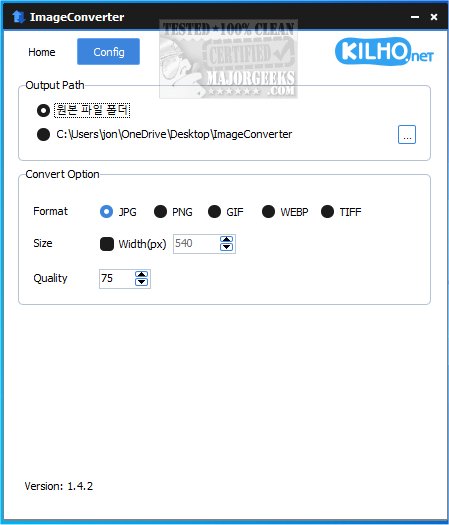
The app's intuitive design allows users to easily drag and drop images into its interface. Once uploaded, users can customize their conversion preferences, including choosing the output format, adjusting resolution, and applying filters or enhancements. With just a few clicks, images can be converted to meet specific needs. Users can also specify an output path, with the option to create a new folder on the desktop for easy access.
Included Resizing Feature
In addition to format conversion, ImageConverter offers a resizing feature, allowing users to specify desired dimensions for their images. This is particularly useful for optimizing images for web use or ensuring they fit within specific size requirements without sacrificing quality.
Multi-Format Support
ImageConverter supports a wide range of graphic formats, including PDF, SVG, AI, PSD, PNG, JPG, GIF, WEBP, and TGA. Its support for WEBP files is noteworthy, as this format is commonly used for web images but can pose compatibility issues with certain applications and devices. ImageConverter effectively addresses this challenge, making it an essential tool for anyone needing to manage and convert graphic files.
Geek Verdict
ImageConverter is an invaluable application for image editing and manipulation. It simplifies the process of converting images between different formats, enabling users to achieve quick and efficient results. Its user-friendly interface is designed to eliminate the complexities often associated with image conversion software, making it suitable for both novices and seasoned professionals. Whether resizing, cropping, or changing image formats, ImageConverter provides an effective solution that enhances productivity.
Future Outlook
With the ongoing evolution of digital media, tools like ImageConverter will continue to play a critical role in enabling seamless image management. As more users rely on high-quality images for various applications, the demand for efficient and accessible conversion tools will likely grow. Future updates may include additional features, enhanced compatibility with emerging formats, and further improvements to user experience, ensuring that ImageConverter remains a top choice in the competitive landscape of image editing software
Why Choose ImageConverter?
The app's intuitive design allows users to easily drag and drop images into its interface. Once uploaded, users can customize their conversion preferences, including choosing the output format, adjusting resolution, and applying filters or enhancements. With just a few clicks, images can be converted to meet specific needs. Users can also specify an output path, with the option to create a new folder on the desktop for easy access.
Included Resizing Feature
In addition to format conversion, ImageConverter offers a resizing feature, allowing users to specify desired dimensions for their images. This is particularly useful for optimizing images for web use or ensuring they fit within specific size requirements without sacrificing quality.
Multi-Format Support
ImageConverter supports a wide range of graphic formats, including PDF, SVG, AI, PSD, PNG, JPG, GIF, WEBP, and TGA. Its support for WEBP files is noteworthy, as this format is commonly used for web images but can pose compatibility issues with certain applications and devices. ImageConverter effectively addresses this challenge, making it an essential tool for anyone needing to manage and convert graphic files.
Geek Verdict
ImageConverter is an invaluable application for image editing and manipulation. It simplifies the process of converting images between different formats, enabling users to achieve quick and efficient results. Its user-friendly interface is designed to eliminate the complexities often associated with image conversion software, making it suitable for both novices and seasoned professionals. Whether resizing, cropping, or changing image formats, ImageConverter provides an effective solution that enhances productivity.
Future Outlook
With the ongoing evolution of digital media, tools like ImageConverter will continue to play a critical role in enabling seamless image management. As more users rely on high-quality images for various applications, the demand for efficient and accessible conversion tools will likely grow. Future updates may include additional features, enhanced compatibility with emerging formats, and further improvements to user experience, ensuring that ImageConverter remains a top choice in the competitive landscape of image editing software
ImageConverter 1.5.6 released
ImageConverter lets you change image formats in one click; it is designed to be a user-friendly image conversion app.