The IDM Integration Module version 6.42.60 has been released for popular browsers including Chrome, Firefox, Edge, and Opera. This extension is designed to connect these browsers seamlessly with Internet Download Manager (IDM), which enhances download speeds, allows for resuming and scheduling downloads, and facilitates the downloading of streaming videos.
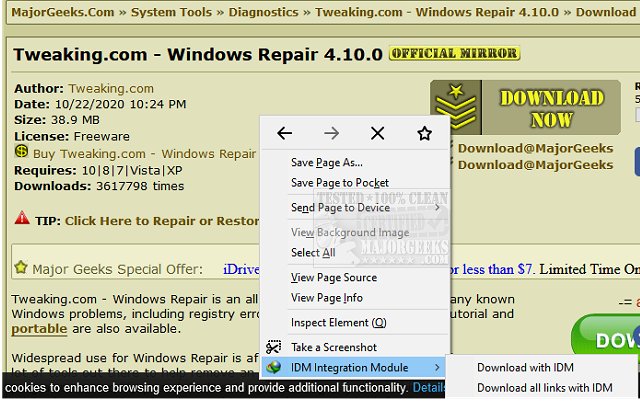
To use the integration module, users must have IDM installed on their computer. The process begins by sending download jobs to IDM, which can then be managed and processed through the toolbar button. This integration improves the user experience by allowing downloads to be initiated directly from the right-click context menu within the browser.
For effective operation, users must also install a minimal native client application, which acts as a bridge between the browser and the operating system, ensuring that download links are properly communicated to IDM. This functionality is especially beneficial in scenarios involving lost connections, network issues, computer shutdowns, or power outages, allowing users to maintain their downloads without interruption.
In addition to the integration module, users might find related resources useful, such as guides on monitoring internet upload and download usage, troubleshooting blocked downloads in Chrome, and tips for optimizing browser performance.
Overall, the IDM Integration Module enhances the download experience across multiple browsers, providing users with efficient tools for managing their downloads effectively
To use the integration module, users must have IDM installed on their computer. The process begins by sending download jobs to IDM, which can then be managed and processed through the toolbar button. This integration improves the user experience by allowing downloads to be initiated directly from the right-click context menu within the browser.
For effective operation, users must also install a minimal native client application, which acts as a bridge between the browser and the operating system, ensuring that download links are properly communicated to IDM. This functionality is especially beneficial in scenarios involving lost connections, network issues, computer shutdowns, or power outages, allowing users to maintain their downloads without interruption.
In addition to the integration module, users might find related resources useful, such as guides on monitoring internet upload and download usage, troubleshooting blocked downloads in Chrome, and tips for optimizing browser performance.
Overall, the IDM Integration Module enhances the download experience across multiple browsers, providing users with efficient tools for managing their downloads effectively
IDM Integration Module for Chrome, Firefox, Edge, and Opera 6.42.60 released
IDM Integration Module for Chrome, Firefox, Edge, and Opera integrates your supported browser with Internet Download Manager.
IDM Integration Module for Chrome, Firefox, Edge, and Opera 6.42.60 released @ MajorGeeks