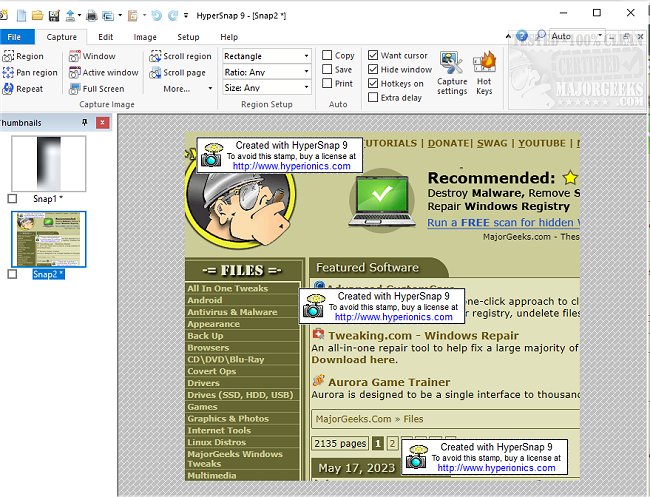
HyperSnap 9.7.3 has been released, offering users an efficient tool for capturing screen images and text. This powerful software enables quick and seamless screen captures from both standard screens and full-screen games, as well as a unique feature called TextSnap, which allows users to capture editable text from areas where traditional copying methods may fail.
HyperSnap combines a robust image editing utility with a top-tier screen capture application, creating an all-in-one solution for users. It supports capturing images from multiple monitors and includes various editing, annotation, and manipulation tools. A standout feature is its native file format that allows users to save drawn objects for future editing or integrate them permanently into standard images.
Key features of HyperSnap include:
- Unlimited undo and redo capabilities.
- TextSnap for capturing editable text and tab-delimited data for easy import into applications like Microsoft Excel.
- The ability to capture challenging screens from DirectX and Glide games.
- Tools for image stamping, framing, and drop shadow effects, as well as free-hand capturing.
- FTP server uploads for easy sharing.
- Automatic color substitution and non-rectangular window capture.
- A Button Capture feature tailored for technical writers needing to document numerous buttons.
- Auto-scroll functionality for capturing lengthy web pages and documents beyond the visible screen.
- Tight integration with the MS Windows clipboard for automating repetitive tasks with automatic pasting of capture images.
- Automatic saving of captures to graphics files.
- Functionality as an image viewer and format converter, with support for over 20 image formats.
- A fully customizable user interface, allowing users to rearrange menus and toolbars, assign preferred keyboard shortcuts, create instant toolbars, and even control the software using voice commands.
- An extended window capture function for Windows XP, enabling users to capture oversized windows without the need for auto-scrolling.
With its extensive features and user-friendly interface, HyperSnap 9.7.3 is an invaluable tool for anyone in need of effective screen capture and image editing capabilities. As technology continues to advance, we can expect future updates to enhance performance, introduce new features, and improve compatibility with emerging software and hardware trends
HyperSnap combines a robust image editing utility with a top-tier screen capture application, creating an all-in-one solution for users. It supports capturing images from multiple monitors and includes various editing, annotation, and manipulation tools. A standout feature is its native file format that allows users to save drawn objects for future editing or integrate them permanently into standard images.
Key features of HyperSnap include:
- Unlimited undo and redo capabilities.
- TextSnap for capturing editable text and tab-delimited data for easy import into applications like Microsoft Excel.
- The ability to capture challenging screens from DirectX and Glide games.
- Tools for image stamping, framing, and drop shadow effects, as well as free-hand capturing.
- FTP server uploads for easy sharing.
- Automatic color substitution and non-rectangular window capture.
- A Button Capture feature tailored for technical writers needing to document numerous buttons.
- Auto-scroll functionality for capturing lengthy web pages and documents beyond the visible screen.
- Tight integration with the MS Windows clipboard for automating repetitive tasks with automatic pasting of capture images.
- Automatic saving of captures to graphics files.
- Functionality as an image viewer and format converter, with support for over 20 image formats.
- A fully customizable user interface, allowing users to rearrange menus and toolbars, assign preferred keyboard shortcuts, create instant toolbars, and even control the software using voice commands.
- An extended window capture function for Windows XP, enabling users to capture oversized windows without the need for auto-scrolling.
With its extensive features and user-friendly interface, HyperSnap 9.7.3 is an invaluable tool for anyone in need of effective screen capture and image editing capabilities. As technology continues to advance, we can expect future updates to enhance performance, introduce new features, and improve compatibility with emerging software and hardware trends
HyperSnap 9.7.3 released
HyperSnap allows you to take quick and easy screen captures from your main screen and full-screen games and text capture (TextSnap) where normal text copy is not possible.