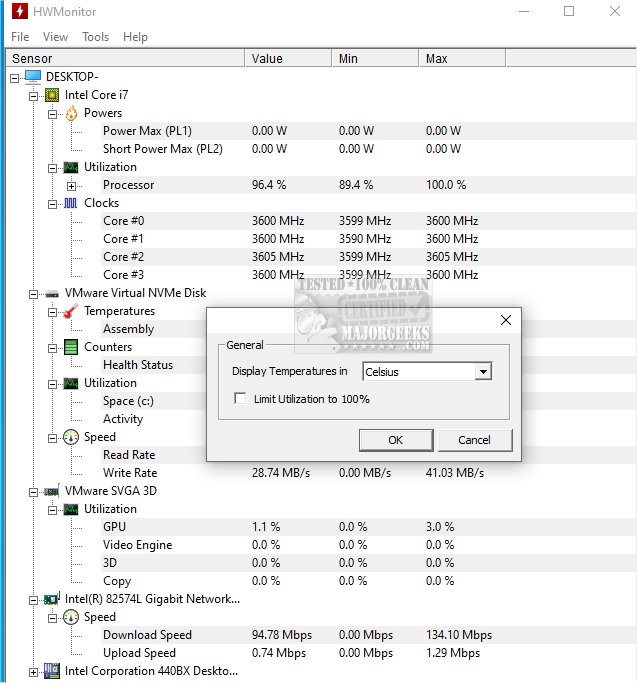
HWMonitor 1.62 has been released, enhancing its reputation as a reliable hardware monitoring tool that provides essential information about your PC's health. Developed by CPUID, which is also known for CPU-Z, HWMonitor is a lightweight program that reads and displays critical system metrics, including voltages, temperatures, and fan speeds, all in real time. It is particularly useful for stress-testing, benchmarking, overclocking, and troubleshooting overheating issues.
HWMonitor tracks a range of vital data points, such as CPU and GPU temperatures, fan speeds, system voltages, battery status for laptops, and power consumption for supported processors. This tool is invaluable when diagnosing performance drops, unexpected shutdowns, or cooling issues, allowing users to take necessary actions like enhancing cooling solutions or adjusting fan settings.
The program is designed with simplicity in mind, utilizing minimal system resources, and features a straightforward, no-bloat interface. It is compatible with various Windows versions—11, 10, 8, and 7—and supports most Intel and AMD processors, along with many modern graphics cards and motherboards. A portable version is also available, making it convenient for IT professionals or users who work on multiple systems.
For those seeking advanced features, HWMonitor PRO offers added functionalities such as logging, graph generation, remote monitoring, and improved sensor detection. However, for most users, the free version is sufficiently robust.
Pros and Cons Summary:
Pros:
- Minimal file size and quick launch
- No installation required for the portable version
- Real-time monitoring of vital system information
- Free version meets the needs of most users
- Trusted brand reputation
Cons:
- Lacks alert or fan control capabilities
- Outdated interface without customization options
- Advanced features are exclusive to the PRO version
Conclusion:
HWMonitor is an essential tool for anyone concerned about their system's health. Its accuracy, lightweight nature, and ease of use make it suitable for hobbyists, builders, and casual users alike. For a seamless experience in monitoring system temperatures, voltages, and fan speeds, HWMonitor is a reliable, free choice.
Extension:
In addition to its monitoring capabilities, users can benefit from learning how to optimize their overall system performance based on the data HWMonitor provides. For example, understanding the relationship between temperature thresholds and performance can guide users in making informed decisions about hardware upgrades or overclocking strategies. Moreover, as technology evolves, keeping an eye on updates for HWMonitor and similar tools can help users stay ahead in maintaining an efficient and healthy computing environment. Exploring community forums or tech blogs might also offer valuable insights into leveraging HWMonitor for specific use cases or troubleshooting scenarios
HWMonitor tracks a range of vital data points, such as CPU and GPU temperatures, fan speeds, system voltages, battery status for laptops, and power consumption for supported processors. This tool is invaluable when diagnosing performance drops, unexpected shutdowns, or cooling issues, allowing users to take necessary actions like enhancing cooling solutions or adjusting fan settings.
The program is designed with simplicity in mind, utilizing minimal system resources, and features a straightforward, no-bloat interface. It is compatible with various Windows versions—11, 10, 8, and 7—and supports most Intel and AMD processors, along with many modern graphics cards and motherboards. A portable version is also available, making it convenient for IT professionals or users who work on multiple systems.
For those seeking advanced features, HWMonitor PRO offers added functionalities such as logging, graph generation, remote monitoring, and improved sensor detection. However, for most users, the free version is sufficiently robust.
Pros and Cons Summary:
Pros:
- Minimal file size and quick launch
- No installation required for the portable version
- Real-time monitoring of vital system information
- Free version meets the needs of most users
- Trusted brand reputation
Cons:
- Lacks alert or fan control capabilities
- Outdated interface without customization options
- Advanced features are exclusive to the PRO version
Conclusion:
HWMonitor is an essential tool for anyone concerned about their system's health. Its accuracy, lightweight nature, and ease of use make it suitable for hobbyists, builders, and casual users alike. For a seamless experience in monitoring system temperatures, voltages, and fan speeds, HWMonitor is a reliable, free choice.
Extension:
In addition to its monitoring capabilities, users can benefit from learning how to optimize their overall system performance based on the data HWMonitor provides. For example, understanding the relationship between temperature thresholds and performance can guide users in making informed decisions about hardware upgrades or overclocking strategies. Moreover, as technology evolves, keeping an eye on updates for HWMonitor and similar tools can help users stay ahead in maintaining an efficient and healthy computing environment. Exploring community forums or tech blogs might also offer valuable insights into leveraging HWMonitor for specific use cases or troubleshooting scenarios
HWMonitor 1.62 released
HWMonitor is a free hardware monitoring program that reads PC systems' primary health sensors: voltages, temperatures, and fan speeds. Portable version via PortableApps is also available.