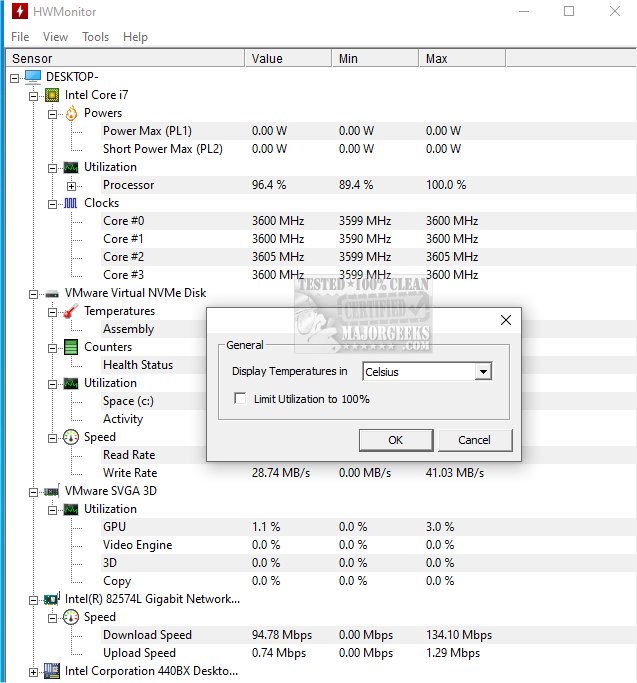
HWMonitor 1.61 has been released, providing users with a reliable and free hardware monitoring tool that tracks essential health sensors of their PC systems, such as voltages, temperatures, and fan speeds. Developed by CPUID, the same team behind CPU-Z, HWMonitor offers a user-friendly interface that displays real-time statistics, making it easy for users to diagnose potential issues such as overheating or erratic fan behavior.
The software monitors critical metrics including CPU and GPU temperatures, fan speeds, system voltages, battery status (for laptops), and power consumption on supported hardware. This makes it particularly useful during stress tests, gaming benchmarks, overclocking sessions, or when troubleshooting overheating problems.
HWMonitor is lightweight and does not consume significant system resources, allowing for a quick setup without the need for installation. It operates seamlessly on Windows 11, 10, 8, and 7, and is compatible with most Intel and AMD processors, as well as many modern graphics cards and motherboards. A portable version can be run directly from a USB stick, making it convenient for IT professionals who frequently work on different machines.
For users seeking more advanced features, HWMonitor PRO is available as a paid upgrade. This version offers additional functionalities such as data logging, graph generation, and remote monitoring capabilities, which can be particularly beneficial for managing servers or test rigs. However, the free version is generally sufficient for typical users.
Pros and Cons:
- Pros: Small file size, quick startup, no installation needed for the portable version, real-time monitoring of vital system parameters, backed by a reputable company.
- Cons: Lacks alerting or fan control features, outdated interface with no customization options like dark mode, advanced features available only in the PRO version.
Conclusion:
HWMonitor is an essential tool for anyone interested in monitoring their system's health or troubleshooting potential hardware issues without delving into the BIOS. It is accurate, user-friendly, and efficient, making it suitable for enthusiasts, builders, and casual users alike. For those needing a straightforward solution to monitor temperatures, voltages, and fan speeds, HWMonitor is the perfect choice.
In addition to its primary functions, users might also explore related topics such as updating and finding their Windows Experience Index score, identifying computer hardware, monitoring internet usage on the taskbar, and understanding Windows auto-tuning
The software monitors critical metrics including CPU and GPU temperatures, fan speeds, system voltages, battery status (for laptops), and power consumption on supported hardware. This makes it particularly useful during stress tests, gaming benchmarks, overclocking sessions, or when troubleshooting overheating problems.
HWMonitor is lightweight and does not consume significant system resources, allowing for a quick setup without the need for installation. It operates seamlessly on Windows 11, 10, 8, and 7, and is compatible with most Intel and AMD processors, as well as many modern graphics cards and motherboards. A portable version can be run directly from a USB stick, making it convenient for IT professionals who frequently work on different machines.
For users seeking more advanced features, HWMonitor PRO is available as a paid upgrade. This version offers additional functionalities such as data logging, graph generation, and remote monitoring capabilities, which can be particularly beneficial for managing servers or test rigs. However, the free version is generally sufficient for typical users.
Pros and Cons:
- Pros: Small file size, quick startup, no installation needed for the portable version, real-time monitoring of vital system parameters, backed by a reputable company.
- Cons: Lacks alerting or fan control features, outdated interface with no customization options like dark mode, advanced features available only in the PRO version.
Conclusion:
HWMonitor is an essential tool for anyone interested in monitoring their system's health or troubleshooting potential hardware issues without delving into the BIOS. It is accurate, user-friendly, and efficient, making it suitable for enthusiasts, builders, and casual users alike. For those needing a straightforward solution to monitor temperatures, voltages, and fan speeds, HWMonitor is the perfect choice.
In addition to its primary functions, users might also explore related topics such as updating and finding their Windows Experience Index score, identifying computer hardware, monitoring internet usage on the taskbar, and understanding Windows auto-tuning
HWMonitor 1.61 released
HWMonitor is a free hardware monitoring program that reads PC systems' primary health sensors: voltages, temperatures, and fan speeds. Portable version via PortableApps is also available.