HTTP Toolkit has announced the release of version 1.24.2, which enhances its capabilities for intercepting HTTP and HTTPS traffic across a wide range of clients. This includes popular web browsers such as Chrome and Firefox, various command-line interface (CLI) tools, and back-end programming languages like Node.js, Python, and Ruby.
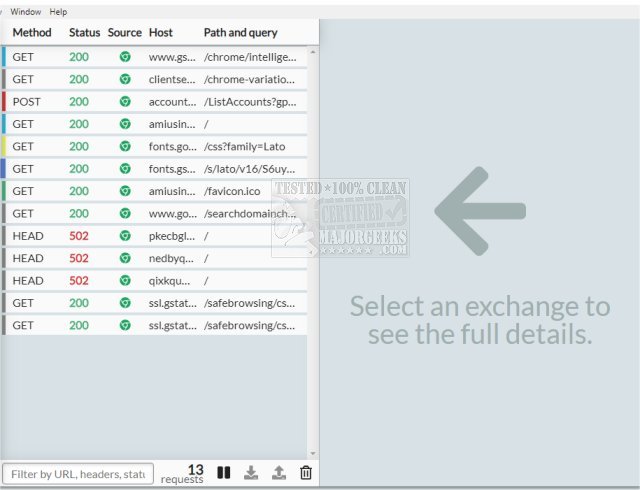
Designed primarily as an HTTP(S) proxy, HTTP Toolkit is compatible with standard HTTP requests from any language or tool, making it a versatile addition for developers in need of traffic analysis. Users can easily sift through intercepted traffic, as the toolkit highlights key information such as content type, status, and source. It also features a powerful search function that allows users to filter messages by URL, status, and headers, helping them quickly identify relevant communications.
The toolkit provides detailed examination capabilities, allowing users to view the URL, status, headers, and body of each request or response. Accompanying inline explanations and documentation from MDN make it easy for developers to understand the traffic they are working with. Additionally, the inclusion of the Monaco editor from Visual Studio Code enhances the experience by offering advanced formatting and highlighting for various message body types, including JSON, HTML, JavaScript, and hexadecimal.
One of HTTP Toolkit's standout features is its ability to pause and edit live HTTP traffic. Users can match requests as they come in, allowing them to modify target URLs, methods, headers, or bodies on-the-fly. Furthermore, the tool enables users to manually respond to incoming requests or modify real responses before they are sent back, providing extensive control over HTTP interactions. Developers can also step through requests one at a time or simulate endpoints and errors as needed.
Key features of HTTP Toolkit include:
- Cross-platform support (Linux, Mac, Windows)
- Comprehensive interception integrations
- Essential debugging tools for HTTP traffic
- Manual HTTP mocking and rewriting capabilities
In addition to its core functionalities, the release also includes several related resources and guides, such as troubleshooting tips for network issues on Windows and instructions for managing the DNS cache and TCP/IP settings.
As HTTP Toolkit continues to evolve, it remains a crucial tool for developers looking to enhance their HTTP traffic management and debugging processes
Designed primarily as an HTTP(S) proxy, HTTP Toolkit is compatible with standard HTTP requests from any language or tool, making it a versatile addition for developers in need of traffic analysis. Users can easily sift through intercepted traffic, as the toolkit highlights key information such as content type, status, and source. It also features a powerful search function that allows users to filter messages by URL, status, and headers, helping them quickly identify relevant communications.
The toolkit provides detailed examination capabilities, allowing users to view the URL, status, headers, and body of each request or response. Accompanying inline explanations and documentation from MDN make it easy for developers to understand the traffic they are working with. Additionally, the inclusion of the Monaco editor from Visual Studio Code enhances the experience by offering advanced formatting and highlighting for various message body types, including JSON, HTML, JavaScript, and hexadecimal.
One of HTTP Toolkit's standout features is its ability to pause and edit live HTTP traffic. Users can match requests as they come in, allowing them to modify target URLs, methods, headers, or bodies on-the-fly. Furthermore, the tool enables users to manually respond to incoming requests or modify real responses before they are sent back, providing extensive control over HTTP interactions. Developers can also step through requests one at a time or simulate endpoints and errors as needed.
Key features of HTTP Toolkit include:
- Cross-platform support (Linux, Mac, Windows)
- Comprehensive interception integrations
- Essential debugging tools for HTTP traffic
- Manual HTTP mocking and rewriting capabilities
In addition to its core functionalities, the release also includes several related resources and guides, such as troubleshooting tips for network issues on Windows and instructions for managing the DNS cache and TCP/IP settings.
As HTTP Toolkit continues to evolve, it remains a crucial tool for developers looking to enhance their HTTP traffic management and debugging processes
HTTP Toolkit 1.24.2 released
HTTP Toolkit offers automatic interception of HTTP and HTTPS traffic from most clients, including web browsers like Chrome and Firefox, almost all CLI tools, and back-end languages (Node.js, Python, Ruby, and more).