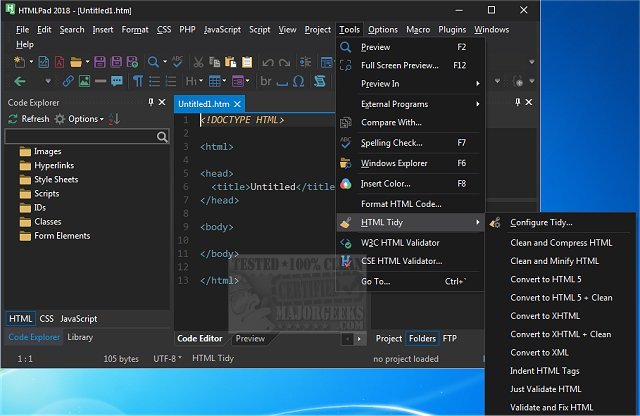
HTMLPad 18.6 has been released, offering an extensive coding tool designed for CSS, HTML, and JavaScript, all within a remarkably user-friendly interface. This software is particularly appealing to both novice users, who will find it easy to learn and use, and advanced users, who can leverage its powerful features. HTMLPad functions similarly to a basic text editor but enhances the experience with a variety of helpful tools, including HTML and CSS wizards, instant code snippets, and a browser preview feature, all aimed at minimizing coding errors and improving the learning curve for web development.
Upon launching HTMLPad, users are welcomed by a setup wizard that assists with initial configuration and layout selection. Users can choose from several pre-defined layouts, such as All But Kitchen Sink, File Explorer Only, Full IDE, Normal, and Notepad, or create and save their own custom layouts. Once set up, users can take advantage of features like syntax and line highlighting, an advanced text editor, code folding, macro recording, and a search-and-replace function. Additionally, HTMLPad includes a file explorer and FTP interface, a code beautifier, and extensive customization options for the text editor, menus, toolbars, and shortcut keys, enabling users to tailor the environment to their specific needs.
To explore the full range of features available in HTMLPad 18.6, users are encouraged to visit the author's website, as there are numerous functionalities that enhance coding efficiency and productivity.
In conclusion, HTMLPad 18.6 stands out as a versatile tool for web developers at all skill levels, combining ease of use with robust capabilities that support efficient coding practices. Whether you're just starting your journey in web development or are a seasoned professional seeking a reliable coding environment, HTMLPad 18.6 is worth considering for your projects. The continuous updates and feature expansions further solidify its position as a top choice in the coding software landscape
Upon launching HTMLPad, users are welcomed by a setup wizard that assists with initial configuration and layout selection. Users can choose from several pre-defined layouts, such as All But Kitchen Sink, File Explorer Only, Full IDE, Normal, and Notepad, or create and save their own custom layouts. Once set up, users can take advantage of features like syntax and line highlighting, an advanced text editor, code folding, macro recording, and a search-and-replace function. Additionally, HTMLPad includes a file explorer and FTP interface, a code beautifier, and extensive customization options for the text editor, menus, toolbars, and shortcut keys, enabling users to tailor the environment to their specific needs.
To explore the full range of features available in HTMLPad 18.6, users are encouraged to visit the author's website, as there are numerous functionalities that enhance coding efficiency and productivity.
In conclusion, HTMLPad 18.6 stands out as a versatile tool for web developers at all skill levels, combining ease of use with robust capabilities that support efficient coding practices. Whether you're just starting your journey in web development or are a seasoned professional seeking a reliable coding environment, HTMLPad 18.6 is worth considering for your projects. The continuous updates and feature expansions further solidify its position as a top choice in the coding software landscape
HTMLPad 18.6 released
HTMLPad is a comprehensive coding tool for CSS, HTML, and Javascript through an extremely user-friendly interface.