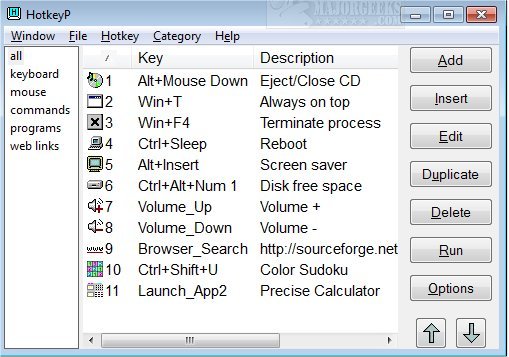
The latest release of HotkeyP, version 4.11, introduces a versatile tool for managing keyboard, mouse, WinLIRC, and joystick shortcuts. This utility allows users to create shortcuts for a variety of functions, including executing .exe files, opening documents and folders, navigating to web pages, and executing commands. Among the commands supported by HotkeyP are shutdown, hibernate, adjusting desktop resolution, controlling volume levels, setting process priority, ejecting CDs, changing wallpapers, and managing window visibility (e.g., keeping a window always on top or hiding an active window). Additionally, users can terminate processes and paste text using designated shortcuts.
HotkeyP is compatible with multimedia keyboards and can handle up to five mouse buttons along with mouse wheel actions. The software also features a categorization system, enabling users to organize their shortcuts efficiently.
To further enhance productivity, users can explore various keyboard shortcuts available in Windows, which include general commands for copying, pasting, and navigating through File Explorer. Additionally, options to manage notifications in Windows 10 and 11 using keyboard shortcuts are available, alongside insights into the function of the Pause and Break keys on keyboards.
In summary, HotkeyP 4.11 is a powerful tool for users seeking to streamline their computer operations through customizable shortcuts. It not only simplifies access to various commands and applications but also integrates seamlessly with multimedia devices, making it an essential utility for enhancing productivity and efficiency in daily computing tasks. Users are encouraged to explore its features and consider how it can fit into their workflow
HotkeyP is compatible with multimedia keyboards and can handle up to five mouse buttons along with mouse wheel actions. The software also features a categorization system, enabling users to organize their shortcuts efficiently.
To further enhance productivity, users can explore various keyboard shortcuts available in Windows, which include general commands for copying, pasting, and navigating through File Explorer. Additionally, options to manage notifications in Windows 10 and 11 using keyboard shortcuts are available, alongside insights into the function of the Pause and Break keys on keyboards.
In summary, HotkeyP 4.11 is a powerful tool for users seeking to streamline their computer operations through customizable shortcuts. It not only simplifies access to various commands and applications but also integrates seamlessly with multimedia devices, making it an essential utility for enhancing productivity and efficiency in daily computing tasks. Users are encouraged to explore its features and consider how it can fit into their workflow
HotkeyP 4.11 released
HotkeyP provides keyboard/mouse/WinLIRC/joystick shortcuts for .exe files, documents, folders, www pages, and commands.