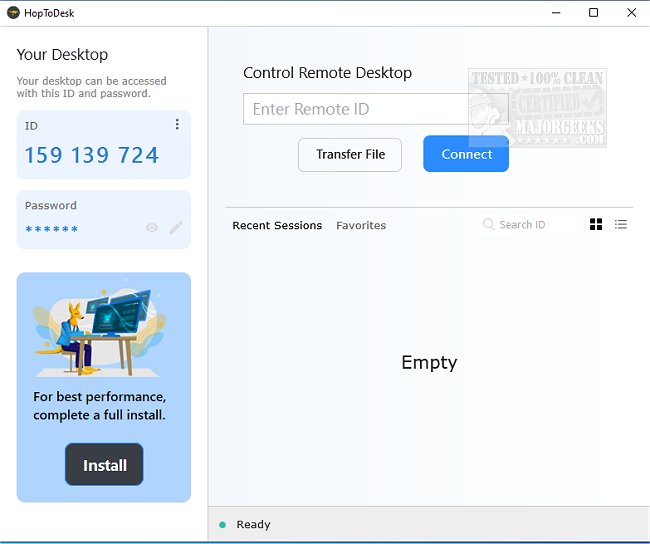
HopToDesk has recently released version 1.45.20.0, enhancing its capabilities as a versatile multiplatform application designed for remote desktop sharing and access to personal machines. What distinguishes HopToDesk from other remote access tools is its entirely free service for both commercial and personal use, coupled with robust end-to-end encryption for all peer communications. This ensures that users’ chats, file transfers, and other interactions are secure and accessible only to the intended recipients.
The application prioritizes user privacy and security, making it easy to set up without the need for complex router or firewall configurations. Its portability allows users to access their systems from virtually anywhere, enhancing flexibility and convenience. Users familiar with other remote access applications will find HopToDesk’s interface intuitive, facilitating a swift onboarding experience. In our testing, we found the connection speed to be impressive, positioning HopToDesk as a strong competitor among established remote access solutions.
Key features of HopToDesk include:
- Screen sharing
- Remote control
- File transfer
- Live chat
- Direct IP access
- IP whitelisting
- SOCKS5 proxy connections
These functionalities make it a comprehensive tool for both personal and business use. As the digital landscape evolves, solutions like HopToDesk not only provide essential remote access capabilities but also place a strong emphasis on security and user experience, making it an ideal choice for a wide range of users.
In addition to the features listed, the HopToDesk team is likely to continue enhancing the app with future updates, potentially adding new functionalities or improving existing ones based on user feedback. This commitment to continuous improvement will help maintain its competitive edge in the remote desktop access market
The application prioritizes user privacy and security, making it easy to set up without the need for complex router or firewall configurations. Its portability allows users to access their systems from virtually anywhere, enhancing flexibility and convenience. Users familiar with other remote access applications will find HopToDesk’s interface intuitive, facilitating a swift onboarding experience. In our testing, we found the connection speed to be impressive, positioning HopToDesk as a strong competitor among established remote access solutions.
Key features of HopToDesk include:
- Screen sharing
- Remote control
- File transfer
- Live chat
- Direct IP access
- IP whitelisting
- SOCKS5 proxy connections
These functionalities make it a comprehensive tool for both personal and business use. As the digital landscape evolves, solutions like HopToDesk not only provide essential remote access capabilities but also place a strong emphasis on security and user experience, making it an ideal choice for a wide range of users.
In addition to the features listed, the HopToDesk team is likely to continue enhancing the app with future updates, potentially adding new functionalities or improving existing ones based on user feedback. This commitment to continuous improvement will help maintain its competitive edge in the remote desktop access market
HopToDesk 1.45.20.0 released
HopToDesk is a multiplatform app that enables remote desktop sharing of screens and remote access to your machine.