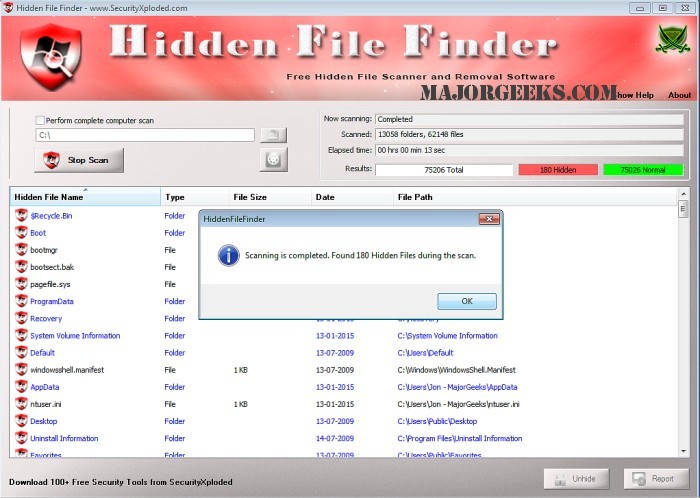
Hidden File Finder 9.0 has been released, offering users a powerful tool for uncovering hidden files on their computers through an efficient scanning process. This portable application is designed to quickly perform multi-threaded scans across all folders and automatically detect hidden executable files such as EXE, DLL, and COM formats. These files are conveniently displayed in a bold red font for easy identification, while other hidden files and folders are shown in black and blue, respectively, facilitating quick visual classification.
A notable feature of Hidden File Finder is its Unhide Operation, which allows users to select multiple hidden files and unhide them with ease. The success of this operation is color-coded: green indicates success, while yellow signals failure, providing immediate feedback to the user.
Key features of Hidden File Finder include:
- User-friendly graphical interface
- Rapid multi-threaded scanning capabilities for the entire computer, specific drives, or folders
- One-click functionality to unhide all hidden files
- Option to permanently delete selected files or folders
- Online scanning feature for threat verification of executable files using Google Search or VirusTotal
- Right-click context menu for quick access to tasks
- Customizable settings for scanning preferences
- Color-coded representation of hidden files, folders, and executable files, as well as the status of unhide operations
- Sorting options to organize hidden files by name, size, type, date, or path
- Detailed scan reports generated in HTML format
In addition to these features, users can benefit from tutorials on displaying or hiding hidden files, folders, or drives, making Hidden File Finder a comprehensive solution for managing hidden data on their devices. As technology continues to evolve, tools like Hidden File Finder will remain essential for enhancing user control over file visibility and security
A notable feature of Hidden File Finder is its Unhide Operation, which allows users to select multiple hidden files and unhide them with ease. The success of this operation is color-coded: green indicates success, while yellow signals failure, providing immediate feedback to the user.
Key features of Hidden File Finder include:
- User-friendly graphical interface
- Rapid multi-threaded scanning capabilities for the entire computer, specific drives, or folders
- One-click functionality to unhide all hidden files
- Option to permanently delete selected files or folders
- Online scanning feature for threat verification of executable files using Google Search or VirusTotal
- Right-click context menu for quick access to tasks
- Customizable settings for scanning preferences
- Color-coded representation of hidden files, folders, and executable files, as well as the status of unhide operations
- Sorting options to organize hidden files by name, size, type, date, or path
- Detailed scan reports generated in HTML format
In addition to these features, users can benefit from tutorials on displaying or hiding hidden files, folders, or drives, making Hidden File Finder a comprehensive solution for managing hidden data on their devices. As technology continues to evolve, tools like Hidden File Finder will remain essential for enhancing user control over file visibility and security
Hidden File Finder 9.0 released
Hidden File Finder is a portable app for discovering hidden files on your machine through a quick scan process.