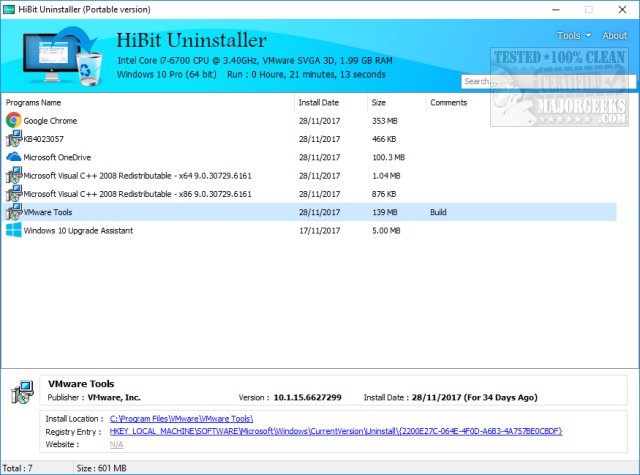
HiBit Uninstaller 4.0.10 has been released, providing users with a robust solution for uninstalling Windows programs along with a suite of ten additional tools designed to enhance system performance. This free software is particularly useful for those frustrated with leftover files, registry entries, and hidden folders that often remain after using Windows' built-in uninstaller.
2. Forced Uninstall: For particularly stubborn software that might resist removal due to corruption or missing uninstallers, HiBit offers a Forced Uninstall feature that guarantees complete removal.
3. Batch Uninstallation: Save time by uninstalling multiple applications at once, streamlining the cleanup process significantly.
4. Junk File & Registry Cleaning: This tool also acts as a comprehensive system cleaner, removing unnecessary junk files and scanning for invalid registry entries to maintain optimal performance.
5. Startup & System Optimization Tools: The included Startup Manager helps users manage startup programs, improving boot times and overall system speed.
6. Portable Version: HiBit offers a portable version, allowing users to carry the software on a USB drive and perform cleanups on any PC without needing installation.
7. Free and Lightweight: Unlike many alternatives that charge for advanced features, HiBit Uninstaller is completely free, with no ads or unnecessary bloatware.
Key Features of HiBit Uninstaller
1. Complete Program Removal: HiBit Uninstaller goes beyond the standard uninstallation process by thoroughly eliminating all traces of uninstalled programs, including orphaned files and lingering registry entries.2. Forced Uninstall: For particularly stubborn software that might resist removal due to corruption or missing uninstallers, HiBit offers a Forced Uninstall feature that guarantees complete removal.
3. Batch Uninstallation: Save time by uninstalling multiple applications at once, streamlining the cleanup process significantly.
4. Junk File & Registry Cleaning: This tool also acts as a comprehensive system cleaner, removing unnecessary junk files and scanning for invalid registry entries to maintain optimal performance.
5. Startup & System Optimization Tools: The included Startup Manager helps users manage startup programs, improving boot times and overall system speed.
6. Portable Version: HiBit offers a portable version, allowing users to carry the software on a USB drive and perform cleanups on any PC without needing installation.
7. Free and Lightweight: Unlike many alternatives that charge for advanced features, HiBit Uninstaller is completely free, with no ads or unnecessary bloatware.
Unique Advantages
HiBit Uninstaller stands out as a go-to solution for users who deal with bloatware on new PCs, malware infections, and sluggish system performance. Its capabilities not only facilitate the removal of unwanted software but also ensure that sensitive data is not left behind after uninstallation, enhancing user privacy.Conclusion
In summary, HiBit Uninstaller is a highly effective tool for anyone seeking to maintain a clean, fast, and clutter-free computer. Its comprehensive features, including forced uninstalls, batch processing, and system optimization tools, position it as a superior option compared to many paid alternatives. Tech enthusiasts and casual users alike will find it an invaluable addition to their system maintenance toolkit. Don't hesitate to try HiBit Uninstaller—you may soon wonder how you managed without it!Future Outlook
As software environments continue to evolve, tools like HiBit Uninstaller will likely adapt and expand their functionalities. Future updates could include enhanced compatibility with newer operating systems, improved user interfaces, and additional cleaning features to address emerging concerns such as privacy and data security. This makes HiBit Uninstaller not only a current asset but also a promising tool for the future of PC maintenanceHiBit Uninstaller 4.0.10 released
HiBit Uninstaller can completely uninstall Windows programs and features ten more tools, including a drive and registry cleaner, process and startup manager, and more. One of our Top Freeware Picks that includes a video tutorial.