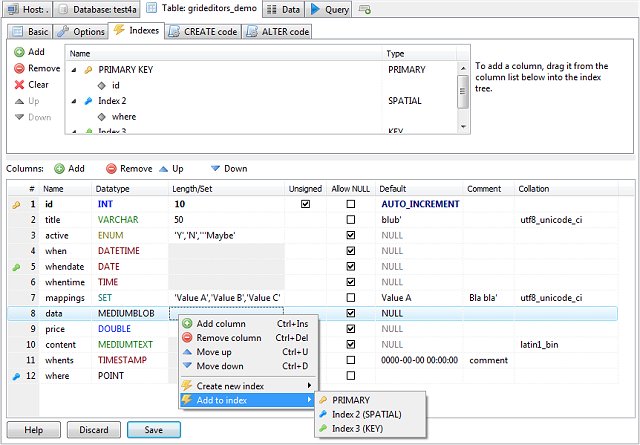
HeidiSQL has recently released version 12.15.0.7171, enhancing its capabilities as a user-friendly database management tool. This software allows users to view and modify data and structures across various database systems, including MariaDB, MySQL, Microsoft SQL, and PostgreSQL.
Key features of HeidiSQL include the ability to run custom queries, manage user access permissions through a dedicated user management module, and create or edit tables, views, procedures, triggers, and scheduled events. Users can efficiently export data and structures to SQL files or other platforms and effortlessly handle data import/export with a simple click.
Notable features of HeidiSQL:
- Connect to multiple database servers simultaneously in a single interface.
- Establish connections via command line, SSH tunnels, or SSL settings.
- Create and modify various database objects such as tables and views.
- Generate and compress SQL exports or copy them to the clipboard.
- Directly export data from one server/database to another.
- Manage user privileges and import text files easily.
- Export table rows in various formats, including CSV, HTML, XML, SQL, LaTeX, Wiki Markup, and PHP Array.
- Browse and edit data in a user-friendly grid layout and perform bulk edits on tables.
- Execute batch-insert operations for ASCII or binary files.
- Utilize a query editor with customizable syntax highlighting and code completion.
- Optimize and repair tables in bulk and monitor client processes.
- Search for specific text across all tables within a server.
In summary, HeidiSQL stands out for its comprehensive features that cater to both novice and experienced database users, making database management more accessible and efficient. The recent update further solidifies its position as a powerful tool for database administration and development.
As HeidiSQL continues to evolve, future updates may focus on enhancing user experience, improving performance, and integrating support for additional database systems or functionalities to meet the needs of its growing user base
Key features of HeidiSQL include the ability to run custom queries, manage user access permissions through a dedicated user management module, and create or edit tables, views, procedures, triggers, and scheduled events. Users can efficiently export data and structures to SQL files or other platforms and effortlessly handle data import/export with a simple click.
Notable features of HeidiSQL:
- Connect to multiple database servers simultaneously in a single interface.
- Establish connections via command line, SSH tunnels, or SSL settings.
- Create and modify various database objects such as tables and views.
- Generate and compress SQL exports or copy them to the clipboard.
- Directly export data from one server/database to another.
- Manage user privileges and import text files easily.
- Export table rows in various formats, including CSV, HTML, XML, SQL, LaTeX, Wiki Markup, and PHP Array.
- Browse and edit data in a user-friendly grid layout and perform bulk edits on tables.
- Execute batch-insert operations for ASCII or binary files.
- Utilize a query editor with customizable syntax highlighting and code completion.
- Optimize and repair tables in bulk and monitor client processes.
- Search for specific text across all tables within a server.
In summary, HeidiSQL stands out for its comprehensive features that cater to both novice and experienced database users, making database management more accessible and efficient. The recent update further solidifies its position as a powerful tool for database administration and development.
As HeidiSQL continues to evolve, future updates may focus on enhancing user experience, improving performance, and integrating support for additional database systems or functionalities to meet the needs of its growing user base
HeidiSQL 12.15.0.7171 released
HeidiSQL provides you with an easy-to-use option to view and edit data/structures from machines running MariaDB, MySQL, Microsoft SQL, or PostgreSQL database systems.